
AI-powered customer experience marketing (CXM) platform that helps local businesses win.



AI Receptionist for Law Firms: Never Miss a Client Call Again
If you’re running a small or mid-sized practice, you know the frustration: the phone rings while you’re in a deposition, your paralegal is buried in paperwork, and your front desk is juggling three things at once. An AI receptionist for law firms solves this completely. It answers every single call, qualifies potential clients, and books consultations 24/7, without adding a single person to your payroll. It’s a natural-sounding AI agent that handles intake conversations the way a trained receptionist would.
The legal industry is at an inflection point. Firms that respond to inquiries within minutes win cases. Firms that let calls go to voicemail lose them, permanently. According to a recent study from Legal Navigator AI, roughly 35% of calls to law firms now go unanswered. That’s not a small leak in your pipeline. It’s a flood of lost revenue. Whether you practice personal injury, family law, estate planning, or criminal defense, the math is simple: faster response equals more signed retainers. This page breaks down exactly why law firms are adopting AI receptionists, how the technology works, and how SalesCaptain makes it easy to deploy one at your firm today.
Why Law Firms Struggle With Client Communication
Law firms aren’t like other businesses. Your “customers” are often people in crisis, they’ve been in an accident, they’re facing a divorce, they’ve been charged with a crime. When they call, they need to talk to someone now. They won’t leave a voicemail and patiently wait for a callback tomorrow morning. The 2024 Legal Trends Report from Clio makes it clear that responsiveness is one of the biggest factors potential clients use to evaluate a firm. Yet most solo and small firm attorneys are stretched so thin that timely call answering feels impossible.
The Staffing Dilemma
Hiring a full-time receptionist costs $35,000 to $50,000 per year in salary alone. Add benefits, training, and management overhead. For a solo practitioner or two-attorney firm, that’s a massive fixed cost. According to the Bureau of Labor Statistics, receptionists are among the most in-demand administrative roles, which means finding a qualified candidate can take weeks. Many firms split reception duties among paralegals and office managers, but that pulls trained legal staff away from billable work. The hidden cost compounds every month.
After-Hours and Weekend Gaps
Legal emergencies don’t wait for business hours. Someone arrested on a Friday night. A family dealing with a sudden custody issue on Sunday. An accident victim calling from a hospital bed at 2 AM. These are high-value potential clients reaching out at the exact moment they need help most. If your firm can’t answer, they’ll call the next name on Google. Virtual receptionist services have tried to fill this gap, but as Responsive Answering’s guide to virtual receptionists for law firms notes, live answering services still involve per-minute billing that adds up fast, inconsistent quality across operators, and limited ability to actually qualify a lead or book a consultation without transferring to your team.
Slow Follow-Up Kills Conversion
Even when firms do capture a lead through a website form, voicemail, or missed call notification, the follow-up often takes hours or even days. By then, the prospect has already spoken with two other attorneys and signed elsewhere. Analysis of 2024 legal trends data from Answering Legal highlights that speed-to-response is now the single biggest differentiator for firms competing for the same pool of clients. The firms winning new business aren’t necessarily better lawyers. They’re the ones who answered the phone first. This pattern is especially brutal in competitive practice areas like personal injury, immigration, and bankruptcy, where potential clients are calling multiple firms simultaneously. 5
How SalesCaptain’s AI Receptionist for Law Firms Solves This
SalesCaptain isn’t a generic chatbot bolted onto your website. It’s a purpose-built AI communication platform that handles voice calls, SMS, webchat, and social media messages from a single unified inbox, designed specifically for service businesses like law firms. Here’s how it works across the stages of client communication that matter most to your practice.
AI Phone Agent: Your 24/7 Intake Specialist
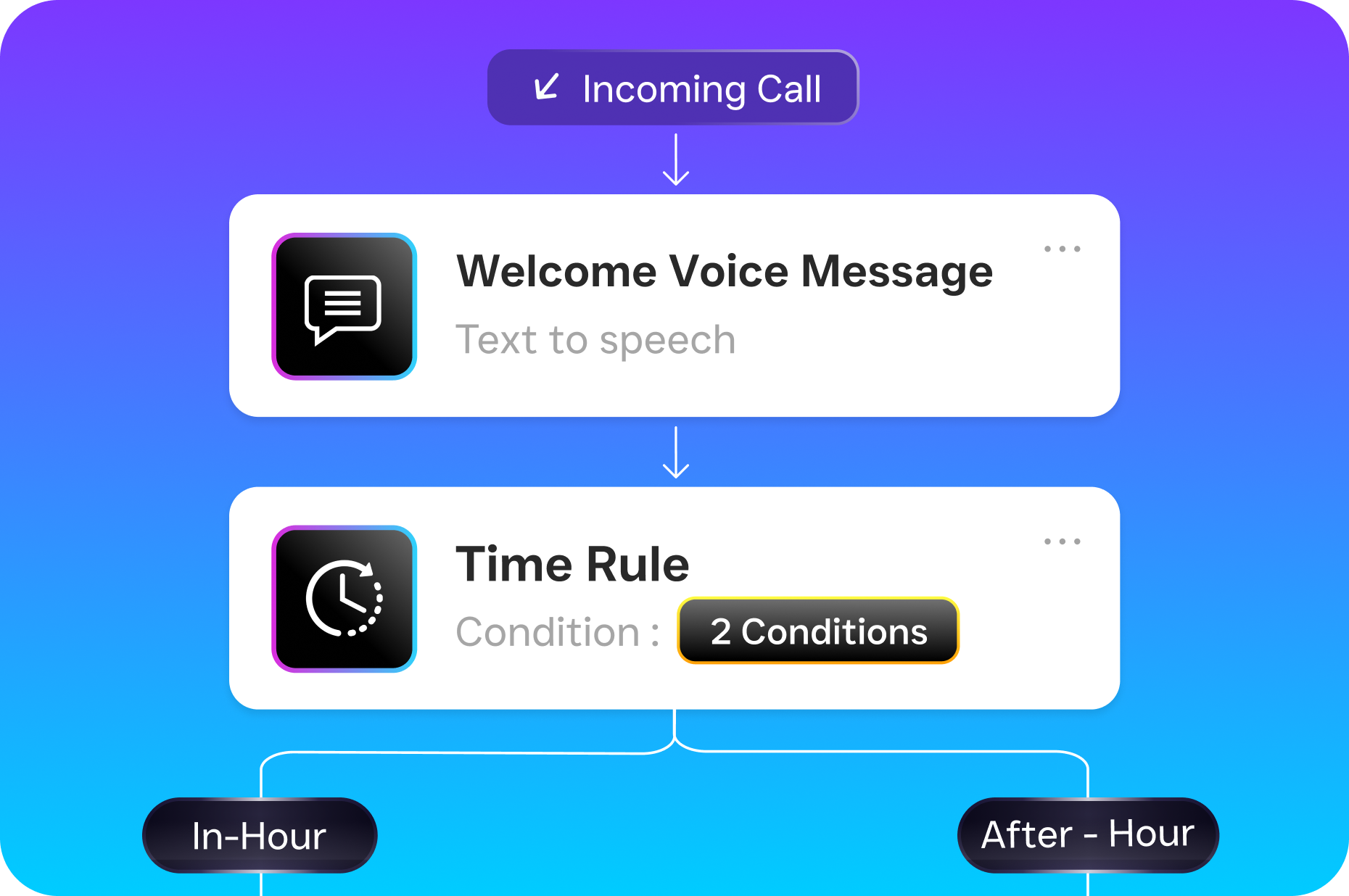
SalesCaptain’s AI Phone Agent answers every inbound call with a natural-sounding voice. You customize the conversation flow to match your firm’s intake process. The AI greets the caller, asks qualifying questions (type of legal matter, timeline, jurisdiction), captures contact information, and books a consultation directly on your calendar. It handles FAQ-level questions about your practice areas, office hours, and fees without transferring to a human. If the caller needs to speak with an attorney immediately, the AI routes the call based on rules you set: by practice area, availability, or urgency level.
The AI agent processes the full context of the conversation in real time, adjusting its responses based on what the caller says. If someone calls about a car accident, the AI asks about injury severity, insurance status, and whether they’ve spoken to the other party’s insurer. If someone calls about a divorce, it shifts to questions about custody, property, and urgency. You build these custom call flows once, and the AI handles them consistently every time, at 2 PM on a Tuesday or 11 PM on a Saturday. And it costs just $0.12 per minute, a fraction of what a live answering service charges.
AI Chat Agents: Capture Leads Across Every Channel
Not every potential client picks up the phone. Many start with a text message, a webchat on your firm’s website, or a direct message on Facebook or Instagram. SalesCaptain’s AI Chat Agents respond instantly on all of these channels, qualifying the lead, answering basic questions, and scheduling consultations without waiting for a human to check their inbox. The missed-call text-back feature is especially powerful for law firms. If someone calls and you can’t answer, rare with the AI phone agent, but possible during routing, they automatically receive a text message within seconds, and the conversation stays alive.
Unified Inbox: One Place for Everything
Managing client communication across phone calls, texts, emails, webchat, and social media is chaotic. Especially when multiple attorneys and staff members are involved. SalesCaptain’s Unified Inbox pulls every conversation into a single view, with full contact history and real-time tracking. Your office manager can see that a potential client called Tuesday, chatted on the website Wednesday, and texted a follow-up question Thursday, all in one thread. Team collaboration features let multiple people work the same inbox without duplicating effort or letting leads fall through the cracks.
Workflow Automation: Follow-Up Without Forgetting
The intake call is just the beginning. After a potential client books a consultation, they need a confirmation. They need a reminder. Sometimes they need intake forms, and maybe a follow-up if they don’t show. SalesCaptain’s drag-and-drop workflow builder automates all of this. Set triggers like “when consultation is booked, send confirmation text and email” or “if no response after 48 hours, send follow-up SMS”, and the system runs in the background. It syncs with your existing tools, too. SalesCaptain integrates natively with Clio (through Zapier), HubSpot, Salesforce, and Zoho, so lead information flows directly into your case management or CRM system without manual data entry.
Key Features for Law Firms Using SalesCaptain
Call Text-Back: If a call is missed during routing, the caller receives an instant text message to keep the conversation going and prevent them from calling a competitor.
Custom Call Flows and IVR: Build phone menus and routing rules that match your firm’s structure, by practice area, attorney, or office location, using a visual builder that requires zero technical skill.
Call Recording and Contact History: Every interaction is logged and accessible in the unified inbox, giving attorneys full context before a consultation even begins.
50+ Integrations: Connect SalesCaptain to your case management software, CRM, and billing tools through native integrations and Zapier.
Per-Location Pricing: If you’ve got multiple offices, each location gets its own AI receptionist and phone number, scaling affordably at $159/month per location (Business plan) with a free Startup plan available for a single location.
Real Results You Can Expect
Capture Every After-Hours Lead
The most immediate impact is simple: you stop losing the calls that come in outside of 9-to-5. For many firms, especially in personal injury and criminal defense, a significant portion of inquiries arrive in the evening, on weekends, and on holidays. With the AI Phone Agent answering 24/7, every one of those callers gets a full intake experience, not a voicemail prompt. The result? A larger top-of-funnel without spending a dollar more on advertising. You’re not generating new demand. You’re capturing the demand you were already paying for through SEO, PPC, and referrals but previously letting slip away.
Faster Speed-to-Lead, More Signed Retainers
When a potential client gets an immediate, professional response, whether by phone, text, or webchat, the likelihood of them signing with your firm increases dramatically compared to a delayed callback. The LEX Reception analysis of legal trends heading into 2026 underscores that speed-to-lead is becoming the primary competitive advantage for small and mid-sized firms. SalesCaptain collapses your response time from hours, or days, to seconds, across every channel simultaneously. That speed advantage translates directly into more consultations booked and more retainers signed, without changing your marketing budget.
Reclaim Billable Hours for Attorneys and Staff
Every minute a paralegal spends answering the phone or triaging intake calls is a minute they’re not doing billable legal work. Every interruption to an attorney’s workflow costs far more than the duration of the interruption itself. Context switching is expensive for knowledge workers. By offloading routine intake calls and basic FAQ responses to the AI agent, your human team gets to focus on what they do best: practicing law, preparing cases, and serving existing clients. This doesn’t mean eliminating staff. It means redeploying them to higher-value tasks where their expertise actually matters.
Consistent Client Experience Every Time
Human receptionists have bad days. They get overwhelmed during high-volume periods. They forget to ask a qualifying question. They accidentally give incorrect information about your fees or practice areas. An AI receptionist delivers the same professional, accurate intake experience on every single call, whether it’s the first call of the day or the fiftieth. That consistency builds trust with potential clients from the very first interaction, setting the tone for the entire attorney-client relationship. It also protects your firm from liability risks associated with miscommunicated information during intake.
How to Get Started in 10 Minutes
One of the biggest concerns law firm owners have about AI tools is complexity. If you’ve ever tried to implement a new case management system or CRM, you know how painful onboarding can be. SalesCaptain is designed to be the opposite. It’s built for non-technical business owners who need results fast, not a six-week implementation project.
Step 1: Sign Up and Choose Your Plan
Create your SalesCaptain account in under two minutes. The free Startup plan covers one location and lets you explore the platform without entering a credit card. If you’ve got multiple offices, the Business plan at $159/month per location gives you the full feature set. There’s no long-term contract. No setup fee. No hidden costs. AI call minutes are billed at $0.12/minute on top of your plan, so you only pay for what you actually use.
Step 2: Build Your AI Agent’s Intake Flow
Using the visual workflow builder, you define how the AI receptionist handles calls for your firm. Select your practice areas, add qualifying questions for each one, set your consultation booking rules, and record (or type) custom greetings and responses. The platform walks you through this with templates designed for legal practices. You’re not starting from scratch. Most firm owners complete this step in under ten minutes. You can also configure your AI Chat Agents for webchat, SMS, and social channels during this same setup process.
Step 3: Connect Your Phone Number and Go Live
Port your existing business phone number into SalesCaptain’s phone system, or get a new local number. Connect your calendar for appointment booking. Link your CRM or case management tool through one of the 50+ integrations, HubSpot, Salesforce, Zoho, and Clio via Zapier are the most common for law firms. Activate your AI agent. From this point forward, every call, text, and message is handled automatically. Everything shows up in your unified inbox for your team to review, track, and act on.
Ready to Feel the Difference?
Still have questions? Reach out to our team here, or schedule a free demo of all the ways SalesCaptain can help your business grow.