
AI-powered customer experience marketing (CXM) platform that helps local businesses win.


Automated Review Requests for Restaurants: Fill More Tables Without Lifting a Finger
Here’s a question every restaurant owner has asked at some point: why don’t more happy customers leave reviews? Your dining room was packed last Friday. Guests were complimenting the food, tipping well, and telling their server they’d be back. But when you checked Google the next morning, nothing. Zero new reviews. Meanwhile, that one bad experience from three weeks ago is still sitting at the top of your page, scaring away new diners. Automated review requests for restaurants solve exactly this problem by sending a quick, friendly text or email to every guest after their visit, asking them to share their experience online. It’s simple, it works, and it takes the entire task off your team’s plate.
Restaurants live and die by reputation. A strong Google rating can mean the difference between a full house on a Tuesday night and empty tables all week. But most restaurant owners and managers are too busy running their kitchens, managing staff, and handling daily fires to personally follow up with every single customer. That’s where automation steps in. Instead of hoping guests remember to leave a review, you can set up a system that does the asking for you, every single time, without fail. And the results tend to speak for themselves.
Why Restaurants Struggle With Reviews and Customer Communication
Running a restaurant is chaotic by nature. Between managing reservations, handling takeout orders, answering phone calls during the dinner rush, and keeping the front-of-house running smoothly, asking customers for reviews is almost always the last thing on anyone’s mind. Your host is busy seating guests. Your servers are juggling six tables. And your manager is putting out fires in the kitchen. Nobody has time to hand out review cards or send follow-up emails. So the review requests just don’t happen, and your online reputation stagnates while competitors with better review strategies pull ahead.
Free weekly newsletter
Growth tips for restaurants & cafes
Every Tuesday — actionable ideas to get more leads, reviews, and repeat customers. No fluff.
The Missed Call Problem During Peak Hours
Think about what happens during your busiest hours. The phone rings, but your host is seating a party of eight. A potential customer wanting to book a table for Saturday night hears it ring five, six, seven times, then hangs up. That reservation goes to the restaurant down the street. According to the National Restaurant Association, the restaurant industry’s razor-thin margins mean every lost customer matters significantly. Yet most restaurants miss a shocking number of calls during peak service times, simply because there aren’t enough hands to answer the phone while also running the floor.
On top of missed calls, there’s the problem of scattered communication channels. Customers reach out through Instagram DMs, Facebook Messenger, Google Business messages, phone calls, and your website’s contact form. Each channel lives in a different app, on a different device, managed by a different staff member. Messages slip through the cracks constantly. A catering inquiry from Facebook goes unanswered for three days. An Instagram DM about a private event never gets a response. Every missed message is lost revenue, and every slow response makes your restaurant look unprofessional.
Why Manual Review Requests Fail
Some restaurant owners try the manual approach. They train servers to ask guests for reviews at the end of the meal, or they print QR codes on receipts. But here’s the reality: manually asking for reviews is inconsistent and hard to sustain. Servers forget. QR codes get ignored. And even when a guest says “sure, I’ll leave a review,” most of them forget by the time they get to their car. The intention is there, but without a timely follow-up, the review never actually gets written. Automation fixes the timing problem because the request arrives when the dining experience is still fresh in the customer’s mind.
How SalesCaptain Solves This for Restaurants
SalesCaptain brings together everything a restaurant needs to manage customer communication and automate review collection in one platform. Rather than stitching together five different tools for phone calls, texting, social media messages, and review requests, you get a single system that handles all of it. The AI Phone Agent answers calls during your dinner rush so no reservation request goes unanswered. AI Chat Agents respond instantly to Instagram DMs and Facebook messages about your menu, hours, or availability. And the Workflow Automation engine sends automated review requests for restaurants right after a guest’s visit, timed perfectly for maximum response rates.
Automated Review Requests That Actually Work
Here’s what the review automation looks like in practice. After a customer dines at your restaurant, SalesCaptain’s workflow engine triggers a personalized text message or email asking about their experience. As review automation best practices suggest, the timing of your request matters enormously. Sending a message within a few hours of the meal, while the experience is still fresh, dramatically increases the chance that someone actually follows through. SalesCaptain’s drag-and-drop workflow builder lets you set this timing precisely, whether that’s two hours after their reservation or the next morning.
What makes this approach powerful is that it happens for every guest, every time. There’s no relying on a tired server to remember at the end of a double shift. There’s no hoping a printed QR code catches someone’s eye. Every customer who interacts with your restaurant gets a friendly, well-timed nudge to share their experience. And because it’s automated, the volume of reviews you collect grows steadily week over week, pushing your Google rating up and burying any occasional negative experiences under a mountain of positive ones.
Never Miss Another Phone Call or Message
Beyond reviews, SalesCaptain’s AI Phone Agent acts as a tireless virtual host for your restaurant. When the phone rings at 7 PM on a Saturday and your entire team is slammed, the AI agent picks up instantly. It can answer common questions about your hours, menu, parking, or private dining options. It can book reservations directly into your system. And it does this with natural-sounding conversation that doesn’t feel robotic or awkward. After hours, when your restaurant is closed and someone calls to ask about booking a birthday dinner next week, the AI agent captures their information and books the reservation without any human involvement.
Your Unified Inbox pulls every conversation into one screen. A text about a catering order, a Facebook DM asking about gluten-free options, an Instagram comment about your new seasonal menu, a phone call about a private event: all of it shows up in one place. Your manager can see everything at a glance when they arrive for their shift, respond to anything that needs a personal touch, and let the AI handle the rest. Compare this to the typical restaurant setup where the host checks voicemail on one phone, the owner monitors Instagram on their personal account, and nobody remembers to check Facebook messages. The difference is night and day.
Key Features for Restaurant Businesses
Workflow Automation for Review Collection and Follow-Ups
SalesCaptain’s visual workflow builder is where the real magic of automated review requests for restaurants comes together. You don’t need any technical skills to set it up. Just drag and drop triggers and actions: when a reservation is completed, wait two hours, then send a text message with a personalized review link. You can even create branching logic. For instance, if a customer responds positively, the workflow sends them directly to your Google review page. If they respond with a complaint, it routes the message to your manager’s inbox so you can handle it privately before it becomes a public one-star review. This kind of smart routing turns your review process into both a reputation builder and an early warning system for customer issues.
The automation doesn’t stop at reviews, either. You can build workflows for reservation confirmations, day-before reminders to reduce no-shows, post-visit thank you messages, and even birthday or anniversary promotions that bring guests back. As review automation guides for small businesses explain, the businesses that succeed with reputation management are the ones that build review requests into a larger system of customer engagement. SalesCaptain makes this possible without hiring additional staff or learning complicated software. Everything runs in the background while your team focuses on what they do best: creating great dining experiences.
AI Chat Agents Across Every Channel
Modern diners don’t just call restaurants anymore. They send Instagram DMs at 11 PM asking if you’ve outdoor seating. They message on Facebook Messenger to see if you can accommodate a party of twelve. In fact, they text your business number asking about tonight’s specials. SalesCaptain’s AI Chat Agents handle all of these conversations instantly, any time of day or night. The AI understands context, answers accurately based on the information you provide about your restaurant, and captures lead information like email addresses and phone numbers for your marketing database.
One feature that’s especially valuable for restaurants is missed-call text-back. When a call goes unanswered, SalesCaptain immediately sends a text to the caller: “Hey, sorry we missed your call! How can we help?” This keeps the conversation going even when your team can’t get to the phone. Many callers actually prefer texting anyway, so converting a missed call into a text conversation often works out better than the phone call would have. It’s a small feature that prevents a surprising amount of lost business, especially during those frantic lunch and dinner rushes when every ring of the phone feels like one more thing to juggle.
A Phone System Built for Busy Restaurants
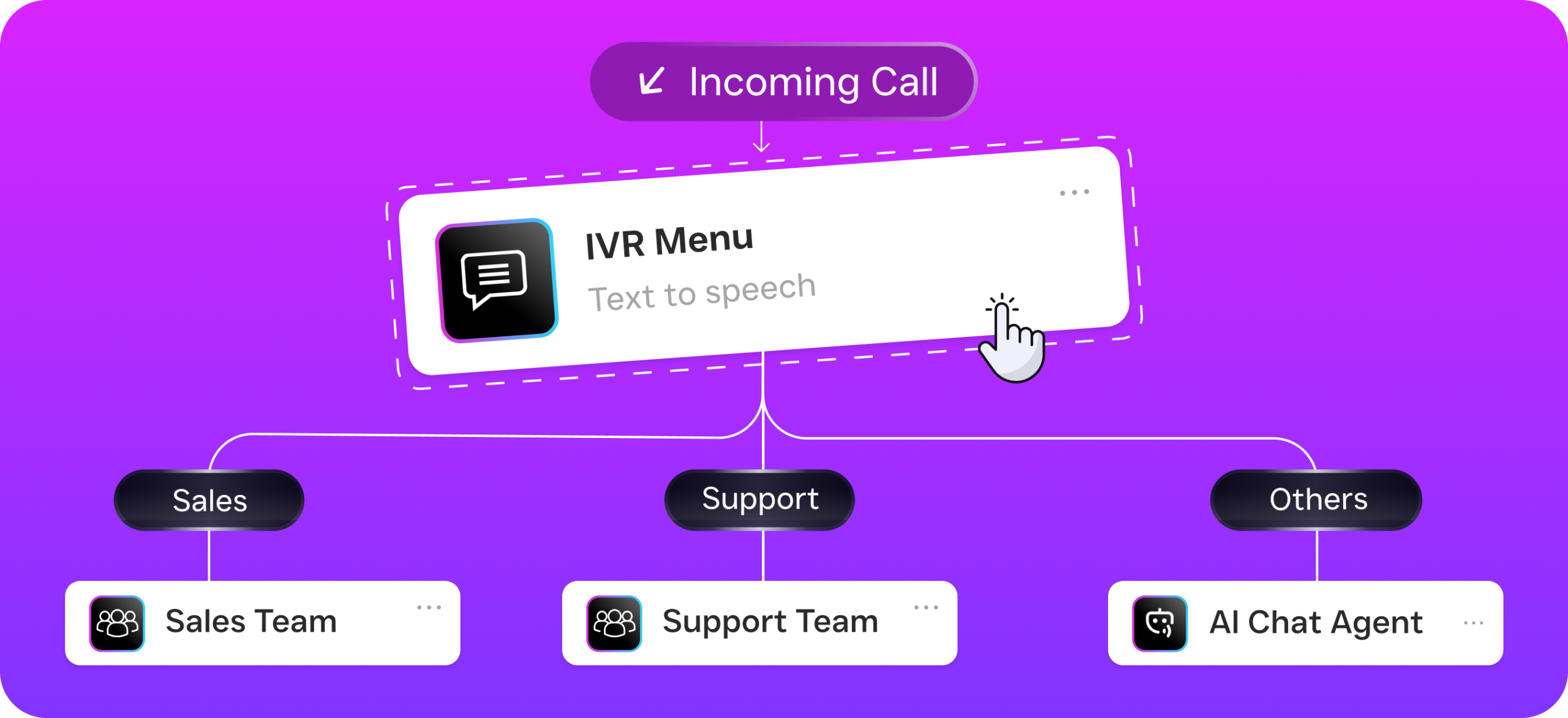
SalesCaptain also includes a full business phone system with 99.99% uptime and crystal-clear audio quality. You get features like an IVR builder so callers can press 1 for reservations, 2 for catering, or 3 for directions. Call routing sends inquiries to the right person on your team. Voicemail and call recording are built in, so you never lose important details from a customer conversation. For restaurants with multiple locations, each location gets its own number and its own AI agent, all managed from one dashboard. The per-location pricing at $159 per month for the Business plan means you’re not paying enterprise prices for a tool that actually fits your budget.
Real Results You Can Expect
More Reviews, Higher Ratings, More Diners
The most immediate result you’ll notice is a steady increase in the number of reviews your restaurant receives. When every guest gets a well-timed, personalized request, your review volume grows consistently. And because SMS review requests tend to have significantly higher open and response rates than email, using SalesCaptain’s text-based automation means more of those requests actually convert into published reviews. Over time, this higher volume of recent, positive reviews improves your search ranking on Google, which means more people find your restaurant when they search for “best Italian restaurant near me” or “dinner reservations tonight.”
Higher ratings also build trust with new customers who’ve never visited before. Most people check reviews before trying a new restaurant. A business with 47 reviews averaging 4.2 stars looks very different from one with 312 reviews averaging 4.6 stars. That volume and quality gap is almost entirely about systems. The food might be identical. But the restaurant with the automation in place captures feedback from happy customers consistently, while the other one relies on luck and the occasional organic review. The compounding effect over months is substantial, and it happens without anyone on your team spending a single extra minute on it.
Fewer Missed Opportunities and Better Staff Efficiency
When AI handles your phone calls, texts, and social media messages during peak hours, your staff can focus entirely on the guests who are already in your restaurant. Hosts aren’t torn between greeting walk-ins and answering the phone. Servers aren’t ducking into the back to check voicemail. Your manager isn’t scrolling through three different social media apps looking for unanswered messages. All of that communication gets handled automatically, and anything that needs a human touch gets flagged in the Unified Inbox for someone to address when they have a moment.
The financial impact is real too, even if it’s hard to measure precisely. Every call that gets answered is a potential reservation saved. Every review request that goes out is a chance to strengthen your online presence. For example, every instant response to an Instagram DM about your private dining room is a potential event booking that might have gone to a competitor. According to research on automated Google review requests, businesses that automate their review collection process see meaningfully higher review volumes compared to those relying on manual methods. For restaurants, where reputation drives foot traffic, that difference translates directly to revenue.
How to Get Started in 10 Minutes
Getting SalesCaptain running for your restaurant is genuinely fast. You start by signing up for a free account on the Startup plan, which covers one location and doesn’t require a credit card. Once you’re in, you’ll set up your business profile with your restaurant’s name, hours, location, and the kind of questions customers typically ask. Think of it as giving your AI agent a quick crash course on your business, much like training a new host on their first day, except this takes minutes instead of weeks.
Next, you’ll build your review request workflow using the drag-and-drop builder. Pick your trigger, like a completed reservation or a closed order in your POS system through one of SalesCaptain’s 50+ integrations. Set your timing delay, maybe two hours after the meal. Write your message or use one of the templates. Then connect it to your Google review link. The whole process takes about five minutes, and once it’s live, it runs forever without anyone touching it. You can also set up your AI Phone Agent during this initial setup, giving it your menu details, reservation policies, and any FAQs so it can start handling calls immediately.
For restaurants using tools like HousecallPro for catering services, Shopify for merchandise or gift cards, or QuickBooks for accounting, SalesCaptain integrates natively so data flows between your systems without manual entry. And if you use a tool that isn’t natively supported, Zapier integration opens up thousands of additional connections. Within 10 minutes of signing up, you can have an AI agent answering your phones, chat agents responding to social media messages, and automated review requests queued up for every future guest. As the complete playbook for automated review requests emphasizes, the businesses that start automating earliest build the biggest competitive advantage over time.
Frequently Asked Questions
Can automated review requests for restaurants really improve my Google rating?
Yes, and the reason is straightforward. Most unhappy customers leave reviews on their own because they’re motivated by frustration. Happy customers, on the other hand, usually need a nudge. By sending a timely, friendly review request to every guest, you capture feedback from the satisfied majority who would never have thought to leave a review otherwise. Over time, this consistently raises your average rating because you’re no longer letting your happiest customers walk away silently while only the unhappy ones speak up.
Will the AI Phone Agent sound robotic when answering calls for my restaurant?
SalesCaptain’s AI Phone Agent uses natural-sounding voice technology that most callers won’t recognize as AI. You can customize the agent’s tone, script, and responses to match your restaurant’s personality, whether that’s casual and friendly or polished and upscale. It handles common questions about hours, menu items, parking, and reservations with natural conversational flow. For anything outside its scope, it smoothly routes the call to a team member or captures the caller’s information for a callback.
How does this work if my restaurant doesn’t collect customer phone numbers?
If you take reservations through a phone call, text, or online booking system, you already have phone numbers. SalesCaptain integrates with popular reservation and POS systems to pull contact information automatically. For walk-in guests, you can capture phone numbers through your WiFi login page, a quick text-to-join at the table, or by offering a small incentive like a discount on their next visit. Even capturing a fraction of your walk-in guests’ numbers creates a meaningful stream of review requests over time.
Is the free plan enough for a single-location restaurant to get started?
The Startup plan is free for one location and includes access to the core platform features, making it a legitimate way to test the system without financial risk. You can set up basic workflows, use the Unified Inbox, and start automating review requests right away. As your needs grow, like needing more AI call minutes at $0.12 per minute or advanced workflow features, the Business plan at $159 per month per location covers everything a busy restaurant would need.
What if a customer responds negatively to a review request?
SalesCaptain’s workflow builder lets you create branching logic for exactly this scenario. If a guest replies with negative feedback, the system can automatically route that message to your manager’s inbox instead of sending them to your public Google review page. This gives you a chance to address the issue privately, fix the problem, and potentially turn a frustrated customer into a loyal one. It’s one of the most valuable aspects of review automation because it acts as a filter, directing happy customers to leave public reviews while catching problems before they become public complaints.
Can I use SalesCaptain for multiple restaurant locations?
Absolutely. SalesCaptain’s pricing is designed specifically for multi-location businesses, with per-location plans that keep costs predictable as you grow. Each location gets its own phone number, its own AI agents, and its own review request workflows, but you manage everything from a single dashboard. So if you’re running three locations, you can see all conversations, review requests, and call activity in one place without logging into separate accounts or juggling different tools for each spot.
Ready to see it in action?
See how restaurants use SalesCaptain to collect 5x more reviews on autopilot.
Book a Free Demo →Stop Losing Reviews and Reservations. Start Automating Today.
If you’re ready to stop missing calls, start collecting more five-star reviews, and grow your restaurant without adding more staff, SalesCaptain is the answer.