
AI-powered customer experience marketing (CXM) platform that helps local businesses win.



An auto response text is one of the fastest ways to keep a lead warm, reassure a customer, and prevent revenue from slipping through the cracks. If your service business misses calls after hours, takes too long to reply to inquiries, or struggles to keep up with messages across SMS, webchat, and social media, automated text replies solve all three problems at once. SalesCaptain’s AI Chat Agents let you set up auto response text messages that fire instantly, whether someone texts your business number, fills out a web form, sends a DM on Instagram, or calls and nobody picks up. Every message is handled in real time, without adding a single person to your payroll.
Quick Answer
Auto response text automatically sends immediate replies to incoming messages outside business hours, confirming receipt and setting expectations. It captures inquiries round-the-clock, prevents lost leads, and improves customer satisfaction by acknowledging contact instantly. Most platforms let you customize templates by message type and schedule delivery windows for maximum relevance.
What Is an Auto Response Text?
An auto response text is a pre-configured SMS message that’s sent automatically when a specific trigger occurs. That trigger could be an incoming text, a missed phone call, a form submission, or even a social media message. The goal is simple: acknowledge the customer immediately so they don’t move on to a competitor.
Related guide: auto reply text message.
Speed matters more than most business owners realize. According to SimpleTexting’s SMS marketing data, the majority of text messages are read within minutes of being received. That’s a dramatically higher engagement rate than email or voicemail. Yet many small businesses still take hours to respond to inquiries, and some never respond at all.
Free weekly newsletter
Growth tips for auto dealerships & repair shops
Every Tuesday — actionable ideas to get more leads, reviews, and repeat customers. No fluff.
The cost of slow replies adds up quickly. Research from SkipCalls shows that small businesses lose over $26,000 per year from missed calls alone. An auto response text bridges that gap. Even when your team can’t answer right away, the customer gets a reply confirming you received their message, setting expectations for a follow-up, or offering them a way to book an appointment on the spot.
Beyond the Basic Out-of-Office Reply
Most people think of auto response texts as simple “We got your message” confirmations. Modern platforms go far beyond that. SalesCaptain’s auto response texts can qualify leads by asking follow-up questions, send booking links, share business hours, route conversations to the right team member, and even collect payment information. It’s not just an acknowledgment. It’s the first step in a fully automated conversation.
How Auto Response Text Works in SalesCaptain
Setting up auto response texts in SalesCaptain doesn’t require technical skills. Here’s the process from start to finish:
- Choose your trigger. Pick what starts the auto response: an incoming SMS, a missed call, a webchat message, an Instagram DM, a Facebook Messenger inquiry, or a form submission. You can set different triggers for different scenarios.
- Write your message (or let AI draft it). Compose the auto response text you want sent. SalesCaptain’s AI Chat Agents can also generate replies dynamically based on what the customer said, so every response feels personal rather than canned.
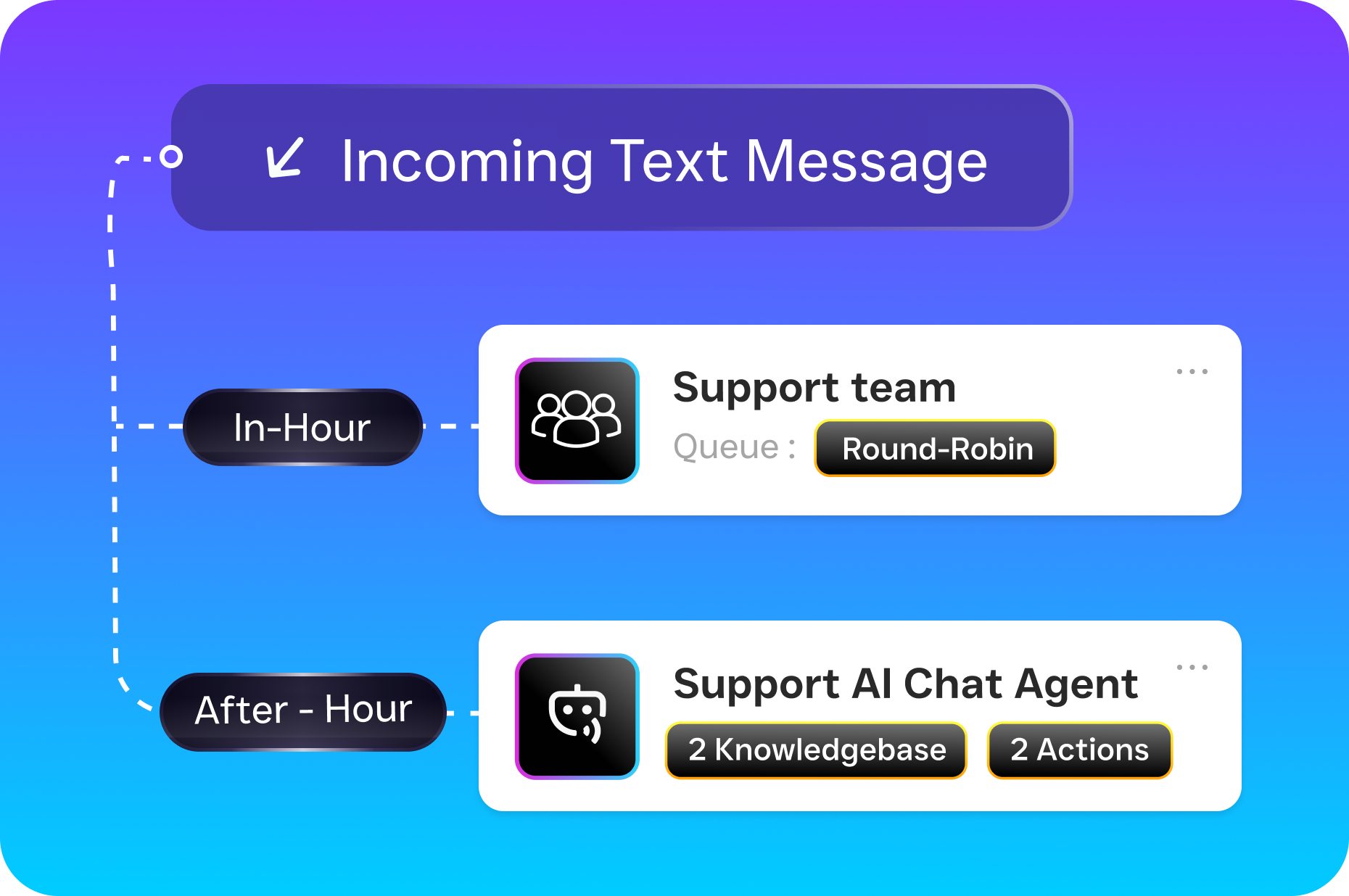
- Set conditions and timing. Define when the auto response fires. For example, you might want one message during business hours (“We’ll get back to you in 10 minutes”) and a different one after hours (“We’re closed, but here’s a link to book your appointment”). Conditions can also be based on the channel, the customer’s location, or the content of their message.
- Add follow-up actions. Connect the auto response to a workflow. After the initial text, SalesCaptain can automatically send a booking link, ask a qualifying question, update your CRM, notify a team member, or trigger a series of follow-up messages if the customer doesn’t reply.
- Activate and monitor. Turn the automation on. Every auto response, along with the full conversation, appears in SalesCaptain’s Unified Inbox, so your team can see exactly what was sent and pick up the conversation at any point.
The entire setup takes minutes. Because SalesCaptain integrates with tools like HubSpot, Salesforce, Zoho, HousecallPro, and ServiceFusion, every auto response text can also sync contact data and conversation history directly into your existing systems.
Key Capabilities
- Missed Call Text-Back: When a call goes unanswered, SalesCaptain automatically sends a text to the caller within seconds. Instead of losing that lead to a voicemail they’ll never leave, you start a text conversation right away. According to Ringlii’s analysis, the financial impact of missed calls runs into thousands of dollars per month for most service businesses.
- Multichannel Auto Responses: Auto replies aren’t limited to SMS. SalesCaptain handles auto responses across webchat, Instagram DMs, and Facebook Messenger from one platform. Every conversation feeds into the same Unified Inbox regardless of where it originated.
- AI-Powered Dynamic Replies: Rather than sending the same generic message to every inquiry, SalesCaptain’s AI Chat Agents can read the customer’s message and respond contextually. Someone asking about pricing gets a different reply than someone asking about availability. The AI handles FAQs, books appointments, and qualifies leads without human involvement.
- Advanced Templating and Personalization: Insert the customer’s name, service type, appointment time, or any custom field into your auto response texts. Personalized messages consistently outperform generic ones in engagement, as SMS engagement research has confirmed.
- Workflow-Triggered Sequences: A single auto response can kick off an entire follow-up sequence. SalesCaptain’s drag-and-drop Workflow Automation builder lets you chain messages, delays, conditions, and CRM actions together visually. No coding required.
- Payments via Text: After an auto response captures a lead, you can send payment links directly through the same text thread. This shortens the path from inquiry to revenue, especially for businesses that take deposits or require upfront payment.
Who Needs This?
Auto response texts aren’t just for large companies with dedicated marketing teams. They’re especially valuable for small and mid-size service businesses where every missed message is a missed sale.
- Home service companies (roofing, plumbing, HVAC, landscaping, appliance repair) that receive calls throughout the day while techs are on job sites and can’t answer the phone.
- Healthcare and wellness practices (dental offices, MedSpas, therapy practices) where patients text to book, confirm, or reschedule appointments outside of front-desk hours.
- Legal practices that need to acknowledge potential client inquiries quickly, because a delayed response often means the prospect calls another firm.
- Salons, gyms, and fitness studios handling high volumes of booking-related messages that follow predictable patterns, perfect for automation.
- Real estate agencies where leads come in through multiple channels and response time directly affects whether you win the listing or the buyer.
- Operations managers and business owners who are tired of managing separate tools for calls, texts, webchat, and social messages.
Data from the National Federation of Independent Business consistently shows that labor costs are a top concern for small businesses. Auto response texts let you handle more customer communication without hiring additional staff, which is precisely why this feature resonates so strongly with SMBs.
Benefits of Auto Response Text for Your Business
Faster Lead Response Without More Headcount
The biggest benefit is obvious but worth stating clearly: you respond to every inquiry instantly, 24 hours a day, 7 days a week. Your team doesn’t need to be awake, available, or even aware that a message came in. The auto response handles the first touch, and your staff picks up the conversation when they’re ready. That gap between “customer reaches out” and “business responds” shrinks from hours to seconds.
Higher Conversion on Inbound Leads
A lead that gets a reply in under a minute is far more likely to convert than one that waits an hour. Text Request’s 2024 State of Business Texting Report found that businesses using text-based communication see significantly higher engagement rates compared to those relying on phone and email alone. Auto response texts capitalize on that engagement by starting the conversation when the customer’s intent is highest.
Consistent Customer Experience Across Channels
Without automation, your customer experience depends on who’s working, what channel the message came through, and how busy your team is at that moment. Some inquiries get fast, helpful replies. Others fall through the cracks entirely. Auto response texts create a consistent baseline, so every customer gets acknowledged, no matter when or how they reach out. And because SalesCaptain routes all channels into one Unified Inbox, your team never has to check five different apps to find a conversation.
Reduced Workload on Repetitive Tasks
A significant portion of inbound messages ask the same questions: “What are your hours?”, “Do you offer free estimates?”, “How do I book an appointment?” Your team shouldn’t spend their day copy-pasting the same answers. SalesCaptain’s AI Chat Agents handle these repetitive inquiries automatically, freeing your staff to focus on conversations that actually require a human.
How SalesCaptain Compares
Several platforms offer some form of auto response texting, but most have gaps that matter for service businesses. Podium, for instance, doesn’t offer outbound workflow automation, so while you can respond to a message, you can’t build a multi-step follow-up sequence from that initial auto reply. SalesCaptain’s Workflow Automation fills that gap with a visual drag-and-drop builder.
Weave focuses heavily on healthcare and dental, lacking features like social chat, WhatsApp support, and advanced templating that service businesses outside the medical vertical need. Birdeye is primarily a reputation management tool. It doesn’t include AI-powered responses for calls, has no call routing or IVR, and can’t function as a full communication platform. Nextiva caps SMS at 250 messages per user per month, which is a serious limitation for any business running auto response campaigns at scale. SalesCaptain supports high-volume SMS without those arbitrary restrictions.
Pricing is also worth noting. SalesCaptain starts with a free plan for a single location and scales at $159/month per location for the Business tier.For service businesses that need auto response text across every channel, not just phone, SalesCaptain covers more ground at a more predictable cost.
What’s the difference between an auto response text and an AI chatbot?
An auto response text sends a specific, pre-set message when triggered by an event like a missed call or incoming SMS. An AI chatbot, like SalesCaptain’s AI Chat Agent, goes further by reading the customer’s message and generating a contextual reply. You can use both together: an auto response for the initial acknowledgment, then the AI agent to continue the conversation dynamically.
Can I customize auto response texts for different times of day?
Yes. SalesCaptain lets you set conditions based on time, day of week, channel, and other factors. You might send a booking link during business hours and a different message after hours that confirms you’ll follow up the next morning. Conditions are set up visually in the Workflow Automation builder.
Does auto response text work for missed calls too?
Absolutely. SalesCaptain’s missed call text-back feature automatically sends an SMS to anyone whose call goes unanswered. That text can include a greeting, a booking link, or a question to start qualifying the lead. It’s one of the most effective ways to recover revenue from calls your team couldn’t pick up.
Will customers know it’s an automated reply?
That depends on how you write it. SalesCaptain’s personalization fields and AI-driven replies make auto responses feel natural. You can insert the customer’s name, reference the service they asked about, and vary the language so it doesn’t read like a canned template. Most customers won’t notice, and even if they do, a fast automated reply beats a slow human one every time.
Start sending auto response texts that capture leads and book appointments around the clock.
Ready to see it in action?
See how businesses use SalesCaptain to automatically respond to texts and never miss a lead.
Book a Free Demo →Frequently Asked Questions
What is an auto response text and why do I need one for my business?
An auto response text is a pre-configured SMS message that sends automatically when a trigger occurs, such as an incoming text, missed call, form submission, or social media message. It keeps leads warm and reassures customers immediately, preventing lost revenue—studies show small businesses lose over $26,000 per year from missed calls alone.
How quickly do auto response texts get sent to customers?
Auto response texts fire instantly in real time without any manual intervention required. Since the majority of text messages are read within minutes of being received, immediate auto responses significantly outperform slower communication channels like email or voicemail.
Can auto response texts do more than just send ‘we got your message’ replies?
Modern auto response text platforms go far beyond basic acknowledgments and can qualify leads by asking follow-up questions, send booking links, share business hours, route conversations to the right team member, and even collect payment information. They function as the first step in a fully automated conversation rather than just a simple confirmation.
What triggers can I set up for auto response texts in SalesCaptain?
Auto response texts can be triggered by incoming text messages, missed phone calls, web form submissions, social media direct messages, and other customer interactions. Each trigger can be customized to send a specific response tailored to that communication channel.
Do I need technical skills to set up auto response texts?
Setting up auto response texts in SalesCaptain doesn’t require technical skills—the process is straightforward and designed for business owners without coding knowledge. You simply choose your trigger and configure your message through an easy-to-use platform.