
AI-powered customer experience marketing (CXM) platform that helps local businesses win.



If you’re running a service business, you’ve probably heard the terms “ERP” and “CRM” tossed around as separate solutions for separate problems. But here’s the reality: most SMBs don’t need a massive enterprise resource planning CRM suite that costs six figures and takes a year to deploy. What they actually need is a way to capture every lead, respond instantly, and keep customer communication organized across every channel. SalesCaptain was built to solve that exact problem, giving service businesses the customer-facing communication power of a CRM without the bloat of a full ERP system.
Quick Answer
Enterprise Resource Planning CRM integrates customer relationship management capabilities directly into broader business management systems, allowing companies to unify customer data, sales pipelines, financial records, and operations in one platform. This eliminates data silos, reduces manual data entry, and enables teams across departments to access real-time customer information for faster decision-making and improved customer experiences.
What Is Enterprise Resource Planning CRM?
Enterprise resource planning (ERP) and customer relationship management (CRM) are two categories of business software that overlap in important ways. An ERP system manages back-office operations like accounting, inventory, supply chain, and HR. A CRM system manages front-office interactions: leads, customer conversations, sales pipelines, and follow-ups. When people search for “enterprise resource planning CRM,” they’re usually looking for a solution that bridges both worlds, or at least handles the customer-facing side well enough that they don’t need two separate platforms.
For large enterprises, that might mean integrating Salesforce with SAP or Oracle. But for a roofing company with three locations, a dental practice, or a growing MedSpa, the equation looks very different. According to ECI Solutions’ 2024 ERP guide for SMBs, small and mid-sized businesses increasingly prioritize systems that are easy to adopt and deliver fast time-to-value over comprehensive but complex enterprise suites. The CRM piece, specifically how you communicate with customers and manage leads, tends to drive the most immediate revenue impact.
Free weekly newsletter
Growth tips for service businesses
Every Tuesday — actionable ideas to get more leads, reviews, and repeat customers. No fluff.
Where ERP Ends and CRM Begins
ERP handles what happens after a sale: invoicing, job costing, scheduling resources. CRM handles what happens before and during the customer relationship: capturing the lead, following up, booking the appointment, and keeping the conversation going. For most service businesses, the CRM side is where revenue lives or dies. Miss a call from a potential customer on a Saturday morning, and that’s a lost job. According to SkipCalls’ 2026 industry data, small businesses lose over $26,000 per year from missed calls alone. No ERP system in the world fixes that problem.
That’s why service businesses are increasingly looking for platforms that nail the CRM and communication layer first, then connect to their existing back-office tools. You don’t need to rip and replace your accounting software. You need to make sure every lead gets a response within seconds, not hours.
How Enterprise Resource Planning CRM Works in SalesCaptain
SalesCaptain isn’t a traditional ERP. It’s a unified communication platform with AI-powered agents that handles the customer-facing work most ERP and CRM systems ignore: real-time phone calls, texts, webchat, and social media DMs. Here’s how it fits into the ERP-CRM picture for a typical service business.
- Connect your channels. Set up your business phone number, SMS, webchat widget, Instagram DMs, and Facebook Messenger inside SalesCaptain. Everything feeds into one unified inbox, so your team doesn’t toggle between five apps to see what’s happening with a customer.
- Deploy AI agents. Build an AI Phone Agent that answers calls 24/7, qualifies leads, books appointments, and answers common questions. Set up AI Chat Agents for text, webchat, and social media. No coding required, and the setup takes minutes, not months.
- Automate follow-ups and workflows. Use the drag-and-drop workflow builder to trigger automatic follow-up texts after missed calls, send appointment reminders, update your CRM, and push notifications to your team. These automations replace the manual busywork that eats hours every week.
- Sync with your existing tools. SalesCaptain integrates with over 50 platforms including HubSpot, Salesforce, Zoho, QuickBooks, HousecallPro, ServiceFusion, Clio, and Shopify. So if you’re already using an ERP or accounting tool, SalesCaptain plugs right in as your customer communication layer.
- Review AI summaries and transcriptions. Every call is automatically transcribed and summarized. Your team gets the key takeaways, action items, and customer concerns without listening to recordings. That data flows into your contact history for full context on every interaction.
The result? You get the lead capture and customer management capabilities of a CRM, the automation of a workflow engine, and 24/7 AI-powered communication, all without deploying a heavyweight ERP system. According to Panorama Consulting Group’s 2024 ERP Report, implementation timelines for traditional ERP systems often stretch well beyond initial estimates. SalesCaptain deploys in a day.
Key Capabilities
- AI Phone Agent with 24/7 Coverage: A natural-sounding voice agent answers every call, qualifies leads, blocks spam, routes callers to the right person, and books appointments. After-hours calls that used to go to voicemail now become booked jobs. At $0.12 per minute, it costs a fraction of hiring a receptionist.
- Multichannel AI Chat Agents: Instant responses across SMS, webchat, Instagram DMs, and Facebook Messenger. These agents capture lead information, answer FAQs, and trigger appointment bookings without any human intervention. Your response time drops from hours to seconds.
- Unified Inbox for Every Channel: Calls, texts, social messages, emails, webchat, and internal notes all live in one collaborative inbox. Every team member sees the full conversation history for any contact, eliminating the “did anyone follow up with that lead?” problem.
- Drag-and-Drop Workflow Automation: Build trigger-based automations for follow-ups, CRM updates, reminders, and internal notifications. For example, when a missed call comes in, automatically send a text-back, create a task for your sales team, and log the event in HubSpot or Salesforce.
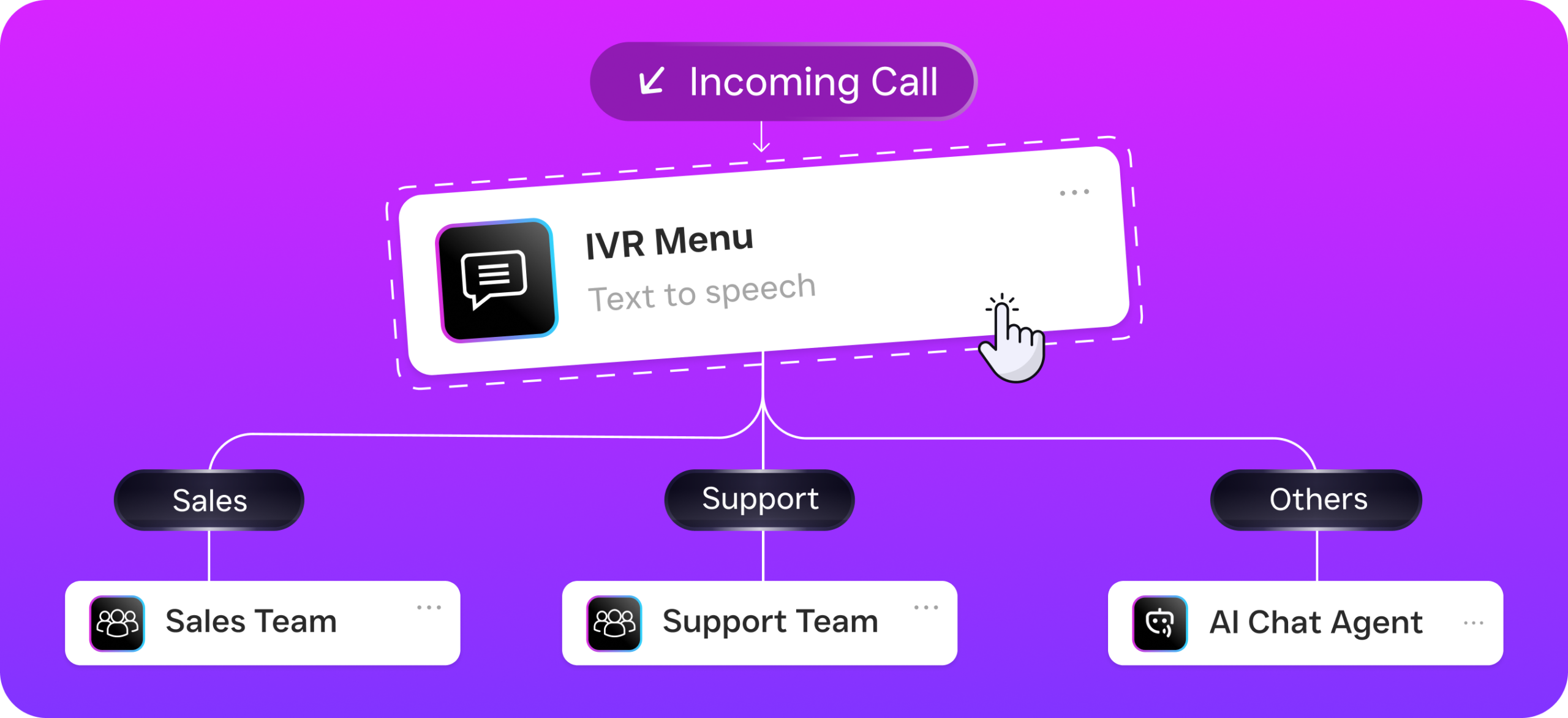
- Call Flows with Visual Builder: Design step-by-step call routing with IVR menus, greetings, after-hours rules, voicemail-to-text, and AI Agent handoff. Every call gets handled consistently, whether it’s 2 PM or 2 AM.
- Native Integrations with Business Tools: Sync with HubSpot, Salesforce, Zoho, QuickBooks, ServiceFusion, HousecallPro, Mindbody, Clio, Shopify, and more via native connections or Zapier. Your communication data flows into whatever ERP, CRM, or accounting system you already rely on.
Who Needs This?
SalesCaptain fits businesses that need the customer communication and lead management power of a CRM but don’t want the complexity or cost of a traditional enterprise resource planning CRM suite. If your business depends on phone calls, appointments, and fast follow-up, this is your category.
- Home services companies (roofing, plumbing, HVAC, landscaping, appliance repair) that miss after-hours calls and lose jobs to competitors who respond faster.
- Healthcare and wellness practices (dental offices, medical clinics, MedSpas, therapy practices) that need secure communication and automated appointment reminders.
- Legal practices where every missed call could be a new client, and intake needs to happen quickly and consistently.
- Salons, gyms, and fitness studios that run on appointments and need to reduce no-shows with automated follow-ups.
- Real estate agencies where lead response time directly correlates to closed deals.
- Multi-location businesses that need per-location pricing and centralized communication management across all their sites.
- Business owners and operations managers who can’t afford to hire more staff but need to handle growing call and message volume.
Benefits of Enterprise Resource Planning CRM Communication
Stop Losing Revenue to Missed Calls
Every unanswered call is a potential customer choosing your competitor. According to Aira’s 2026 data on missed business calls, the cost per missed call varies dramatically by industry, but the pattern is consistent: most callers won’t leave a voicemail, and they won’t call back. SalesCaptain’s AI Phone Agent eliminates this problem entirely. Calls get answered on the first ring, every time, whether your office is open or closed.
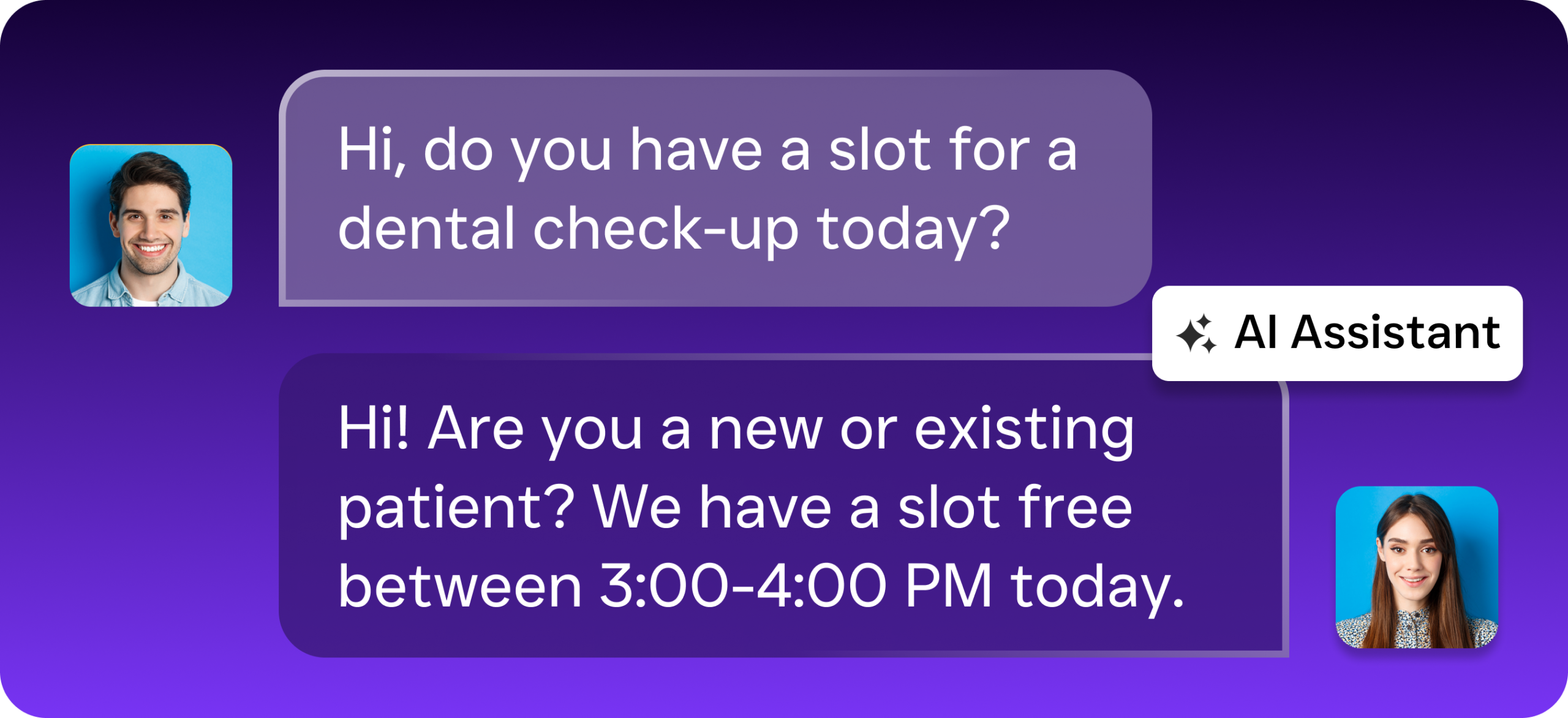
Respond to Leads in Seconds, Not Hours
Speed-to-lead is one of the most well-documented factors in conversion rates. Research from Harvard Business Review found that businesses responding within five minutes are dramatically more likely to qualify a lead than those responding within 30 minutes. With AI Chat Agents handling SMS, webchat, and social media, SalesCaptain responds instantly to every inquiry. Your team focuses on closing deals instead of copying and pasting the same reply across four platforms.
Grow Without Hiring More Staff
Hiring a full-time receptionist costs $30,000 to $40,000 per year. A second one doubles that. SalesCaptain’s AI agents handle the repetitive, high-volume communication work at a fraction of that cost. The free Startup plan covers one location, while the Business plan at $159/month per location gives you the full suite of AI agents, automation, and integrations. For multi-location businesses, that’s dramatically cheaper than staffing each office individually.
Keep Your Existing Tools
One of the biggest headaches with traditional ERP-CRM deployments is ripping out existing systems. SalesCaptain doesn’t ask you to do that. According to InfoTech Group’s analysis of ERP systems for small businesses, integration capability is a top factor in successful deployments. With 50+ native integrations including HubSpot, Salesforce, Zoho, QuickBooks, and Zapier, SalesCaptain layers on top of your current stack. It handles the communication, while your existing tools handle the rest.
How SalesCaptain Compares
Most platforms in the communication space force you to choose between phone features, chat automation, or a unified inbox. SalesCaptain is the only platform that combines AI voice agents, AI chat agents, and a unified inbox in a single tool built specifically for service businesses.
Consider Aircall at $30 per license per month. It’s built for call center teams and lacks a Voice AI Agent, webchat, email channel, and missed-call text-back. There’s no real-time AI for calls, either. Similarly, Nextiva caps SMS at 250 messages per user per month and doesn’t offer WhatsApp, review management, text-to-pay, or live transcription. Both platforms require complex onboarding that isn’t designed for local service businesses. SalesCaptain, by contrast, offers call coaching and whispering, real-time speech analytics, payments via text, and a leads form, all at transparent per-location pricing starting with a free plan.
Birdeye is primarily a reputation management tool. It lacks call routing, call coaching, IVR, call flow building, warm and cold transfers, hold music, and any AI for calls. If you need a full communication platform rather than just review collection, Birdeye won’t cover your needs. SalesCaptain gives you the complete phone system with 99.99% uptime alongside AI-powered automation.
FAQ
Do I need a full ERP system if I already use SalesCaptain?
Not necessarily. Most service businesses need the customer-facing communication capabilities of a CRM far more than they need full ERP functionality. SalesCaptain handles lead capture, AI-powered phone and chat responses, appointment booking, workflow automation, and team collaboration. For back-office needs like accounting or job costing, it integrates with tools like QuickBooks, ServiceFusion, and HousecallPro.
Can SalesCaptain replace my current CRM?
It depends on what you’re using your CRM for. If your primary use is tracking customer conversations, managing leads, and following up, SalesCaptain handles all of that with the added benefit of AI automation across calls, texts, and chat. If you need deep sales pipeline management or marketing automation, you can keep your existing CRM and sync it through native integrations with HubSpot, Salesforce, or Zoho.
What does SalesCaptain cost compared to traditional ERP-CRM systems?
SalesCaptain’s Startup plan is free for one location. The Business plan is $159/month per location, and the Enterprise plan is $300/month per location. AI phone minutes are billed at $0.12/minute. Traditional ERP-CRM suites from vendors like SAP or Oracle can cost tens of thousands of dollars annually, plus implementation fees. For SMBs, SalesCaptain delivers the customer communication layer at a fundamentally different price point.
How quickly can I set up SalesCaptain?
Most businesses are up and running quickly. You’ll connect your phone number and messaging channels, configure your AI Phone Agent’s call flow using the drag-and-drop builder, and set up your automation workflows. There’s no technical expertise required, and no lengthy implementation timeline like you’d expect with a traditional ERP deployment.
Get the Customer Communication Layer Your Business Actually Needs
SalesCaptain gives service businesses AI-powered phone and chat agents, a unified inbox, and workflow automation, all without the cost or complexity of a traditional enterprise resource planning CRM suite. Start with the free plan and see the difference 24/7 AI coverage makes for your revenue.
Ready to see it in action?
See how enterprise teams use SalesCaptain to close deals faster without manual CRM data entry.
Book a Free Demo →Frequently Asked Questions
What is the difference between ERP and CRM?
ERP (Enterprise Resource Planning) manages back-office operations like accounting, inventory, and HR, while CRM (Customer Relationship Management) handles front-office interactions such as leads, customer conversations, and sales pipelines. For service businesses, the CRM side typically drives more immediate revenue impact since it directly affects lead capture and customer communication.
Do small businesses really need a full enterprise resource planning CRM suite?
Most SMBs don’t need a massive enterprise resource planning CRM suite that costs six figures and takes a year to deploy. Instead, they benefit more from solutions that prioritize ease of adoption and fast time-to-value, particularly on the customer-facing CRM side that directly impacts revenue generation.
Why is CRM more important than ERP for service businesses?
For service businesses, the CRM piece—how you communicate with customers and manage leads—drives the most immediate revenue impact, while ERP handles what happens after the sale. Missing a single customer call can cost thousands in lost business, making responsive customer communication more critical than back-office operations.
What features should a service business look for in a CRM system?
A good CRM for service businesses should capture every lead, respond instantly to customer inquiries, and keep customer communication organized across every channel. The focus should be on customer-facing communication power without the unnecessary complexity of a full ERP system.
Can you integrate ERP and CRM systems together?
Large enterprises often integrate major systems like Salesforce with SAP or Oracle, but for small and mid-sized service businesses, a single platform that handles both CRM and essential back-office functions is typically more practical and cost-effective than managing separate integrations.