
AI-powered customer experience marketing (CXM) platform that helps local businesses win.



Every missed text is a missed opportunity. When a customer reaches out and doesn’t hear back quickly, they move on to someone who responds faster. An auto reply text message solves that problem by sending an instant, personalized response the moment someone texts your business, whether it’s 2 PM on a Tuesday or 3 AM on a holiday. For service businesses juggling calls, appointments, and walk-ins, auto reply texting isn’t a nice-to-have. It’s the difference between capturing a lead and losing one to a competitor down the street.
What Is an Auto Reply Text Message?
An auto reply text message is an automated SMS that’s sent to a customer immediately after they text your business number, call and don’t reach someone, or trigger a specific event like booking a form submission. Think of it as your digital front desk: always on, always responding, never taking a break.
Unlike a generic voicemail greeting, auto replies are actionable. They can confirm an appointment, answer a common question, share a booking link, or simply let the customer know a real person will follow up shortly. According to recent business texting research from Textline, SMS open rates sit above 90%, making text messages one of the most reliable channels for reaching customers. That’s why auto replies work so well: people actually read them.
There’s also a psychological component at play. When someone gets an instant acknowledgment, they feel heard. They’re far less likely to call your competitor while waiting. And for businesses that can’t staff a phone or inbox around the clock, that instant confirmation buys valuable time without sacrificing the customer experience.
How Auto Reply Text Messages Work in SalesCaptain
Setting up auto reply text messages in SalesCaptain takes minutes, not hours. You don’t need a developer, and you don’t need to connect a pile of third-party tools. Here’s how the process works from start to finish:
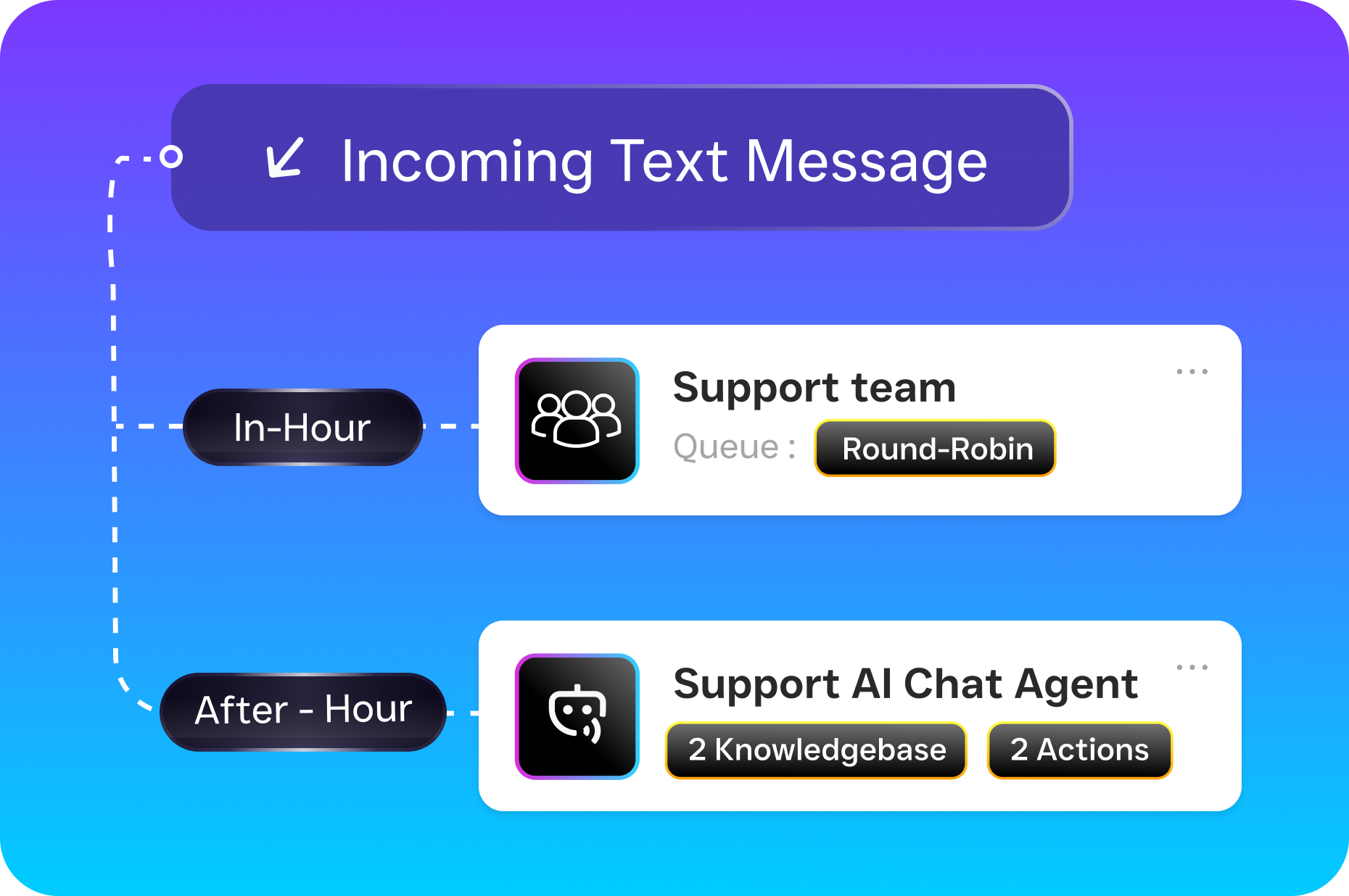
- Choose your trigger. Decide what event should fire off the auto reply. Common triggers include an incoming text to your business number, a missed call, a new form submission, or an after-hours message. SalesCaptain’s workflow automation builder lets you select from dozens of trigger types.
- Write your message. Craft the reply using SalesCaptain’s advanced templating and personalization tools. You can insert the customer’s name, the service they asked about, or a direct link to your online booking page. Keep it short, specific, and human-sounding.
- Set conditions and timing. Want auto replies only after 6 PM? Only for new contacts? Only when a specific keyword appears in their message? The drag-and-drop workflow builder supports conditional logic, so your auto replies fire at exactly the right moment.
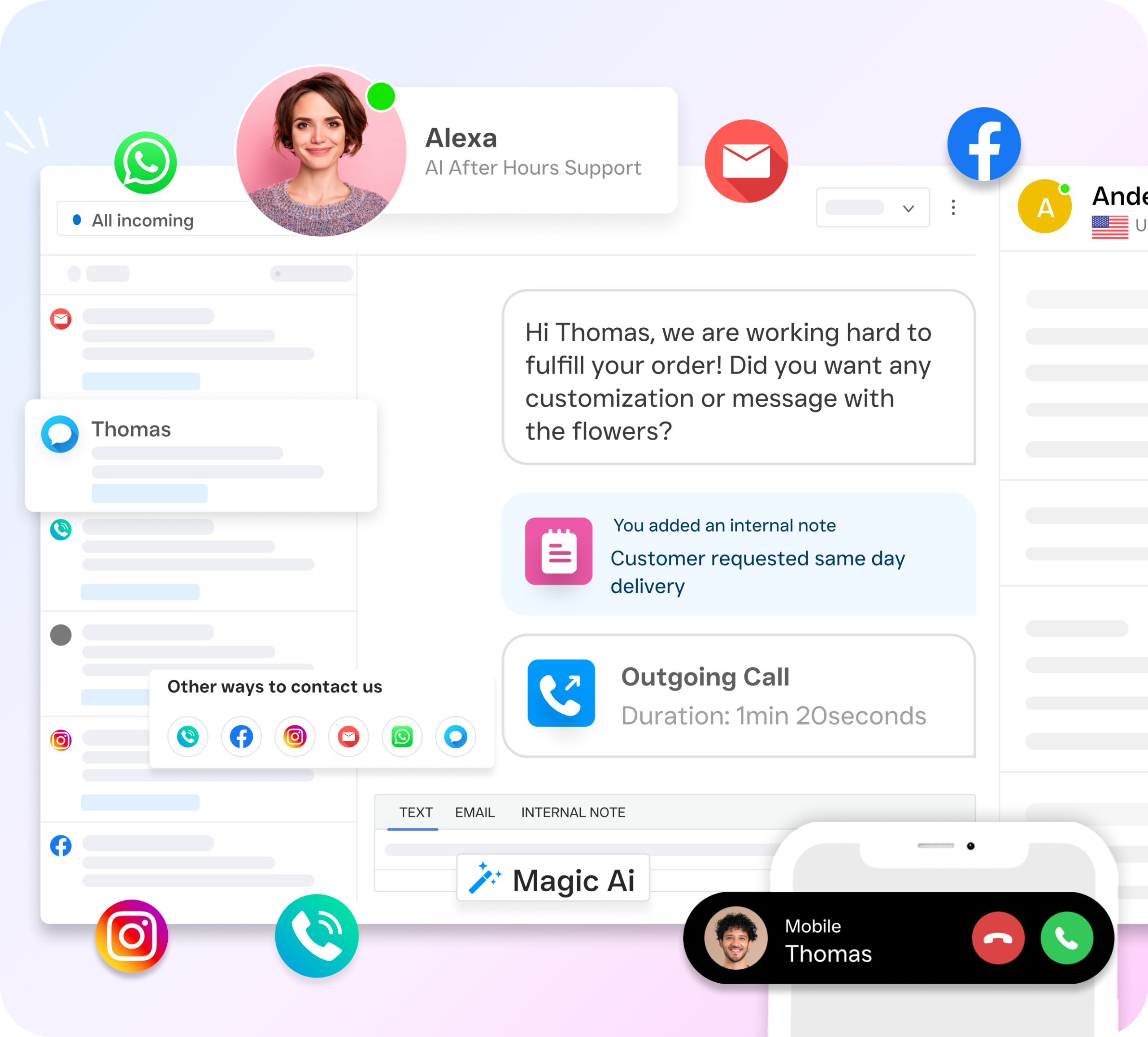
- Activate and monitor. Turn the workflow on and watch it run. Every auto reply appears in SalesCaptain’s unified inbox alongside your calls, webchat conversations, Instagram DMs, and Facebook Messenger threads. Your team sees the full picture in one place.
- Refine over time. Use conversation history and response data inside the unified inbox to see which auto replies lead to booked appointments. Then tweak your templates to improve results.
Because SalesCaptain connects SMS, voice, webchat, and social messaging into a single collaborative inbox, your auto reply doesn’t exist in a silo. It feeds into the same conversation thread your team already uses, so nobody loses context.
Key Capabilities
- Missed call text-back: When a customer calls and nobody answers, SalesCaptain automatically sends a text within seconds. According to industry data from SkipCalls, small businesses lose over $26,000 per year from missed calls alone. Missed call text-back recovers a significant portion of those leads before they disappear.
- Keyword-triggered replies: If a customer texts “hours,” “pricing,” or “appointment,” SalesCaptain can detect the keyword and send a targeted auto reply with the exact information they need. No manual sorting required.
- After-hours automation: Set business hours in your account, and SalesCaptain switches to a dedicated after-hours auto reply template automatically. Customers know you’re closed but still feel taken care of.
- Multichannel auto responses: Auto replies aren’t limited to SMS. SalesCaptain’s AI Chat Agents handle the same instant-response logic across webchat, Instagram DMs, and Facebook Messenger, giving you consistent coverage everywhere customers reach out.
- Appointment booking links: Include a direct scheduling link in your auto reply so customers can book without waiting for a callback. This is especially valuable for appointment-heavy small businesses like salons, dental offices, and home service companies.
- Payments via text: For businesses that collect deposits or invoice after service, SalesCaptain lets you embed payment links directly in your automated text messages. Customers pay from the same thread where they booked.
Who Needs This?
Auto reply text messages aren’t just for large call centers. They’re most impactful for businesses where every inbound inquiry has real revenue attached to it. Here’s who benefits most:
- Home service companies (roofers, plumbers, HVAC techs, landscapers) that miss calls while on the job site and can’t afford to let leads go cold.
- Healthcare and wellness practices (dental offices, MedSpas, therapy clinics) where patients expect quick confirmation and easy scheduling.
- Legal practices that need to acknowledge potential clients immediately, especially during intake-heavy periods.
- Salons, gyms, and fitness studios that rely on appointment volume and can’t staff a receptionist around the clock.
- Real estate agencies where a delayed response to a buyer inquiry can mean losing the deal entirely.
- Multi-location businesses that need consistent messaging across every location without managing separate tools for each one.
- Operations managers and business owners who want to reduce manual follow-up work without hiring additional staff.
If your team is already stretched thin and you’re losing leads to slow response times, auto reply texting is one of the highest-ROI automations you can put in place. According to SMS marketing data compiled by Textdrip, response rates for text messages dwarf those of email and phone, making it the channel most likely to convert an inquiry into a customer.
Benefits of Auto Reply Text Messages
Faster Response Times Without Hiring
Speed matters more than almost anything else in lead conversion. Research on missed call costs from Phone2 consistently shows that businesses responding within five minutes are dramatically more likely to convert leads than those responding within 30 minutes. Auto reply text messages compress that response window to near zero. Your customer hears from you before they’ve even closed the messaging app.
What’s especially powerful is that this speed doesn’t require adding headcount. A plumbing company with three technicians in the field can respond to every inquiry instantly, even during the busiest day of the year. That’s a competitive advantage most small businesses couldn’t access before AI-powered automation.
Consistent Customer Experience Across Channels
When auto replies live inside a unified inbox alongside calls, emails, webchat, and social media DMs, your team never loses track of a conversation. Every interaction, whether it started as a missed call text-back or an Instagram DM, appears in a single thread. Customers don’t have to repeat themselves, and your staff doesn’t waste time hunting for context across five different platforms.
This consistency builds trust. Patients, clients, and homeowners notice when your business feels organized and responsive. Over time, that reputation drives referrals and repeat business.
Recapturing Revenue from Missed Calls
The missed call text-back feature alone justifies the investment for many businesses. According to SchedulingKit’s analysis of missed call revenue loss, thousands of dollars slip through the cracks each month simply because nobody was available to pick up. Auto reply text messages transform those missed calls into active text conversations, keeping the lead warm until someone on your team can follow up.
Reduced Workload for Your Team
Repetitive tasks like confirming appointments, sharing business hours, and acknowledging new inquiries eat up hours every week. Automating those responses frees your staff to focus on higher-value work: closing deals, delivering service, and building relationships. SalesCaptain’s workflow automation handles the routine stuff so your people don’t have to.
How SalesCaptain Compares
Several platforms offer some form of text automation, but few combine it with a full communication suite built specifically for service businesses. Podium, for example, doesn’t include outbound workflow automation or real-time speech analytics, and its pricing isn’t publicly transparent. Birdeye is primarily a reputation management tool with weak VoIP capabilities: no call routing, no call flow builder, and no AI for voice calls. Neither platform gives you a true unified inbox that spans calls, SMS, webchat, social DMs, and email in one view.
OpenPhone is another common option, but it offers minimal AI features, only seven integrations, and no call coaching or missed-call text-back. SalesCaptain, on the other hand, includes voicemail drop, call coaching and whispering, real-time speech analytics, call queueing, and sentiment analysis on top of full SMS automation.
What really sets SalesCaptain apart is the combination: AI phone agents that answer calls 24/7, AI chat agents that handle text and social conversations, missed call text-back, workflow automation, and a unified inbox. That’s not a collection of bolt-on features. It’s a single platform designed so service businesses can grow without hiring more staff. Pricing starts with a free plan, and paid plans run $159 per month per location, well below platforms like Aircall that charge $30 per license per user with fewer capabilities.
Frequently Asked Questions
Can I customize auto reply messages for different situations?
Yes. SalesCaptain’s workflow builder lets you create different auto reply templates based on triggers like missed calls, after-hours messages, specific keywords, or new contact submissions. You can personalize each template with the customer’s name, the service they asked about, and direct booking links.
Does auto reply text-back work for missed calls too?
Absolutely. SalesCaptain’s missed call text-back feature sends a personalized SMS within seconds of a missed call. The message appears in your unified inbox so your team can pick up the conversation as soon as they’re available.
Will customers know they’re getting an automated reply?
That depends on how you write your templates. SalesCaptain’s personalization tools let you craft messages that feel natural and human. Many businesses write their auto replies in a conversational tone, so customers simply experience a fast, helpful response rather than something that reads like a robot.
Can I use auto reply across channels other than SMS?
Yes. SalesCaptain’s AI Chat Agents provide instant automated responses on webchat, Instagram DMs, and Facebook Messenger in addition to SMS. All conversations feed into the same unified inbox, so your team has full visibility regardless of the channel.
How quickly can I set this up?
Most businesses have their first auto reply workflow running within 15 to 20 minutes. SalesCaptain’s drag-and-drop builder requires no coding or technical expertise. Choose a trigger, write your message, set your conditions, and activate.
Start Responding to Every Lead Instantly
SalesCaptain gives your business the auto reply text messaging, missed call text-back, and AI-powered communication tools you need to capture more leads without adding staff. Set up your first automated workflow in minutes.