
AI-powered customer experience marketing (CXM) platform that helps local businesses win.



Every service business runs on workflows. Whether it’s following up with a new lead, sending appointment reminders, or routing a missed call to the right person. The best workflow automation tools don’t just digitize those tasks—they eliminate the manual effort entirely. Sound familiar? If you’re still relying on sticky notes, spreadsheets, or sheer memory to manage customer communication, you’re losing time and revenue every single day. SalesCaptain’s Workflow Automation gives service businesses a drag-and-drop builder that connects AI phone agents, AI chat agents, a unified inbox, and 50+ integrations into one system that runs on autopilot.
What Is Workflow Automation?
Workflow automation is the process of using software to execute repetitive business tasks without human input. Instead of manually sending a follow-up text after every missed call, a workflow handles it automatically based on triggers you define. Think of it as a set of “if this, then that” rules. Applied to your daily operations.
There’s an important distinction between basic workflow automation and AI-powered automation. Traditional tools like Zapier or Make connect apps and pass data between them. That’s useful. But they don’t understand context. They can’t listen to a phone call, summarize the conversation, identify the caller’s intent, and then trigger a personalized follow-up. AI-powered workflow automation does all of that. And that’s why service businesses are moving beyond simple app connectors.
According to recent workflow automation research, businesses that adopt automation see significant reductions in time spent on repetitive tasks. For small businesses specifically, SMB automation data from Iron River Technologies shows that automation adoption is accelerating. Why? Because owners simply can’t hire fast enough to keep up with demand. The gap between what your team can handle and what your customers expect keeps growing. So automation closes it.
How Workflow Automation Works in SalesCaptain
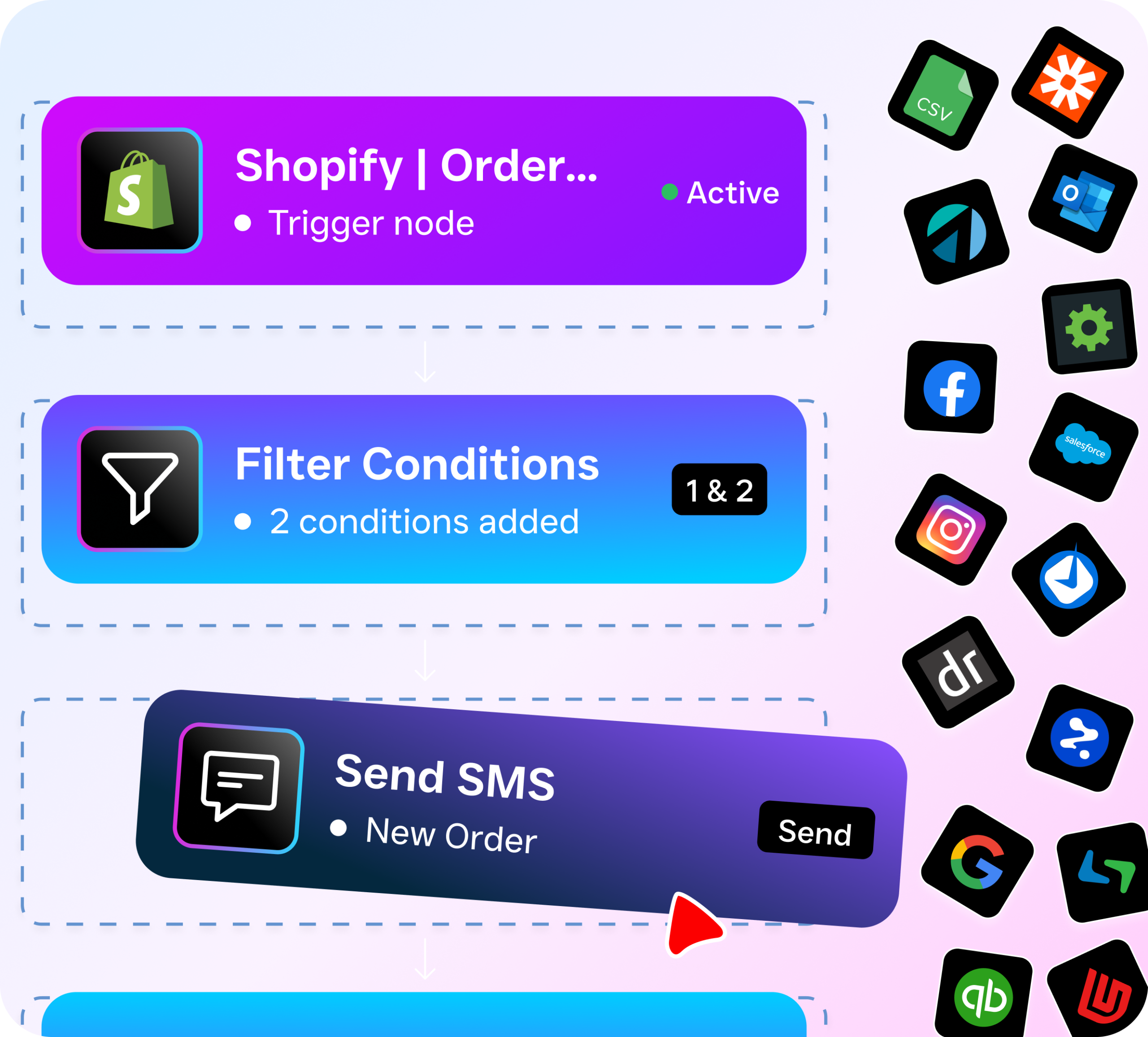
SalesCaptain’s workflow builder is visual, not code-based. You don’t need a developer. You don’t need a tech background. Here’s exactly how to set up an automated workflow from scratch.
- Choose a trigger. Every workflow starts with a trigger event. This could be an incoming phone call, a missed call, a new text message, a form submission, or an appointment booking. You pick the event that kicks things off.
- Define conditions. Add branching logic to route the workflow based on context. For example, if a caller is a new lead, send them one response. If they’re an existing customer, send a different one. Conditions let you personalize automation without creating separate workflows for every scenario.
- Set actions. Actions are what the workflow actually does. Send an SMS, update a contact record, create a task for your team, trigger an AI phone callback, send an appointment reminder, or push data to your CRM. You can chain multiple actions together in sequence.
- Connect your tools. SalesCaptain integrates natively with HubSpot, Salesforce, Zoho, ServiceFusion, HousecallPro, Mindbody, Shopify, QuickBooks, Clio, and 40+ other platforms. Your workflows don’t live in isolation. They sync data across every tool your business already uses.
- Activate and monitor. Once your workflow is live, SalesCaptain tracks every execution in real time. You’ll see which workflows fired, what actions completed, and where contacts are in the pipeline. No guessing.
The entire setup takes minutes, not days. And because workflows connect directly to SalesCaptain’s AI Phone Agent and AI Chat Agents, you’re not just automating data transfers. You’re automating entire customer conversations.
Key Capabilities
Not all workflow builders are created equal. Here’s what makes SalesCaptain different from generic tools.
- Missed call text-back. When a call goes unanswered, a workflow instantly sends an SMS to the caller. According to Aira’s research on missed business calls, a staggering percentage of business calls go unanswered. Automated text-back recovers those leads. Before they call your competitor.
- AI-triggered follow-ups. After your AI Phone Agent handles a call, the workflow can automatically send a summary to your team, update the CRM, schedule a follow-up task, or text the caller a booking link. Every post-call action happens without anyone lifting a finger.
- Appointment reminder sequences. Build multi-step reminder workflows that send an SMS 24 hours before an appointment, another one 2 hours before, and a confirmation request. No-shows drop dramatically when reminders are consistent.
- Lead qualification and routing. Workflows can score incoming leads based on their responses to your AI Chat Agent, then route high-value leads to a specific team member while auto-nurturing lower-priority contacts with drip messages.
- CRM sync across 50+ integrations. Every workflow action can push or pull data from your existing tools. A new contact captured by AI Chat on Instagram? It’s in HubSpot within seconds. An appointment booked via your AI Phone Agent? It shows up in HousecallPro automatically.
- Multi-channel trigger support. Workflows aren’t limited to one channel. A trigger from a Facebook Messenger conversation can fire the same workflow as an inbound phone call. This means you build once and cover every communication channel your customers use.
Who Needs This?
Workflow automation isn’t a nice-to-have anymore. It’s the difference between capturing revenue and watching it walk out the door. SkipCalls reports that small businesses lose $26,000 or more per year from missed calls alone. Automation prevents that. Here’s who benefits most.
- Home service companies (roofing, plumbing, HVAC, landscaping, appliance repair) where field teams can’t answer phones and office staff is stretched thin. Automated lead capture and follow-up keep the pipeline full without hiring a receptionist.
- Legal practices where every missed intake call is a potential client lost to another firm. Workflows ensure instant response and proper case routing through Clio integration.
- Healthcare and wellness providers (dental offices, MedSpas, therapy practices) that need appointment reminders, no-show follow-ups, and patient communication across multiple channels.
- Salons, gyms, and fitness studios managing high appointment volume with small front-desk teams. Automated booking confirmations and reminders through Mindbody integration eliminate scheduling chaos.
- Real estate agencies where lead response speed determines who wins the listing. Workflows that fire within seconds of a new inquiry outperform manual follow-up every time.
- Multi-location businesses that need consistent workflows across all locations without rebuilding everything from scratch. SalesCaptain’s per-location pricing means you scale affordably.
Benefits of Workflow Automation for Your Business
Faster Lead Response Without More Staff
Speed kills in sales. Slow response kills deals. When a potential customer fills out a form, sends a DM, or calls your business, the clock starts. According to Harvard Business Review, companies that respond to leads within an hour are seven times more likely to qualify them. But most small businesses take hours or even days. Workflow automation eliminates that delay entirely. Your AI agents respond in seconds. Workflows handle every step that follows.
Consistent Customer Experience at Scale
Manual processes break down as you grow. One team member remembers to send the follow-up text. Another forgets. A third sends it to the wrong person. Workflows enforce consistency. Every customer gets the same professional experience. Whether they call at 2 PM or 2 AM, whether they reach you on Instagram or through your website’s webchat. That consistency builds trust. Trust converts.
Real Cost Savings
Hiring a full-time receptionist costs $35,000 to $45,000 per year, according to the Bureau of Labor Statistics. A virtual receptionist service like Smith.ai or Ruby charges per call or per minute. So costs climb quickly for busy businesses. SalesCaptain’s workflow automation, combined with AI agents, handles the same volume at a fraction of that cost. Your Business plan runs $159 per month per location. Even the AI call minutes are just $0.12 each. The math speaks for itself.
More Revenue From Existing Traffic
Most service businesses don’t have a traffic problem. They have a conversion problem. Leads come in but fall through the cracks because nobody followed up fast enough. Or the follow-up wasn’t personalized. Or it simply didn’t happen. Workflows close those gaps systematically. Every lead gets nurtured. Every missed call gets a text-back. Every appointment gets a reminder. You’re not spending more on marketing. You’re extracting more value from what you already have.
How SalesCaptain Compares
Generic automation platforms like Zapier and Make are powerful connectors. But they don’t come with a phone system, AI voice agents, or a unified inbox. You’ll spend months stitching together separate tools for calling, texting, chat, and automation. Then pay for each one individually. SalesCaptain bundles all of it.
Compared to communication platforms that offer some automation, the differences are clear. Nextiva caps SMS at 250 messages per user per month. This limits what your workflows can actually accomplish. Aircall, at $30 per license, doesn’t include a Voice AI Agent or missed-call text-back. Dialpad lacks toll-free minutes and has no native social chat support. OpenPhone offers minimal AI capability. Only seven integrations, which severely restricts workflow flexibility.
HighLevel is often mentioned alongside the best workflow automation tools. But it’s built for marketing agencies, not service businesses. The learning curve is steep. And there’s no native AI voice agent. Podium offers outbound texting but lacks a real workflow automation engine for building multi-step sequences with conditional logic. Birdeye? It’s primarily a reputation management tool with weak VoIP and no AI for calls.
SalesCaptain is the only platform combining AI voice agents, AI chat agents, a unified inbox, and drag-and-drop workflow automation. In a single product. Built specifically for service businesses and priced per location, not per user. It scales without punishing you for growing your team.
Frequently Asked Questions
Do I need technical skills to build workflows in SalesCaptain?
No. The visual drag-and-drop builder is designed for business owners and operations managers. Not developers. You pick triggers, set conditions, and choose actions from dropdown menus. If you can use a smartphone, you can build a workflow. Most users have their first automation running within 15 minutes.
Can workflows connect to my existing CRM and scheduling tools?
Yes. SalesCaptain offers 50+ native integrations. HubSpot, Salesforce, Zoho, ServiceFusion, HousecallPro, Mindbody, Shopify, QuickBooks, and Clio. For tools without a native integration, Zapier connectivity extends your reach even further. Data flows both ways. So your CRM stays up to date. Your workflows can pull contact information to personalize every action.
What happens when a workflow fires after hours?
That’s exactly when workflows shine. Your AI Phone Agent answers calls 24/7. Any workflow triggered by those interactions runs automatically regardless of the time. A lead who calls at 11 PM on Saturday gets the same instant text-back, CRM update, and follow-up sequence as someone who calls during business hours. According to SchedulingKit’s missed call data, after-hours calls represent a significant chunk of total inbound volume. Capturing them automatically means you’re not losing revenue while your team sleeps.
How does SalesCaptain’s workflow automation differ from standalone tools like Zapier?
Zapier connects apps to each other. That’s valuable. However, it doesn’t include a phone system, AI agents, or a unified inbox. With SalesCaptain, your workflows operate inside the same platform where calls, texts, webchat, and social messages are already happening. That means richer triggers (like “AI agent detected a high-intent caller”). Smarter conditions (based on call transcription sentiment). More powerful actions (like triggering an AI callback). You’re automating the full customer interaction. Not just moving data between two separate apps.
Start Automating Your Business Communication Today
SalesCaptain gives you AI phone agents, AI chat agents, a unified inbox, and drag-and-drop workflow automation in one platform. Starting free. Stop losing leads to slow follow-ups and missed calls. Get started with SalesCaptain now.