
AI-powered customer experience marketing (CXM) platform that helps local businesses win.



call center cloud technology gives service businesses a way to manage every customer call, text, and message through internet-based software instead of on-premise phone hardware. If you’re running a plumbing company, dental practice, or multi-location fitness studio, this technology replaces expensive phone systems with a flexible platform that scales with your business. SalesCaptain brings call center cloud technology together with AI-powered voice agents, automated chat, and a unified inbox so your team can handle more customer conversations without hiring more staff.
What Is Call Center Cloud Technology?
At its core, call center cloud technology moves your entire phone and communication system to the cloud. Instead of physical PBX boxes, copper wiring, and dedicated server rooms, your calls route through internet infrastructure hosted in secure data centers. Your team answers calls from any device, anywhere, and your system stays online even if your office loses power.
But modern cloud call centers go far beyond just replacing hardware. They’ve evolved into full communication platforms that handle voice calls, SMS, webchat, social media messages, and email from a single interface. According to recent market research on cloud-based contact centers, adoption is accelerating across business sizes as companies recognize the operational advantages over legacy systems.
Contact Center vs. Call Center
A traditional call center handles voice calls only. A contact center covers every channel customers use to reach you. That distinction matters because today’s customers don’t just call. They text, send DMs on Instagram, message through Facebook, and chat on your website. Cloud technology makes it possible to unify all of these channels without buying separate tools for each one.
For SMBs especially, this convergence is a game-changer. You don’t need five different subscriptions, five different logins, and five different conversation histories. Research from Techaisle on SMB contact center trends shows that small and midsize businesses are increasingly investing in unified platforms rather than point solutions. One platform that handles everything is no longer a luxury reserved for enterprises.
How Call Center Cloud Technology Works in SalesCaptain
Setting up cloud-based call center capabilities in SalesCaptain takes minutes, not weeks. Here’s the process from signup to handling your first customer interaction:
- Get your business phone number. Choose a local or toll-free number, or port your existing number. SalesCaptain’s phone system runs on 99.99% uptime infrastructure with crystal-clear audio quality.
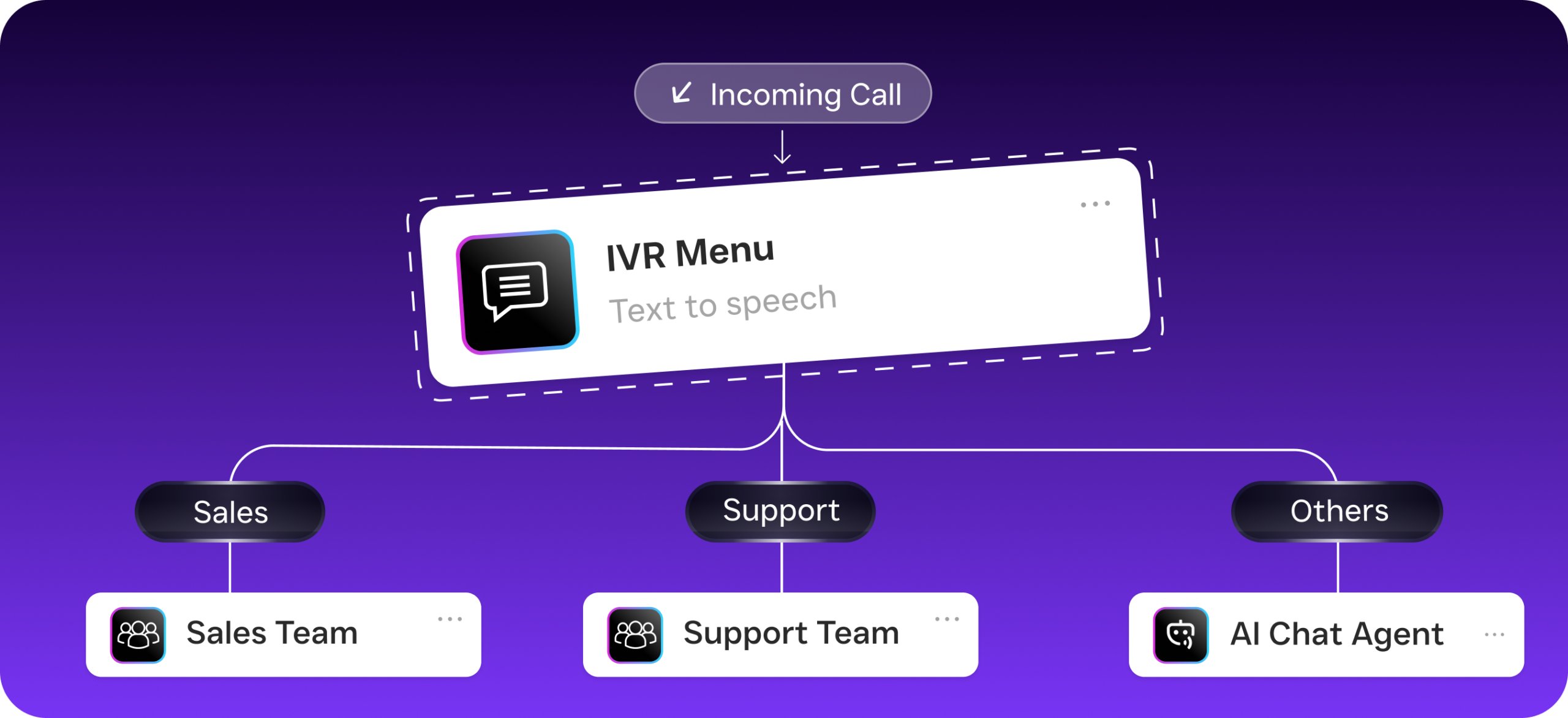
- Build your call flows. Use the drag-and-drop call flow builder to define exactly what happens when a customer calls. Set up greetings, IVR menus, routing rules, after-hours handling, and voicemail capture without writing a single line of code.
- Deploy your AI Phone Agent. Configure your AI voice agent with your business details, FAQs, appointment availability, and qualification criteria. The agent picks up calls 24/7, sounds natural, and handles conversations from greeting to resolution.
- Connect your other channels. Activate AI Chat Agents for SMS, webchat, Instagram DMs, and Facebook Messenger. Every conversation feeds into the same unified inbox.
- Set up workflow automations. Use the visual workflow builder to create follow-up sequences, appointment reminders, CRM updates, and team notifications. Connect to HubSpot, Salesforce, ServiceFusion, HousecallPro, or any of SalesCaptain’s 50+ integrations.
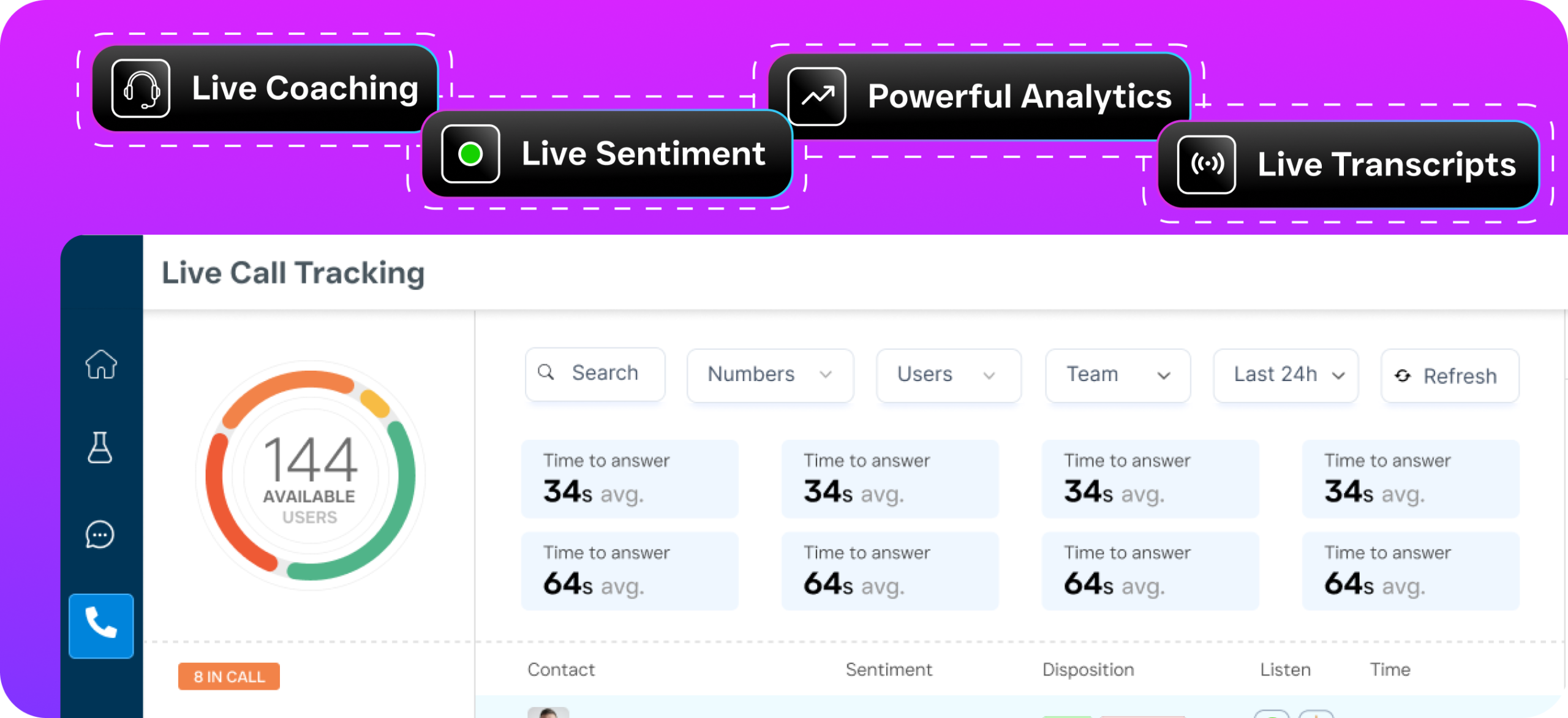
- Monitor and improve. AI-generated call summaries and transcriptions give your team instant insight into every conversation. Review sentiment, track outcomes, and coach your team using real data rather than memory.
Key Capabilities
SalesCaptain’s call center cloud technology isn’t a stripped-down phone system with a few add-ons. It’s a purpose-built communication platform for service businesses. Here are the capabilities that matter most:
- AI Phone Agent with 24/7 coverage: A natural-sounding voice agent that answers every call, qualifies leads, books appointments, handles FAQs, and blocks spam. It captures after-hours calls that would otherwise go to voicemail and never come back. According to data on missed business call statistics, a significant percentage of business calls go unanswered, and most of those callers won’t leave a message.
- Unified inbox across all channels: Calls, texts, webchat, Instagram DMs, Facebook Messenger, email, and internal notes all live in one collaborative inbox. Your team sees the full customer history regardless of which channel the conversation started on.
- Call coaching and whispering: Managers can listen to live calls and whisper guidance to agents without the customer hearing. This real-time coaching capability is something many competitors at higher price points still don’t offer.
- AI summaries and transcriptions: Every call gets automatically transcribed with speaker distinction and summarized into key action items. Your team spends less time taking notes and more time following up.
- Visual call flow builder: Drag-and-drop interface for designing exactly how calls route through your business. Set up IVR menus, time-based routing, department transfers, and AI agent handoffs in minutes.
- Missed call text-back: When a call can’t be answered, SalesCaptain automatically sends a text to the caller, keeping the conversation alive. Research on the cost of missed calls for small businesses consistently shows that fast follow-up dramatically improves conversion rates.
Who Needs This?
Call center cloud technology isn’t just for large enterprises with 200-seat call floors. In fact, the businesses that benefit most are often smaller operations where every missed call represents real lost revenue. Here’s who should be paying close attention:
- Home service companies (roofing, plumbing, HVAC, landscaping, appliance repair) that receive high call volumes during peak seasons and can’t afford to miss a single job lead.
- Healthcare and wellness practices (dental offices, medical clinics, MedSpas, therapy practices) that need HIPAA-aware communication, appointment scheduling, and patient reminders across multiple channels.
- Legal practices where a missed intake call could mean losing a client worth thousands of dollars to the firm down the street that answered first.
- Multi-location businesses (salons, gyms, fitness studios, real estate agencies) that need consistent call handling and communication standards across every location without staffing a receptionist at each one.
- Operations managers and business owners who are tired of juggling separate tools for calls, texts, social media, and CRM and want everything in one place with automation handling the repetitive work.
A report on SMB communication challenges found that small businesses consistently struggle with managing phone-based customer interactions alongside digital channels. The ones that solve this problem gain a measurable competitive edge.
Benefits of Call Center Cloud Technology
Never Lose Another Lead to a Missed Call
The most immediate benefit is obvious: you stop losing money. Analysis of the true cost of missed calls reveals that small businesses lose substantial revenue every year from unanswered phones. SalesCaptain’s AI Phone Agent eliminates this problem entirely. Calls get answered at 2 AM on a Saturday the same way they get answered at 10 AM on a Tuesday. No hold times, no voicemail dead ends, no “we’ll call you back.”
Scale Without Proportional Headcount Growth
Hiring a receptionist costs $35,000-$45,000 per year according to Bureau of Labor Statistics data on receptionist salaries. That’s per location. SalesCaptain’s per-location pricing starts at $159/month for the Business plan, with AI call handling at $0.12/minute. Even a busy location handling 500 minutes of AI calls per month adds just $60 to that cost. Compare that to a full-time salary, benefits, sick days, and turnover.
Your existing team becomes more productive too. When AI handles routine calls, appointment confirmations, and basic FAQs, your staff focuses on complex customer needs and revenue-generating activities. The workflow automation engine handles follow-ups, reminders, and CRM updates automatically, so nothing slips through the cracks.
Consistent Customer Experience Across Every Channel
Customers don’t think in channels. They call, then text, then send an Instagram DM, all about the same issue. Without a unified inbox, your team scrambles to piece together the conversation from three different tools. With SalesCaptain, every interaction lives in one place. Your team sees the complete picture the moment they open a contact record, regardless of how that customer reached out.
This consistency extends to quality control as well. AI transcriptions and summaries create a searchable record of every conversation. Managers can review calls for training purposes, track sentiment trends, and ensure follow-ups actually happen based on what was discussed.
How SalesCaptain Compares
Most cloud call center platforms fall into one of two camps: enterprise-grade solutions that are too complex and expensive for SMBs, or basic phone apps that lack the automation and AI capabilities growing businesses need. SalesCaptain sits in a space that neither camp serves well.
Take Aircall at $30 per license per month. It’s built for call center teams, but it doesn’t offer real-time AI for calls, missed-call text-back, payments via text, or a leads form. SalesCaptain includes all of these. Or consider OpenPhone at $15 per user. It’s affordable, but it lacks call coaching and whispering, call queueing, sentiment analysis, and voicemail drop. Its AI capabilities are minimal, and it supports only 7 integrations compared to SalesCaptain’s 50+.
Dialpad offers a solid phone platform at $15 per user, yet it doesn’t include toll-free minutes, audio conferencing, high-volume SMS, or social chat natively. Nextiva, priced at $20 per user, caps SMS at 250 messages per user per month and doesn’t support WhatsApp, text-to-pay, or live transcription. For service businesses that rely heavily on texting and multi-channel messaging, those gaps create friction.
What truly separates SalesCaptain is the combination of AI voice agents, AI chat agents, and a unified inbox in a single platform. Most competitors offer pieces of this puzzle. None assemble the whole thing at a price point that makes sense for a two-location dental practice or a five-truck plumbing company. The free Startup plan lets you test the platform with one location before committing, which removes the risk entirely.
Frequently Asked Questions
How is call center cloud technology different from a regular business phone system?
A traditional business phone system handles voice calls using on-premise hardware. Call center cloud technology runs entirely over the internet and typically includes features like IVR menus, call routing, call recording, analytics, and multi-channel communication. SalesCaptain goes further by adding AI-powered voice agents, automated chat, workflow automation, and a unified inbox that brings calls, texts, social messages, and email into one interface.
Can SalesCaptain replace my current phone system completely?
Yes. SalesCaptain provides a full business phone system with local and toll-free numbers, call routing, IVR, voicemail, call recording, and 99.99% uptime. You can port your existing business number so customers don’t notice any change. On top of the phone system, you get AI agents and automation capabilities that a traditional phone provider can’t match.
What does the AI Phone Agent actually sound like?
SalesCaptain’s AI Phone Agent uses natural-sounding voice technology that callers often can’t distinguish from a human receptionist. It handles greetings, appointment booking, lead qualification, FAQ answering, and call routing. You configure it with your business’s specific information, tone, and processes so it represents your brand accurately.
How much does call center cloud technology cost for a small business?
SalesCaptain offers a free Startup plan for one location. The Business plan runs $159/month per location, and the Enterprise plan costs $300/month per location. AI call minutes are billed at $0.12/minute. For most small businesses, the total monthly cost is a fraction of hiring even one part-time receptionist, while providing 24/7 coverage across every communication channel.
Put Call Center Cloud Technology to Work for Your Business
SalesCaptain combines AI phone agents, AI chat, a unified inbox, and workflow automation into one platform built for service businesses. Stop losing leads to missed calls and slow follow-ups.