
AI-powered customer experience marketing (CXM) platform that helps local businesses win.



A cloud based enterprise phone system replaces traditional hardware-dependent phone setups with a flexible, internet-powered communication platform that grows alongside your business. If you’re running a service business with multiple locations, juggling missed calls, and struggling to keep communication consistent across your team, sound familiar? This is the category of solution you should be evaluating. SalesCaptain delivers a cloud based enterprise phone system built specifically for SMBs and multi-location service businesses, combining AI-powered voice agents, a unified inbox, and workflow automation into a single platform that doesn’t require an IT department to manage.
What Is a Cloud Based Enterprise Phone System?
A cloud based enterprise phone system routes all your business calls over the internet instead of through copper wires or on-premises PBX hardware. Your phone numbers, call routing rules, voicemail, IVR menus, and call recordings all live in the cloud. That means you can manage everything from a browser or mobile app, no matter where your team sits. No server room needed.
Traditional on-premises systems require expensive upfront hardware purchases, dedicated server rooms, and ongoing maintenance contracts. Every time you open a new location or add staff, you’re buying more hardware and paying a technician to configure it. Cloud systems eliminate that entire cost structure. According to Yahoo Finance’s coverage of the 2024 State of the Cloud survey, small businesses are accelerating their move to cloud infrastructure precisely because it reduces these capital expenditures while improving reliability.
But here’s where most cloud phone providers stop: they give you a dial tone and some basic features, then charge per seat as your team grows. For service businesses that need to handle high call volumes, respond to leads instantly, and keep every conversation organized across channels, a basic cloud phone system isn’t enough. You need something better. You need one that’s purpose-built for how service businesses actually operate.
How Cloud Based Enterprise Phone Systems Work in SalesCaptain
Setting up SalesCaptain’s cloud phone system doesn’t involve shipping hardware or scheduling a technician visit. Here’s how it works from signup to live calls:
- Choose your business phone number. Pick a local or toll-free number, or port your existing number into SalesCaptain. Each location gets its own dedicated number, and you can use a single unified number for calls, SMS, and fax.
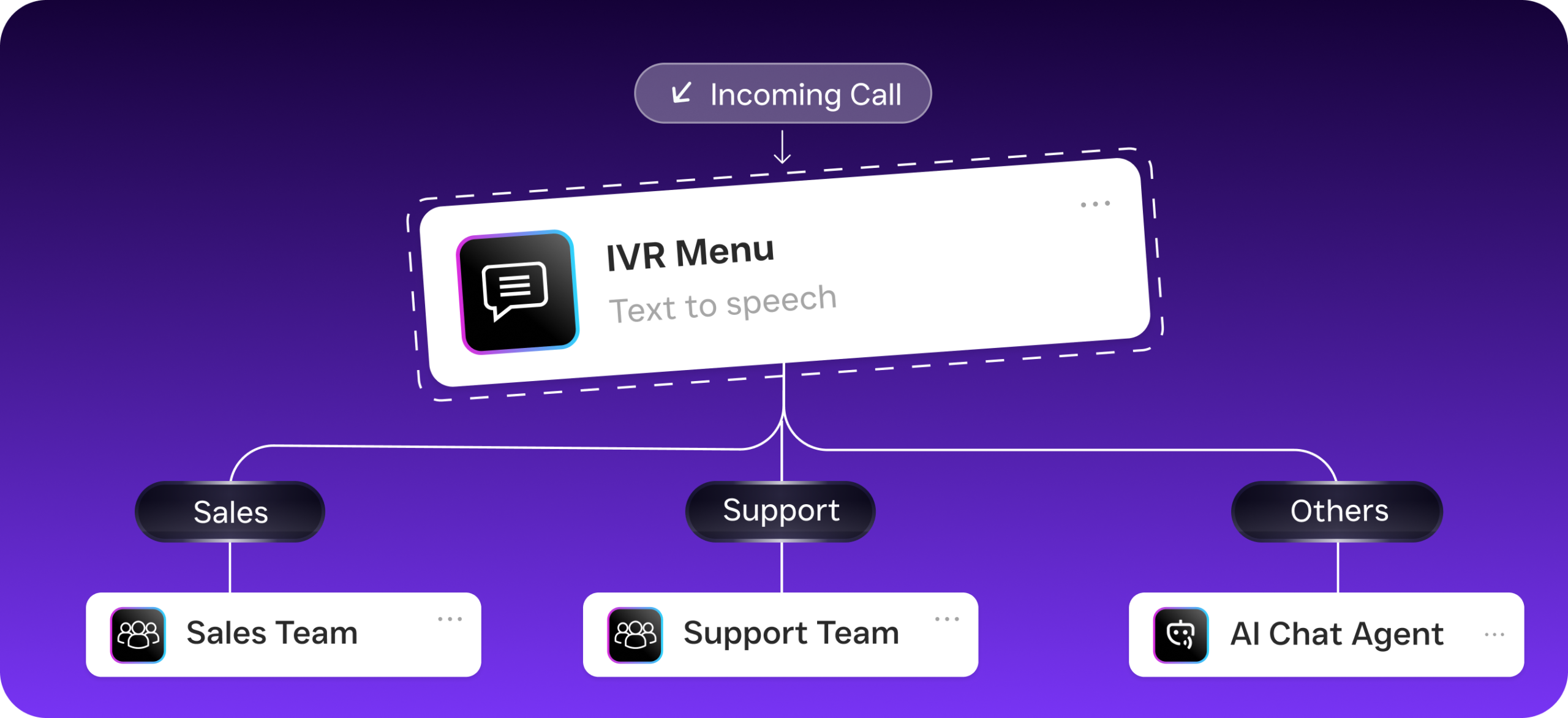
- Build your call flow. Use the drag-and-drop call flow builder to design exactly how incoming calls are handled. Set up IVR menus, route calls to specific team members or departments, add after-hours rules, and configure voicemail greetings. No coding required.
- Deploy your AI Phone Agent. Activate a natural-sounding AI voice agent that answers calls 24/7. It can book appointments, qualify leads, answer frequently asked questions, and block spam callers before they waste your team’s time.
- Connect your channels. Link SMS, webchat, Instagram DMs, Facebook Messenger, and email to your unified inbox so every customer conversation lives in one place. Your team sees the full picture for every contact.
- Set up automations. Use the visual workflow builder to trigger follow-up texts after missed calls, send appointment reminders, update your CRM, and notify team members. Over 50 integrations connect SalesCaptain to tools like HubSpot, Salesforce, ServiceFusion, and HousecallPro.
- Go live. Calls start flowing through your new system immediately. Every call gets recorded, transcribed by AI, and summarized so your team can review conversations without listening to full recordings.
The entire setup process can be completed in a single afternoon. That’s it. Compare that to Mindsight’s cloud adoption report, which notes that traditional phone system deployments for small businesses often take weeks or months to fully provision.
Key Capabilities
- 99.99% Uptime with Crystal-Clear Audio: SalesCaptain’s phone system delivers enterprise-grade reliability. Your customers hear you clearly, and your lines don’t go down when you need them most. For businesses where a missed call means a missed job, uptime isn’t a nice-to-have.
- AI Phone Agent for 24/7 Call Handling: Instead of sending after-hours callers to a generic voicemail, SalesCaptain’s AI Phone Agent picks up, has a natural conversation, books appointments directly into your calendar, and qualifies leads based on criteria you define. According to Aira’s research on missed business calls, a significant percentage of business calls go unanswered, costing companies substantial revenue each year.
- Drag-and-Drop Call Flow Builder: Visually design the exact path every incoming call follows. Route by department, time of day, caller location, or any custom rule. Add hold music, transfers (warm or cold), and SMS follow-ups directly within the flow.
- AI Transcription and Summaries: Every call is automatically transcribed with speaker distinction and summarized with key action items. Your team can scan a 20-minute call in 30 seconds and know exactly what follow-up is needed.
- Unified Inbox Across All Channels: Calls, texts, webchat, social DMs, and email all arrive in one collaborative inbox. Contact history travels with each customer, so whoever responds has full context. No more toggling between five apps to piece together a conversation.
- Missed Call Text-Back: When a call goes unanswered (it happens), SalesCaptain automatically sends a text to that caller within seconds. That instant response keeps the lead warm instead of sending them to your competitor. Research from Voksha’s guide on the cost of missed calls shows how quickly potential customers move on after a single unanswered call.
Who Needs This?
Cloud based enterprise phone systems aren’t just for Fortune 500 companies anymore. The “enterprise” part refers to the reliability and feature depth, not the company size required to use them. So who benefits most? Here’s who benefits most from SalesCaptain’s approach:
- Multi-location home service companies (roofing, HVAC, plumbing, landscaping, appliance repair) that need consistent call handling across every branch without hiring receptionists at each one.
- Legal practices where every missed call could be a case worth thousands, and client communication needs to be documented and organized.
- Healthcare and wellness providers (dental offices, MedSpas, therapy practices) managing high appointment volumes and patient follow-ups across phone, text, and online booking.
- Salons, gyms, and fitness studios where appointment scheduling drives revenue and after-hours inquiries are constant.
- Real estate agencies fielding leads from multiple sources who need instant response to win listings and close buyers.
- Operations managers and business owners who are tired of paying per-seat pricing that balloons as their team grows, and want a per-location model that actually makes sense for service businesses.
Benefits of a Cloud Based Enterprise Phone System
Capture Revenue You’re Currently Losing
Every unanswered call is money walking out the door. That’s not an exaggeration. Industry data from Callsetter puts the annual cost of missed calls at $126,000 per year for the average small business. With SalesCaptain’s AI Phone Agent handling calls around the clock, your business never sends a potential customer to voicemail. The AI books appointments, answers questions, and qualifies leads even at 2 AM on a Saturday. That’s revenue you’re capturing instead of losing.
Scale Without Hiring
Adding a receptionist costs $35,000 to $45,000 per year in salary alone, according to the Bureau of Labor Statistics. Multiply that across three or four locations and you’re looking at a serious line item. SalesCaptain’s per-location pricing starts at $159/month for the Business plan. So a five-location business pays $795/month total. That’s all in. AI-powered call handling, unified communications, and workflow automation across every branch. That’s a fraction of what a single full-time hire costs.
Eliminate Communication Chaos
When your team juggles separate tools for calls, texts, social messages, and email, things slip through the cracks. A customer texts about an appointment, calls to change it, then DMs you on Instagram to confirm. Without a unified system, three different team members might handle those touchpoints without any awareness of the others. SalesCaptain’s unified inbox solves this. It pulls every channel into one view with complete contact history. Your team responds faster and with full context every time.
Reliable Infrastructure Without the IT Overhead
On-premises PBX systems fail. Power outages knock them offline. Hardware ages and needs replacement. Cloud systems built on distributed infrastructure don’t have those single points of failure. SalesCaptain’s 99.99% uptime guarantee means your phone system stays up even when your local power doesn’t. And because everything is managed through a web interface, you won’t need to call a telecom vendor for changes. Your team can adjust call flows, add numbers, and update automations in minutes.
How SalesCaptain Compares
Most cloud phone providers focus on one thing: giving you a phone line. RingCentral, Nextiva, 8×8, and Dialpad all offer solid cloud calling. But they’re built primarily as unified communications platforms for general business use, not for the specific workflows that service businesses depend on. That’s the gap SalesCaptain fills.
Take Nextiva, for example. At $20 per user per month, their pricing looks reasonable until you realize SMS is capped at 250 messages per user per month. For a busy plumbing company sending appointment confirmations, follow-ups, and review requests, that cap gets blown through in the first week. SalesCaptain offers high-volume SMS without those restrictions. Plus, Nextiva doesn’t include voicemail drop, call coaching and whispering, WhatsApp messaging, or a leads capture form. You’re missing key features.
Dialpad brings strong AI features to calling at $15 per user, but it lacks toll-free minutes, audio conferencing, and social chat integration. If your customers reach out through Facebook Messenger or Instagram DMs (and they do), Dialpad won’t catch those conversations. SalesCaptain handles them natively in the same inbox as your calls and texts.
Aircall charges $30 per license per month and still doesn’t offer a Voice AI Agent, webchat, email integration, or missed-call text-back. It’s designed for call center teams, not for a roofing company or dental practice that needs every lead captured and followed up on automatically.
What makes SalesCaptain different? It’s the combination. AI voice agents, AI chat agents, a unified inbox, workflow automation, and a full phone system all in one platform. According to Feather’s 2026 roundup of AI receptionist software, this integrated approach is becoming the standard that service businesses expect, rather than stitching together five different tools.
Frequently Asked Questions
Can I keep my existing business phone number when switching to SalesCaptain?
Yes. SalesCaptain supports number porting, so you can bring your current business phone number into the platform. Your customers won’t notice any change. But you’ll gain AI call handling, transcription, and unified messaging on that same number.
How does per-location pricing compare to per-user pricing for growing teams?
Per-user pricing from providers like Aircall or Nextiva means your costs grow every time you hire someone. If you’ve got 10 employees at $20/user, that’s $200/month for just the phone system. SalesCaptain charges $159/month per location regardless of how many team members use the system. For businesses with five or more employees per location, the savings are significant. And they compound as you grow.
Does the AI Phone Agent sound robotic to callers?
No. SalesCaptain’s AI Phone Agent uses natural-sounding voice technology that handles real conversations. It can respond to questions, navigate appointment booking, and qualify leads in a way that callers find helpful rather than frustrating. You customize the agent’s personality, knowledge base, and call flows to match your business. It doesn’t feel like talking to a robot.
What happens if my internet goes down?
Because SalesCaptain runs in the cloud with 99.99% uptime, your phone system doesn’t depend on your local internet connection staying up. Calls can be forwarded to mobile numbers, handled by the AI Phone Agent, or routed through your call flow rules. Your customers still get answered even if your office loses connectivity.
Replace Your Outdated Phone System with SalesCaptain
SalesCaptain gives service businesses a cloud based enterprise phone system with AI voice agents, a unified inbox, and workflow automation, all at a per-location price that scales affordably. Start with the free plan or jump straight into the Business tier at $159/month per location.