
AI-powered customer experience marketing (CXM) platform that helps local businesses win.



If your call center team spends more time dialing numbers than actually talking to prospects, you’re burning hours every single day. Sound familiar? Dialer systems for call centers solve this by automating outbound calls, so your agents stay focused on live conversations instead of waiting through ring tones, voicemails, and disconnected numbers. SalesCaptain’s power dialer and AI-powered call tools give service businesses a faster, smarter way to reach more leads without hiring more reps. Whether you run a roofing company with five salespeople or a multi-location dental practice following up on appointment no-shows, the right dialer system turns your phone operations from a bottleneck into a growth engine.
Quick Answer
Dialer systems automate phone dialing and call distribution for outbound contact centers, eliminating manual dialing and connecting agents only to live answers. This significantly reduces idle time, increases call volume per agent, and improves productivity. Common types include predictive dialers, progressive dialers, and preview dialers, each offering different levels of automation based on your calling needs.
What Are Dialer Systems for Call Centers?
A dialer system automates the process of placing outbound calls. Instead of an agent manually punching in each phone number, the dialer handles number selection, dialing, and call routing automatically. This strips away the dead time between conversations, including busy signals, unanswered rings, and disconnected lines. What does that look like in practice? Your team moves through contacts faster. A lot faster.
There are several types of dialers, and understanding the differences matters when you’re choosing one for your team.
Free weekly newsletter
Growth tips for service businesses
Every Tuesday — actionable ideas to get more leads, reviews, and repeat customers. No fluff.
Power Dialer
A power dialer calls the next number on your list as soon as the current call ends. It moves through contacts one at a time, keeping a steady pace without overwhelming agents. This is the best fit for small and mid-sized teams that need volume without sacrificing call quality. And here’s why it works: According to SuperAGI’s breakdown of top dialer tools, power dialers remain the most popular choice for SMBs because they balance speed with control.
Predictive Dialer
Predictive dialers use algorithms to call multiple numbers simultaneously, connecting agents only when someone picks up. They’re designed for large-scale operations with dozens or hundreds of agents. But there’s a catch. They carry compliance risks because of abandoned call regulations, and they’re overkill for most service businesses.
Preview Dialer
With a preview dialer, the agent sees contact information before the call connects. This works well for high-value or complex conversations, like legal intake or healthcare follow-ups, where context matters more than speed. The tradeoff? Lower call volume per hour.
Progressive Dialer
Progressive dialers sit between power and predictive models. They automatically dial the next number, but only one at a time, and only when an agent’s available. There’s no risk of dropping calls. The pace isn’t as aggressive as predictive dialing, though.
For most service businesses, a power dialer hits the right balance. That’s exactly what SalesCaptain includes natively, alongside AI tools that make every call more productive.
How SalesCaptain’s Power Dialer Works
Setting up and running the power dialer in SalesCaptain takes minutes, not days. Here’s the workflow from start to finish:
- Build or import your contact list. Upload a CSV, pull leads from your CRM through one of SalesCaptain’s 50+ integrations (HubSpot, Salesforce, Zoho, HousecallPro, and more), or use contacts already captured through your AI Chat Agents and webchat forms.
- Configure your call campaign settings. Choose your caller ID, set the call pacing, and assign the campaign to specific agents. You can attach call scripts and notes that appear on-screen during each dial.
- Launch the campaign. Once the campaign starts, the power dialer automatically calls the next contact as soon as the previous call wraps up. Your agent never has to search for or dial a number manually.
- Handle voicemails with one click. When a call hits voicemail, agents use SalesCaptain’s voicemail drop feature to leave a pre-recorded message instantly, then move on to the next contact. No waiting through outgoing messages.
- Review post-call analytics. After each call, SalesCaptain’s AI generates transcriptions and summaries. Managers can review call outcomes, listen to recordings, and see sentiment analysis without sitting through every conversation.
- Trigger automated follow-ups. The workflow automation builder kicks in after calls end. Missed the contact? An SMS follow-up goes out automatically. Booked an appointment? A confirmation reminder fires. Every lead gets a next step, no manual work required.
The entire flow lives inside SalesCaptain’s unified inbox. Nothing falls through the cracks because every call, text, and follow-up stays attached to the contact record.
Key Capabilities
- Power Dialer with Voicemail Drop: Dial through lists automatically and drop pre-recorded voicemails without waiting, saving 30+ seconds per unanswered call. Over a full shift, that adds up to hours of recovered talk time.
- Call Coaching and Whispering: Managers can listen in on live calls and whisper guidance to agents in real time, without the prospect hearing. This is especially valuable for training new hires or handling high-stakes follow-ups. And it works: According to research from Gartner’s customer service division, real-time coaching improves first-call resolution rates significantly.
- Real-Time Speech Analytics and Sentiment Analysis: SalesCaptain analyzes live calls to flag customer sentiment, helping agents adjust their approach mid-conversation. After the call ends, AI summaries highlight key objections, action items, and follow-up needs.
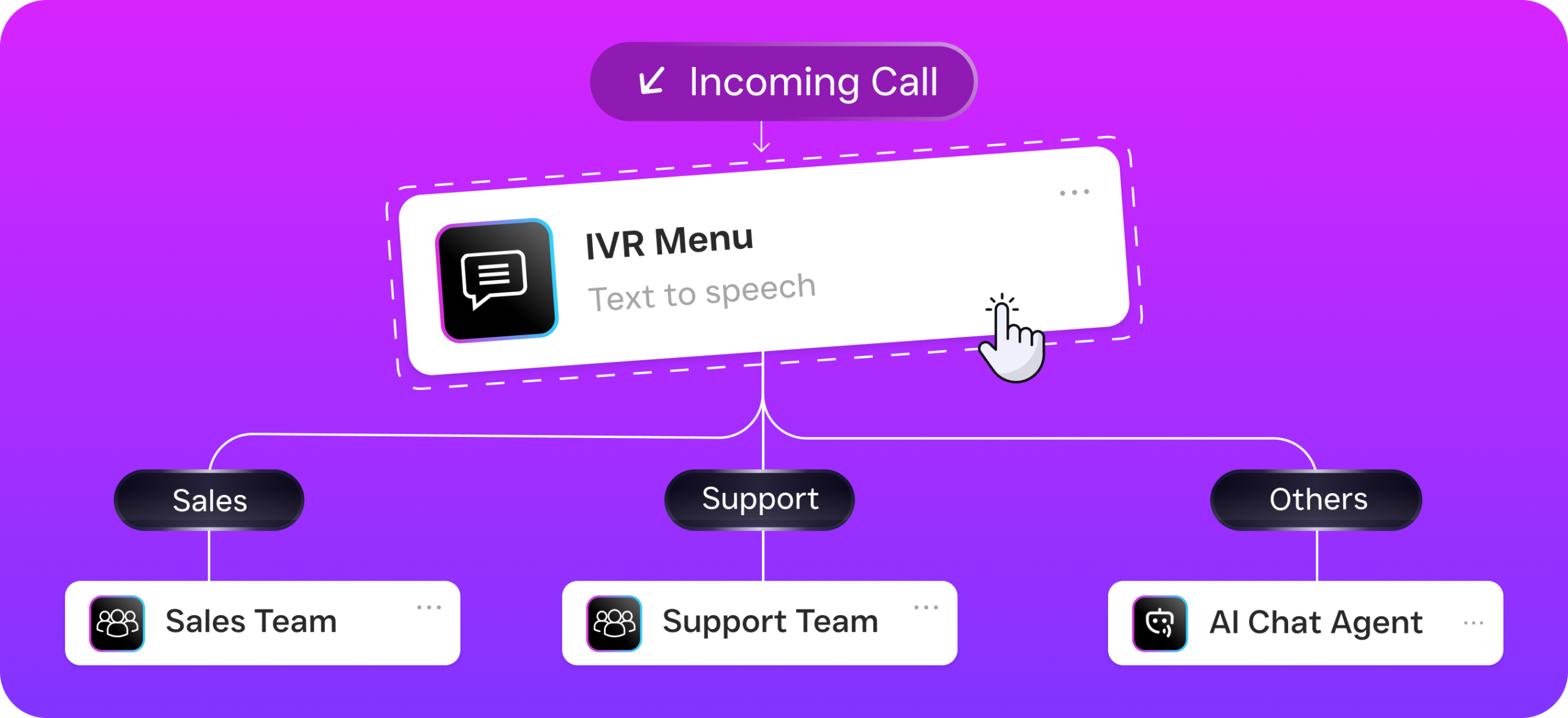
- Call Queueing and Routing: Inbound calls that come in during outbound campaigns get routed through your call flow builder. You don’t miss a hot lead while your team’s dialing out. Custom IVR menus, after-hours rules, and AI Phone Agent backup keep everything running.
- CRM Sync and Workflow Triggers: Every call outcome syncs with your CRM in real time. Missed calls trigger SMS follow-ups. Completed calls update contact records and move leads through your pipeline. The drag-and-drop workflow builder handles all of this automatically.
- Missed Call Text-Back: When a prospect calls back but your agent isn’t available, SalesCaptain’s AI Chat Agent sends an instant text, keeping the conversation alive. Consider this: SkipCalls reports that small businesses lose $26,000 or more per year from missed calls alone. Automated text-back closes that gap.
Who Needs This?
Dialer systems for call centers aren’t just for massive telemarketing operations. Any business making a consistent volume of outbound calls benefits from automation. Here’s who gets the most value from SalesCaptain’s power dialer:
- Home service companies (roofing, HVAC, plumbing, landscaping) running outbound campaigns to follow up on estimates, re-engage past customers, or confirm upcoming appointments.
- Legal practices conducting intake follow-ups, where preview-style calling with CRM context (via Clio integration) ensures every prospect gets a personalized touchpoint.
- Healthcare and wellness businesses (dental offices, MedSpas, therapy practices) calling patients about rescheduled appointments, treatment reminders, or insurance verifications.
- Real estate agencies working lead lists from online inquiries, open houses, or expired listings, where speed-to-lead directly impacts conversion.
- Sales managers and operations leaders at multi-location businesses who need visibility into call activity, agent performance, and follow-up consistency across locations.
- Small teams (1-10 agents) that can’t afford dedicated call center software but still need to dial efficiently. SalesCaptain’s free Startup plan includes core calling features, so you can start without a budget commitment.
Benefits of Dialer Systems for Call Centers
More Conversations Per Hour
Manual dialing eats 15 to 25 minutes of every hour. A power dialer reclaims that time by eliminating number lookup, dialing, and voicemail waiting. Your agents spend more of their shift in actual conversations. Think about it: for a five-person team, that’s the equivalent of adding another full-time caller without the payroll cost.
Faster Lead Response
Speed matters. Research from Aira shows that 62% of business calls go unanswered, costing companies significant revenue. A dialer system paired with automated follow-ups makes sure leads hear from you within minutes, not hours. Because SalesCaptain’s workflow automation sends an immediate text-back on missed inbound calls, your response time stays under a minute even if nobody’s available to pick up the phone.
Consistent Follow-Up Without Micromanagement
Most leads don’t convert on the first call. But follow-up is where small teams fall apart, because it relies on individual agents remembering to call back. SalesCaptain’s dialer queues up follow-up campaigns automatically based on call outcomes. An unanswered call today becomes tomorrow’s redial, plus an SMS touchpoint in between. Managers don’t need to chase anyone to make it happen.
Better Training and Quality Control
Call coaching, whisper mode, and AI-generated summaries create a feedback loop that accelerates agent improvement. New hires ramp faster when a manager can guide them through live calls. And reviewing performance doesn’t mean listening to hours of recordings. Because every call is transcribed and summarized, you see what matters. According to Aircall’s 2024 Voice of SMBs report, phone-based communication remains the most valued channel for small business customers, which makes call quality a direct competitive advantage.
Lower Cost Per Interaction
SalesCaptain’s per-location pricing ($159/month for the Business plan) means you aren’t paying per seat like traditional call center platforms. Add agents, run campaigns, and scale your call operations without watching licensing costs multiply. AI minutes run $0.12/minute for the AI Phone Agent, which handles after-hours and overflow calls at a fraction of the cost of human receptionist services that charge $1-3+ per call.
How SalesCaptain Compares
Several platforms offer calling features, but most don’t bundle a power dialer with AI voice agents, call coaching, and a unified inbox in a single tool. That distinction matters for service businesses.
Aircall charges $30 per license per month and doesn’t include a Voice AI Agent, missed-call text-back, or webchat. It’s built for traditional call centers, not SMBs running both inbound and outbound operations. SalesCaptain? Different story. You get real-time AI for calls, leads forms, and payments via text at no extra per-seat cost.
OpenPhone is affordable at $15 per user, but its AI capabilities are minimal. It lacks call coaching, whisper mode, call queueing, voicemail drop, and sentiment analysis. For a business that needs more than a basic phone app, those gaps add up quickly. Podium doesn’t offer a power dialer at all. And its pricing isn’t publicly listed. SalesCaptain includes post-call analytics and real-time speech analytics that Podium simply doesn’t have.
Dialpad offers strong AI features for sales teams at $15 per user, but it’s missing some key pieces. No toll-free minutes, no audio conferencing, no voicemail drop, and no social chat natively. It’s purpose-built for tech-forward sales organizations, not the plumber or dental office that also needs appointment booking, SMS campaigns, and a unified customer inbox. SalesCaptain brings all of those together. So you aren’t stitching three or four tools into a fragile stack. Voksha’s guide on missed call costs highlights how fragmented communication tools lead to dropped leads, which is exactly the problem a unified platform eliminates.
Frequently Asked Questions
What type of dialer does SalesCaptain offer?
SalesCaptain includes a built-in power dialer that automatically dials the next contact on your list once the current call ends. It also includes voicemail drop so agents can leave pre-recorded messages without waiting through outgoing greetings. This keeps pacing steady without overwhelming small teams.
Is a power dialer compliant with telemarketing regulations?
Power dialers are generally the safest dialer type for compliance because they dial one number at a time and connect an agent to every answered call. Unlike predictive dialers, there’s no risk of abandoned calls. But you’re still responsible for following TCPA rules, maintaining your don’t-call lists, and ensuring proper consent. Always consult legal guidance specific to your industry and state.
Can I use SalesCaptain’s dialer alongside the AI Phone Agent?
Yes. Your team can run outbound power dialer campaigns while the AI Phone Agent handles inbound calls simultaneously. Inbound calls route through your call flow builder, so prospects who call back reach either a live agent or the AI agent. Neither channel interrupts the other.
How does SalesCaptain’s dialer integrate with my CRM?
SalesCaptain syncs natively with HubSpot, Salesforce, Zoho, HousecallPro, Clio, and 50+ other tools. Call outcomes, recordings, transcriptions, and AI summaries push directly to your CRM contact records. You can also use the workflow automation builder or Zapier to trigger custom actions based on call results.
Ready to see it in action?
See how call centers use SalesCaptain to automate outbound dialing and boost agent productivity.
Book a Free Demo →Start Dialing Smarter Today
SalesCaptain’s power dialer, AI Phone Agent, and unified inbox work together so your team talks to more leads, follows up faster, and never drops a conversation. Pricing starts free for one location.