
AI-powered customer experience marketing (CXM) platform that helps local businesses win.



Every service business runs on phone calls. Whether a homeowner’s calling about a leaky pipe or your team’s reaching out to confirm tomorrow’s appointments, inbound and Outbound calls are the backbone of how you win and keep customers. Yet most small businesses still rely on fragmented tools, personal cell phones, or basic VoIP apps that weren’t built for the way service companies actually operate. SalesCaptain gives you a complete business phone system with AI-powered call handling, so every inbound call gets answered and every outbound call gets made on time, without hiring extra staff.
What Are Inbound and Outbound Calls?
Inbound calls are the ones your customers initiate. They’re calling to ask about pricing, schedule an appointment, or report an issue. These calls represent active demand, and research shows that missing even a fraction of them can cost small businesses thousands annually. Every unanswered ring is revenue walking out the door.
Outbound calls go the other direction. Your team dials out to follow up on leads, confirm bookings, collect payments, or check in after a job. While inbound calls capture existing interest, outbound calls create new opportunities and strengthen relationships. Both matter equally, yet most phone systems treat them as an afterthought.
The challenge for service businesses is that these two call types require different workflows. Inbound calls need instant pickup, intelligent routing, and after-hours coverage. Outbound calls need efficiency tools like power dialers, voicemail drop, and call tracking. A platform that handles only one side leaves gaps. According to industry analysis of call center metrics, businesses that track and optimize both directions see measurably better conversion rates and customer satisfaction scores.
How Inbound and Outbound Calls Work in SalesCaptain
SalesCaptain treats calling as a first-class feature, not a bolt-on. Here’s how the system handles both directions from a single platform:
- Set up your business phone number. Choose a local or toll-free number (or port your existing one). SalesCaptain’s phone system runs on 99.99% uptime infrastructure with crystal-clear audio, so call quality isn’t something you’ll worry about.
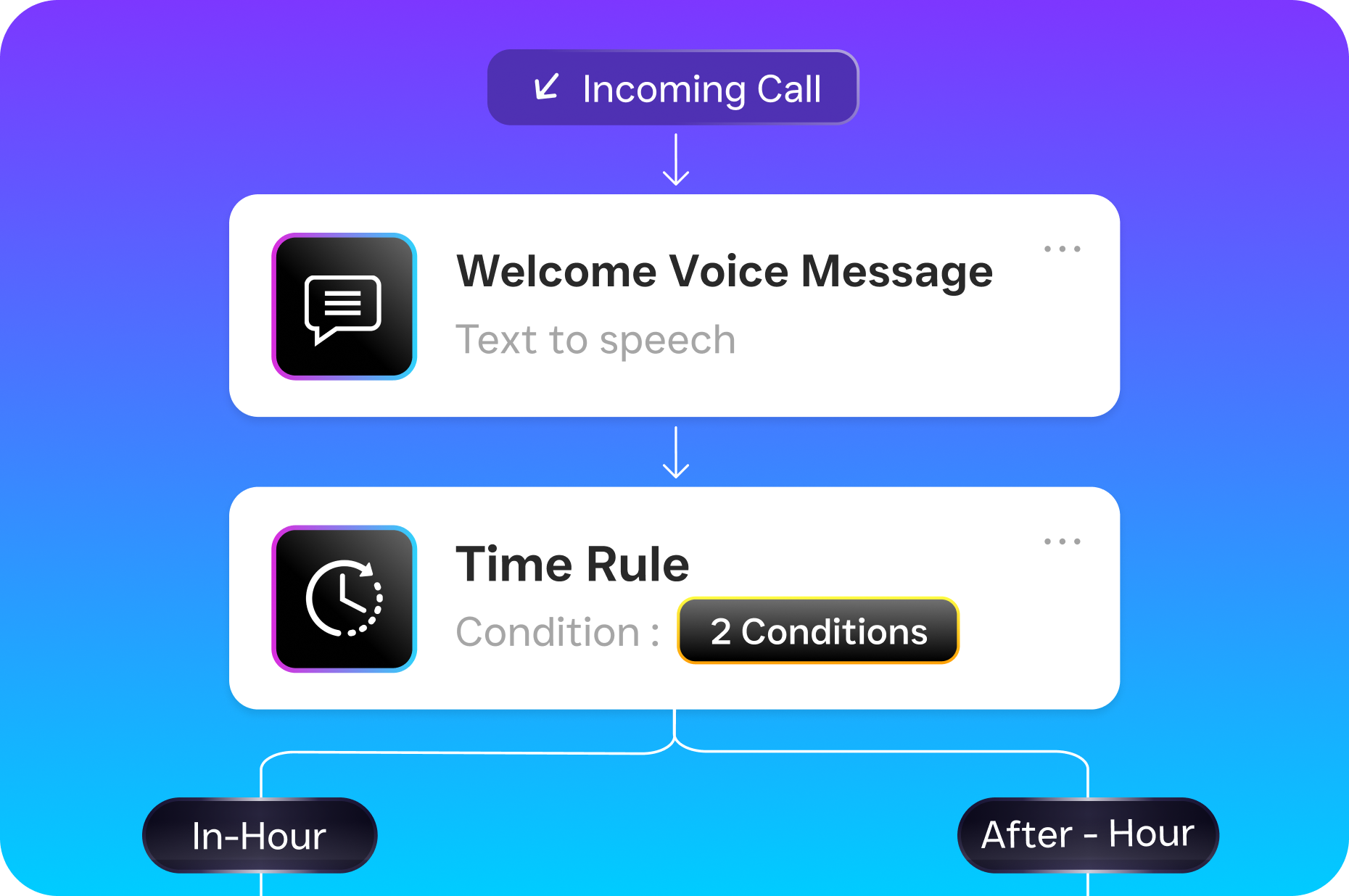
- Build your inbound call flow. Use the drag-and-drop call flow builder to define exactly what happens when someone calls. Route by department, play a greeting, offer an IVR menu, or send the call straight to your AI Phone Agent. You control every step.
- Let AI handle what humans shouldn’t have to. The AI Phone Agent picks up calls 24/7, answers FAQs, qualifies leads, books appointments, and blocks spam. It sounds natural, not robotic. After hours, it captures every caller’s information so nothing slips through.
- Make outbound calls efficiently. Your team dials out from the same platform using the power dialer for high-volume campaigns or click-to-call for one-off follow-ups. Voicemail drop lets reps leave a pre-recorded message in seconds instead of waiting through each voicemail greeting.
- Review and improve with AI. Every call, inbound or outbound, gets an AI-generated transcription and summary. Real-time speech analytics flag sentiment and key topics during live calls, while post-call analytics help managers coach their teams.
- Sync everything to your CRM. Call records, transcriptions, and notes push automatically to HubSpot, Salesforce, Zoho, HousecallPro, or any of SalesCaptain’s 50+ integrations. No manual data entry.
Key Capabilities
- AI Phone Agent for 24/7 Inbound Coverage: Your AI agent picks up every call, day or night. It qualifies callers, answers common questions, and books appointments directly into your calendar. Missed calls drop dramatically because there’s always someone (or something) answering.
- Power Dialer for Outbound Campaigns: When your team needs to work through a list of follow-ups or cold outreach, the power dialer automates the dialing process. Reps spend more time talking and less time punching numbers.
- Voicemail Drop: Pre-record your best voicemail message once. Then drop it into any voicemail box with a single click during outbound campaigns. This alone saves hours each week for teams doing high-volume calling.
- Call Coaching and Whispering: Managers can listen to live outbound or inbound calls and whisper guidance to the rep without the customer hearing. It’s real-time training that improves close rates faster than reviewing recordings after the fact.
- Custom Call Flows with IVR: Build multi-level IVR menus, route calls by time of day or department, set up hold music, and configure warm or cold transfers. The visual builder means you don’t need a developer to make changes.
- Missed Call Text-Back: If a call does go unanswered (rare, but it happens), SalesCaptain automatically sends the caller an SMS within seconds. That text keeps the conversation alive instead of losing the lead to a competitor who picked up faster.
Who Needs This?
Inbound and outbound calling touches every service business, but certain industries and roles feel the pain of poor phone systems more acutely than others. According to SkipCalls, small businesses can lose $26,000 or more per year from missed calls alone. If that number sounds high, consider how many calls your team misses while they’re on the job site or with another patient.
- Home services companies (roofers, plumbers, HVAC, landscapers, appliance repair): Crews are in the field all day. Calls go to voicemail. Jobs get lost. An AI Phone Agent answers while your team works.
- Legal practices: Potential clients calling about a case won’t leave a voicemail and try five firms. Instant pickup and qualification separates you from competitors.
- Healthcare and wellness (dental offices, MedSpas, therapy practices): Appointment scheduling dominates your call volume. Automating that process frees front desk staff for patients who are physically present.
- Salons, gyms, and fitness studios: High appointment volume with frequent rebooking, cancellations, and reminders. Both inbound scheduling and outbound confirmations need to run smoothly.
- Real estate agencies: Speed-to-lead wins deals. Outbound follow-up cadences and instant inbound response are non-negotiable.
- Operations managers and business owners: If you’re the person who ends up answering calls because nobody else will, you need a system that handles it without you.
Benefits of Inbound and Outbound Calls on SalesCaptain
Stop Losing Revenue to Missed Calls
The math is simple. Industry data consistently shows that a significant percentage of callers who reach voicemail won’t call back. They’ll call your competitor instead. With SalesCaptain’s AI Phone Agent handling inbound calls around the clock, your business captures leads at 2 AM the same way it does at 2 PM. And if a call somehow goes unanswered, the automatic text-back keeps that prospect engaged.
Scale Without Hiring More Receptionists
Hiring a full-time receptionist costs $35,000 or more per year according to Bureau of Labor Statistics data. That person works 8 hours a day, 5 days a week, and takes vacation. SalesCaptain’s AI Phone Agent costs $0.12 per minute and works 24/7/365. For most SMBs, that’s a fraction of the cost with far greater coverage.
On the outbound side, the power dialer and voicemail drop let a single rep do the work of three. Instead of spending 45 seconds listening to each voicemail greeting, your rep drops the message instantly and moves to the next call. Multiply that across 100 daily dials and you’ve recovered hours of productive time.
Keep Everything in One Place
Here’s where fragmented tools really hurt service businesses. Your calls happen on one platform, texts on another, and Facebook messages in a third tab. SalesCaptain’s unified inbox pulls inbound and outbound calls, SMS, webchat, Instagram DMs, and Facebook Messenger into a single collaborative view. Every team member sees the full customer history before picking up the phone. That context makes conversations better and follow-ups faster.
Coach Your Team in Real Time
Post-call recordings are useful, but they’re reactive. SalesCaptain’s call coaching and whispering feature lets managers guide reps during live calls. Real-time speech analytics surface sentiment and keyword flags while the conversation is still happening. That’s a meaningful advantage for sales teams closing high-value jobs like roofing replacements or legal consultations.
How SalesCaptain Compares
Most competitors handle either inbound or outbound well, rarely both. And almost none pair calling with AI automation the way SalesCaptain does. SMB research from Aircall confirms that smaller businesses increasingly need unified communication tools, yet many platforms still charge per-user fees that balloon quickly.
Take Aircall at $30 per license per month. It’s a solid call center tool, but it lacks real-time AI for calls, doesn’t offer a leads form or payments via text, and doesn’t include the AI Phone Agent that handles calls autonomously. OpenPhone starts at $15 per user but gives you minimal AI capabilities, no call coaching or whispering, no call queueing, and no sentiment analysis. Dialpad at $15 per user skips audio conferencing and toll-free minutes entirely, and doesn’t support high-volume SMS or social chat.
SalesCaptain’s per-location pricing ($159/month for the Business plan) means you’re not penalized for adding team members. A five-person office pays the same as a two-person office at the same location. That pricing model makes far more sense for service businesses where multiple people need phone access but you’re not running an enterprise call center. Plus, SalesCaptain is the only platform combining an AI voice agent, AI chat agents, and a unified inbox in a single product built specifically for service businesses.
Frequently Asked Questions
Can SalesCaptain’s AI Phone Agent handle both inbound and outbound calls?
The AI Phone Agent is designed primarily for inbound call handling. It answers calls 24/7, qualifies leads, books appointments, and answers FAQs automatically. For outbound calls, your team uses tools like the power dialer, voicemail drop, and click-to-call within the same platform.
What happens if a caller needs to speak to a real person?
SalesCaptain’s call flows support warm and cold transfers. If the AI Phone Agent determines a caller needs human assistance, it routes the call to the appropriate team member based on your configured rules. You set the escalation criteria in the drag-and-drop call flow builder.
Does SalesCaptain record and transcribe calls automatically?
Yes. Every inbound and outbound call can be recorded, transcribed, and summarized using AI. Transcriptions show speaker-labeled text so you can quickly scan who said what. Summaries pull out key action items, customer concerns, and next steps without requiring you to listen to the full recording.
How does pricing work for call minutes?
SalesCaptain charges $0.12 per minute for AI-handled calls. The Business plan starts at $159 per month per location and includes the full phone system, unified inbox, and workflow automation. There’s also a free Startup plan for single-location businesses that want to get started without a monthly commitment.
Handle Every Call. Miss Nothing.
SalesCaptain gives your service business a complete phone system with AI-powered inbound answering, outbound efficiency tools, and a unified inbox that ties it all together. Set it up in minutes, not weeks.