
AI-powered customer experience marketing (CXM) platform that helps local businesses win.



If your team handles inbound calls work from home, you already know the challenges. Sound familiar? Calls ring on personal phones with no tracking. Voicemails pile up unanswered. Leads slip through because nobody’s sure who picked up what. And that’s where SalesCaptain steps in. It gives remote teams a professional phone system with AI-powered call handling, a unified inbox, and workflow automation. So every inbound call gets answered and routed correctly, no matter where your people are sitting.
What Is inbound call handling for Remote Teams?
Inbound call handling for remote teams means routing, answering, and managing business calls when your staff works from home or from multiple locations. Instead of calls ringing on a single office line, they’re distributed across remote team members through a cloud-based phone system. The goal is simple: make it feel like your entire team is in one office, even when they’re not.
This matters more than ever. According to Aircall’s Voice of SMBs report, phone calls remain the most trusted communication channel for small business customers. But here’s the problem. Research from Aira shows that 62% of business calls go unanswered, costing companies significant revenue every year. When your team is remote, that number climbs even higher unless you’ve got the right system in place.
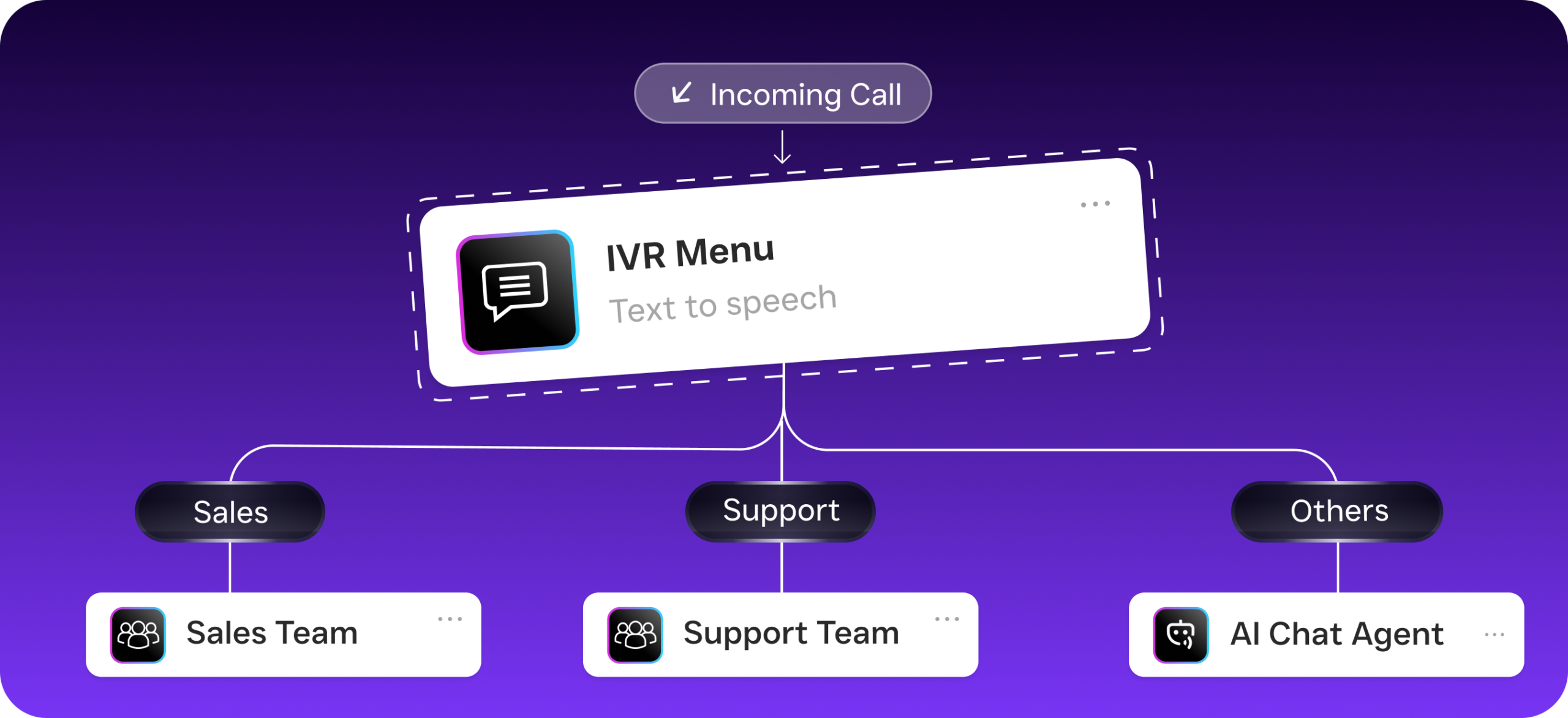
A proper remote inbound call setup includes call routing rules, IVR menus, voicemail fallbacks, call recording, and ideally an AI agent that can answer when no human is available. Without these pieces? You’re essentially asking customers to hope someone picks up. Hope isn’t a strategy.
How Inbound Calls Work from Home with SalesCaptain
Setting up remote inbound call handling in SalesCaptain takes minutes, not days. What does that look like in practice? Here’s how the process works from the moment a customer dials your number.
- Customer calls your business number. Your existing business phone number routes through SalesCaptain’s cloud phone system with 99.99% uptime and crystal-clear audio. No hardware needed.
- Call flow rules kick in. Using SalesCaptain’s drag-and-drop call flow builder, the call follows your custom routing logic. That might mean playing a greeting, offering an IVR menu (“Press 1 for scheduling, Press 2 for billing”), or routing directly to a specific team member based on time of day or caller intent.
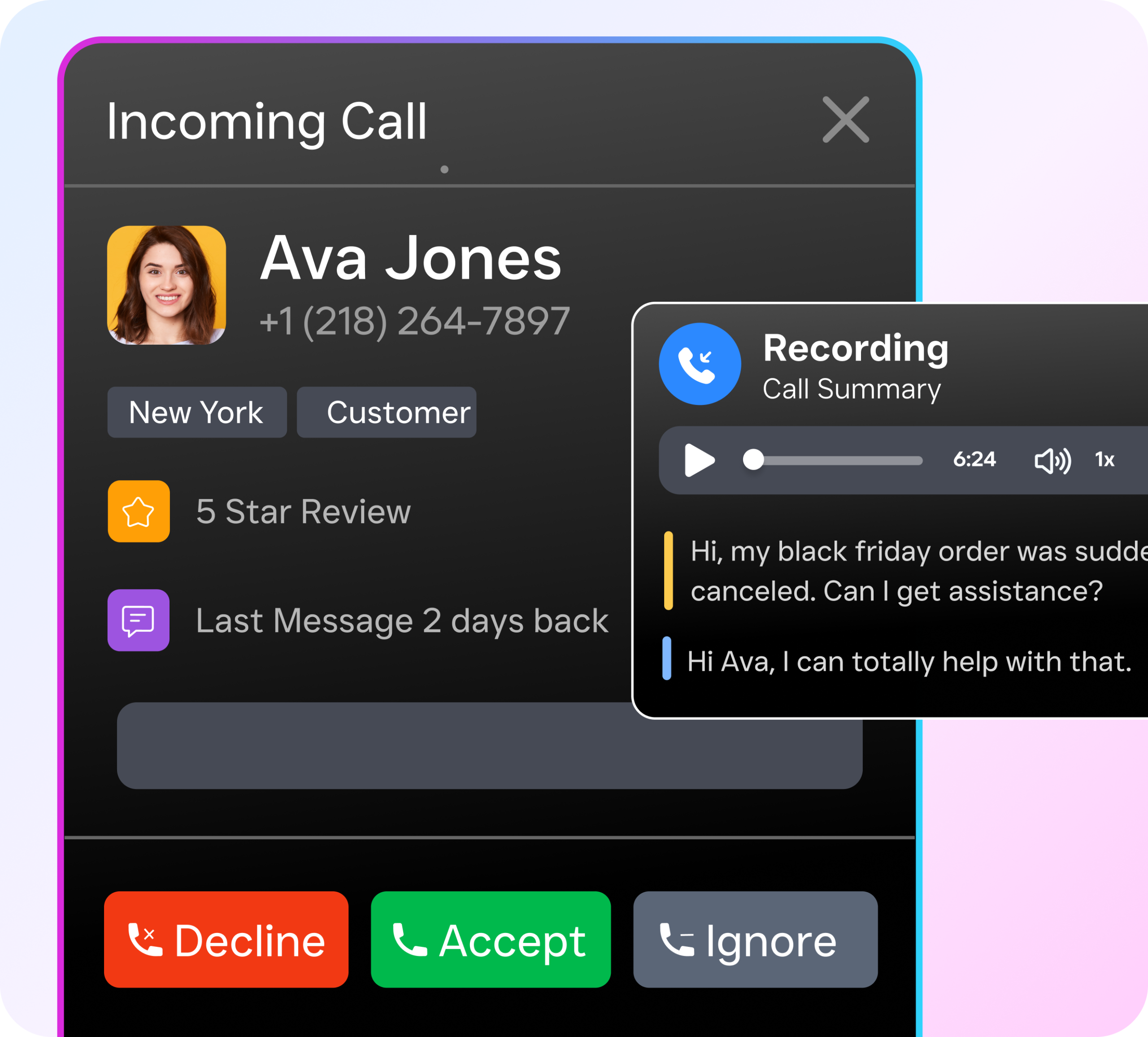
- Remote team members receive the call. Your work-from-home staff gets the call on their laptop, mobile app, or desk phone. Caller details and contact history appear instantly in the unified inbox, so they’ve got full context before saying hello.
- If nobody answers, the AI Phone Agent takes over. SalesCaptain’s AI voice agent picks up, answers the caller’s questions, books appointments, qualifies leads, and blocks spam. It sounds natural and handles the conversation without any human involvement.
- Every interaction is logged and transcribed. Call recordings, AI-generated transcriptions, and conversation summaries land in the unified inbox automatically. Your team can review what happened, follow up on action items, and never lose track of a lead.
- Automated workflows trigger next steps. After the call, SalesCaptain’s workflow automation can send a follow-up text, update your CRM through integrations with HubSpot, Salesforce, or Zoho, and notify team members about urgent callbacks.
Key Capabilities for Remote Inbound Call Handling
- AI Phone Agent with 24/7 Coverage: Your AI agent answers calls around the clock, including evenings, weekends, and holidays. It books appointments, qualifies leads, answers FAQs, and routes callers to the right person. Remote teams don’t need to be “always on” because the AI fills every gap.
- Call Coaching and Whispering: Managers can listen in on live calls and whisper guidance to remote team members without the caller hearing. This is essential for training new hires who aren’t sitting in the same room as experienced staff.
- Unified Inbox Across All Channels: Calls, texts, webchat messages, Instagram DMs, Facebook Messenger conversations, and email all land in one collaborative inbox. Remote workers don’t need to switch between five different apps to stay on top of customer communication.
- Call Queueing and Smart Routing: When call volume spikes, SalesCaptain queues callers with hold music instead of sending them straight to voicemail. Calls route based on availability, skill, or schedule so the right person answers every time.
- AI Summaries and Transcriptions: Every call is automatically transcribed with speaker labels and summarized into key action items. Remote managers can review calls without listening to full recordings, which saves hours each week.
- Missed Call Text-Back: If a call does go unanswered, SalesCaptain instantly sends the caller an automated text message. According to SkipCalls’ research, missed calls cost small businesses over $26,000 per year. Automated text-back recovers a significant portion of those leads before they call a competitor.
Who Needs This?
Remote inbound call handling isn’t just for tech companies with distributed teams. Service businesses across dozens of industries are shifting to hybrid and work-from-home models. If any of these describe your situation, you need a system built for remote call management.
- Home service companies (roofing, HVAC, plumbing, landscaping): Your office staff answers calls from home while field crews are on job sites. Missing a single call during peak season can mean losing a $5,000+ job to a competitor who picks up faster.
- Legal practices: Intake coordinators working remotely need call recording, transcription, and CRM integration with tools like Clio to maintain compliance and follow up on consultations.
- Healthcare and wellness businesses (dental, MedSpa, therapy): Front desk staff handling appointment scheduling from home need HIPAA-conscious workflows and reliable call routing so patients aren’t left on hold.
- Salons, gyms, and fitness studios: These businesses often have one or two people answering phones. When that person works from home or steps away, the AI Phone Agent ensures bookings don’t stop.
- Multi-location businesses: Operations managers overseeing 2-5+ locations need centralized call tracking and a single inbox to monitor how every location handles inbound calls, regardless of where staff members are physically located.
- Business owners wearing multiple hats: If you’re the owner, salesperson, and receptionist all at once, you can’t answer every call. An AI agent handles the overflow while you focus on running the business.
Benefits of Handling Inbound Calls from Home with SalesCaptain
Never Miss Revenue Again
SchedulingKit’s analysis shows that missed calls cost businesses thousands in lost revenue annually. With SalesCaptain, every call reaches someone. Either a team member or the AI Phone Agent picks up. There’s no dead end. Even after hours, the AI books appointments and captures lead information so your pipeline keeps filling while your team sleeps.
Scale Without Hiring More Staff
Hiring a full-time receptionist costs $30,000 to $40,000 per year according to Bureau of Labor Statistics data. SalesCaptain’s AI Phone Agent starts at $0.12 per minute. That means you’re paying for actual call time rather than idle hours. For a growing service business, that’s the difference between profitability and payroll pressure.
Give Remote Teams Full Context on Every Call
Remote work breaks down when team members don’t have the information they need. SalesCaptain’s unified inbox shows everything: past calls, texts, chat conversations, notes, and AI summaries. When a repeat customer calls, your remote team member sees it all in one view. No awkward “can you remind me what we discussed last time?” moments.
Maintain a Professional Image
Customers shouldn’t be able to tell your team works from home. With SalesCaptain’s business phone numbers, IVR builder, custom greetings, and call flows, every inbound call sounds like it’s reaching a polished, established company. Call quality runs on 99.99% uptime infrastructure. Dropped calls and static aren’t part of your customer experience.
How SalesCaptain Compares
Most phone systems weren’t designed for service businesses running remote inbound operations. Take Aircall. It charges $30 per license per month but doesn’t include real-time AI for calls, payments via text, or a leads form. For a five-person remote team, that’s $150/month before you’ve added any AI capabilities. You still won’t get an AI phone agent that answers calls independently.
OpenPhone comes in cheaper at $15 per user. But it lacks call coaching and whispering, call queueing, voicemail drop, and sentiment analysis. If you’re managing a remote team, the inability to whisper coaching to a new hire during a live call is a serious gap. Plus, OpenPhone’s AI features are minimal. It only offers 7 integrations compared to SalesCaptain’s 50+.
Dialpad offers strong transcription. But it doesn’t include toll-free minutes, audio conferencing, or high-volume SMS. SalesCaptain bundles all of these together with the AI Phone Agent, unified inbox, and workflow automation in a single platform. According to Feather’s 2026 review of AI receptionist software, the combination of AI voice agents with a full communication suite is what separates modern platforms from legacy phone systems. And SalesCaptain’s per-location pricing (starting free for one location, $159/month for Business) also scales more predictably than per-user models when your remote team grows.
FAQ
Do I need special hardware for my remote team to handle inbound calls?
No. SalesCaptain works on any laptop, smartphone, or tablet with an internet connection. Your team doesn’t need desk phones, headsets, or any physical equipment beyond what they already have at home.
What happens to inbound calls when my remote team is offline or unavailable?
SalesCaptain’s AI Phone Agent automatically picks up. It answers questions, books appointments, qualifies leads, and blocks spam calls. If you prefer, you can also route to voicemail with automatic transcription and a missed-call text-back so the caller gets an immediate response.
Can managers monitor how remote team members handle inbound calls?
Yes. SalesCaptain includes call coaching and whispering, which lets managers listen to live calls and guide team members in real time. Every call is also recorded, transcribed, and summarized by AI, so managers can review performance without sitting next to each employee.
Does SalesCaptain integrate with my existing CRM and scheduling tools?
SalesCaptain integrates with 50+ tools including HubSpot, Salesforce, Zoho, ServiceFusion, HousecallPro, Mindbody, Clio, Shopify, QuickBooks, and Zapier. Workflow automation can push call data, lead information, and appointment bookings directly into your existing systems without manual data entry.
Start Handling Inbound Calls from Home the Right Way
SalesCaptain gives your remote team a professional phone system, AI-powered call answering, and a unified inbox. All in one platform built for service businesses. The free plan covers one location with no credit card required. Set up your remote inbound call system at SalesCaptain.com and stop losing leads to missed calls.