
AI-powered customer experience marketing (CXM) platform that helps local businesses win.



A reliable voicemail service for small business isn’t just a nice-to-have anymore. It’s the safety net between a missed call and a lost customer. Sound familiar? According to recent missed call research from SkipCalls, a significant percentage of business calls go unanswered every day. For service businesses running on tight margins, each of those unanswered calls could be a booked job that never happened. And that’s exactly what SalesCaptain’s voicemail system changes. It goes far beyond the basic “leave a message after the beep” approach. Instead, it combines AI-powered transcription, smart routing, and instant follow-up into a single platform built for how small businesses actually operate.
What Is a Voicemail Service for Small Business?
At its core, a voicemail service captures messages from callers who can’t reach a live person. But the definition has evolved considerably. Traditional voicemail just recorded an audio clip and stored it until someone remembered to check. Modern voicemail services for small businesses do much more. They transcribe messages in real time, summarize key details, notify your team instantly, and even trigger automated follow-up actions like sending a text to the caller. That’s a completely different ballgame.
Think about what happens when a homeowner calls your plumbing company at 7 PM on a Tuesday. Nobody picks up. With a basic voicemail box, that message sits there until morning. By then the caller’s already hired someone else. A modern voicemail service closes that gap. It captures the message, converts it to text your team can scan in seconds, and fires off an automatic reply so the caller knows you’re on it. That’s the difference between losing revenue and locking it in.
For small businesses, voicemail also serves as a brand touchpoint. Your greeting, your response time, and how professionally you handle after-hours communication all shape how customers perceive your business. According to data compiled by Aira, the cost of missed business calls can add up to significant revenue loss over a year. A well-configured voicemail service directly reduces that risk.
How Voicemail Works in SalesCaptain
SalesCaptain’s voicemail isn’t a standalone feature bolted onto a phone system. It’s woven into a broader communication platform that includes AI Phone Agents, call flows, and a unified inbox. Here’s what actually happens:
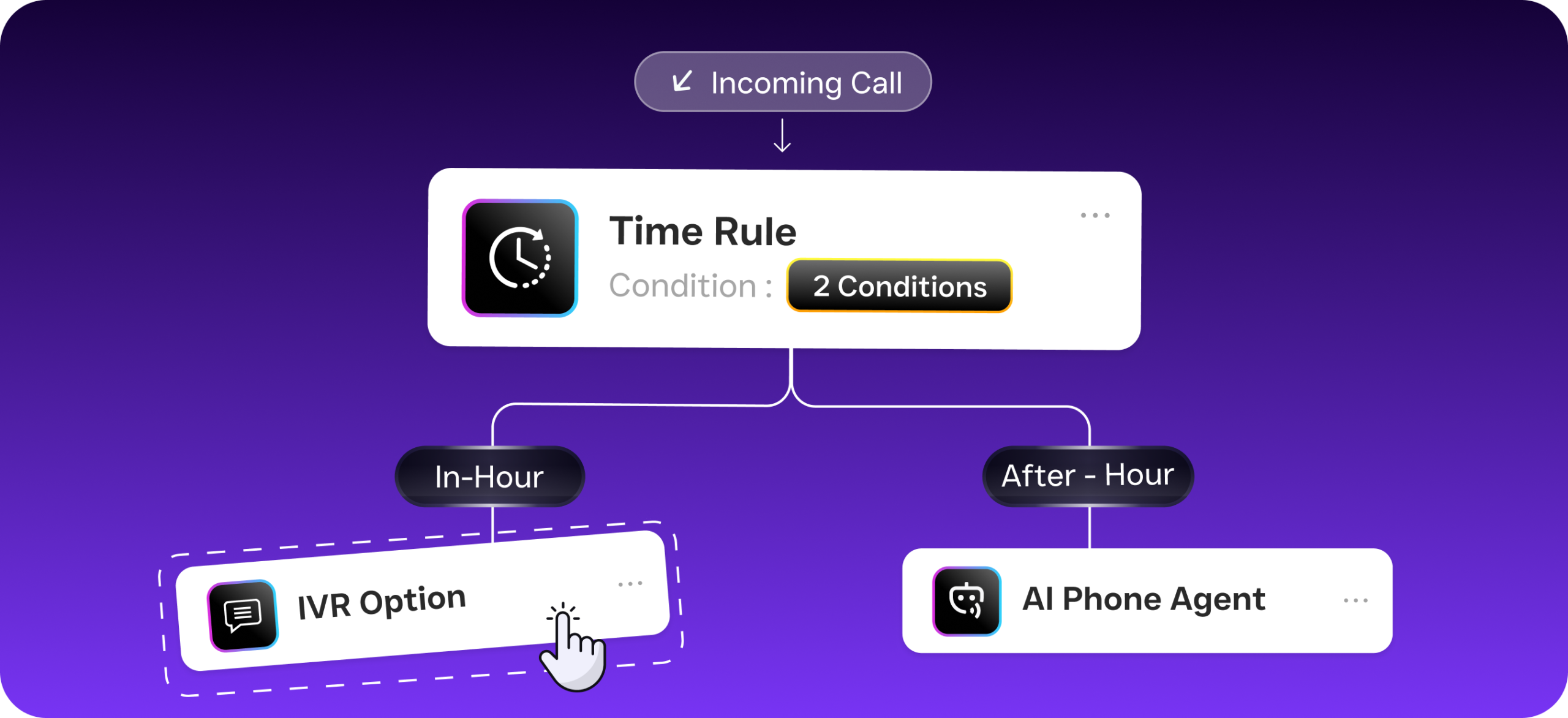
- Caller reaches your business number. SalesCaptain’s call flow engine determines the routing based on your rules: time of day, team availability, department, or location. If no one’s available, the system can first attempt to connect the caller with an AI Phone Agent before falling back to voicemail.
- Custom greeting plays. You record your own professional voicemail greeting, or use different greetings for different extensions and business hours. The caller hears a message that matches your brand, not a generic robot voice.
- Message is recorded and transcribed. As soon as the caller hangs up, SalesCaptain’s AI engine transcribes the voicemail into text and generates a summary highlighting the caller’s name, reason for calling, and any urgency indicators. No need to listen to a two-minute rambling message to figure out what they want.
- Notification hits your unified inbox. The voicemail, its transcription, and the AI summary all appear in SalesCaptain’s Unified Inbox alongside your texts, emails, webchat messages, and social DMs. Your team sees everything in one place, with full caller history attached.
- Automated follow-up triggers. Using SalesCaptain’s Workflow Automation builder, you can set rules that fire automatically. For example: send a text to the caller within 30 seconds saying “We got your message and will call you back within 15 minutes.” Or create a task in your CRM. Or route the voicemail to a specific team member based on keywords in the transcription.
- Voicemail drop for outbound. When your team calls leads back, SalesCaptain’s voicemail drop feature lets them leave a pre-recorded message with one click instead of waiting through a recipient’s voicemail greeting. That’s a significant time saver when you’re working through a callback list of 30 or 40 leads.
Every step above can be customized through SalesCaptain’s drag-and-drop call flow builder. No technical expertise required. Changes take effect immediately.
Key Capabilities
SalesCaptain’s voicemail service includes several features specifically designed for how small businesses handle call volume. Here’s what sets it apart:
- AI Transcription and Summaries: Every voicemail is automatically converted to text with speaker identification. On top of that, an AI-generated summary pulls out the essential details: who called, what they need, and how urgent it is. Your team can triage 20 voicemails in the time it used to take to listen to three.
- Missed Call Text-Back: When a call goes to voicemail, SalesCaptain can instantly text the caller with a customized message. This alone can recover leads that would otherwise disappear. Research from SchedulingKit shows that businesses responding to missed calls within minutes dramatically increase their chances of converting those callers.
- Voicemail Drop: For outbound calls, your team can leave pre-recorded voicemails with a single click. Instead of repeating the same message 50 times a day, reps drop a polished, consistent message and move to the next call. Not every competitor offers this; notably, OpenPhone, Dialpad, and Aircall all lack voicemail drop in their standard plans.
- Custom Greetings Per Extension: Different departments, locations, or team members can each have their own voicemail greeting. A dental office might have one greeting for appointment scheduling and another for billing questions. You record them once and assign them through the call flow builder.
- Unified Inbox Integration: Voicemails don’t live in a separate system. They appear alongside SMS, webchat, Instagram DMs, Facebook Messenger, and email in one collaborative inbox. Your team never has to check multiple apps to find a customer’s message.
- Workflow Automation Triggers: Voicemails can trigger automated workflows, such as CRM updates, follow-up reminders, appointment booking links via text, or escalation to a manager. With 50+ integrations including HubSpot, Salesforce, Zoho, and HousecallPro, these automations connect directly to the tools you already use.
Who Needs This?
Voicemail services matter most for businesses where phone calls drive revenue. If your customers pick up the phone to book, ask questions, or request quotes, then how you handle those calls when you can’t answer directly impacts your bottom line. And that’s critical. According to the Federal Reserve’s 2024 Small Business chartbooks, smaller firms consistently face staffing and resource constraints, which means missed calls aren’t a sign of bad service. They’re a structural challenge. The right voicemail system addresses it without adding headcount.
- Home service companies (roofing, plumbing, HVAC, landscaping, appliance repair): Your crews are in the field, not at a desk. Calls come in all day, and after-hours requests are common. Voicemail with instant text-back and AI summaries keeps leads warm until your office can respond.
- Legal practices: Client intake calls often happen outside business hours. A professional voicemail system with transcription ensures nothing falls through the cracks, and automated follow-up shows prospective clients you’re responsive.
- Healthcare and wellness providers (dental offices, MedSpas, therapy practices): Patients frequently call to schedule, reschedule, or ask about insurance. Multi-extension voicemail greetings route callers to the right department, while HIPAA-conscious workflows keep communication secure.
- Salons, gyms, and fitness studios: Appointment-driven businesses can’t afford slow callbacks. Missed call text-back with a booking link turns a voicemail into a confirmed appointment without any human intervention.
- Real estate agencies: Leads are time-sensitive. A voicemail that triggers an instant text and a CRM task means your agents can follow up before the prospect contacts another agency.
- Multi-location businesses: SalesCaptain’s per-location pricing (starting free for one location, $159/month for additional locations) means each location gets its own voicemail setup, greetings, and routing without the cost spiraling.
Benefits of a Professional Voicemail Service
Recover Revenue You’re Currently Losing
Every missed call without a follow-up is potential revenue walking out the door. Analysis from Voksha demonstrates how the true cost of missed calls compounds over time, especially for service businesses where a single job can be worth hundreds or thousands of dollars. Think about your own numbers. When your voicemail system automatically texts callers back, transcribes their messages, and creates follow-up tasks, you’re plugging holes in your revenue pipeline that most businesses don’t even realize exist.
Free Your Team from Repetitive Work
Listening to voicemails, writing down details, and manually logging callbacks eats up hours every week. And it’s boring work. AI transcription and summaries eliminate that busywork entirely. Your team reads a quick summary, sees the caller’s history in the unified inbox, and takes action immediately. That’s time redirected toward actually serving customers instead of managing messages. Plus, with voicemail drop on outbound calls, reps aren’t spending 45 seconds waiting through a greeting every time they need to leave a message.
Scale Without Hiring
Hiring a receptionist or a virtual answering service gets expensive fast. Feather’s 2026 analysis of AI receptionist solutions highlights how businesses are increasingly turning to automated systems to handle call volume that would otherwise require additional staff. SalesCaptain lets you pair voicemail with an AI Phone Agent that answers calls 24/7. So many callers never need to leave a voicemail at all. But when they do, the system handles the rest automatically.
Consistent Professional Image
Custom greetings, instant acknowledgment texts, and fast callbacks create a polished impression. Whether it’s a Saturday evening or a busy Monday morning, callers experience the same level of professionalism. For small businesses competing against larger companies with bigger teams, that consistency levels the playing field.
How SalesCaptain Compares
Most phone systems include basic voicemail. Few treat it as a strategic tool the way SalesCaptain does. OpenPhone, priced at $15 per user, lacks voicemail drop and real-time speech analytics. It also has minimal AI capabilities and only seven integrations, which limits what you can automate after a voicemail comes in. That’s a significant gap.
Aircall, at $30 per license, still doesn’t offer voicemail drop, missed-call text-back, or real-time AI for calls. You’re paying double per user and getting less automation. Dialpad offers solid AI features at $15 per user, but it doesn’t include toll-free minutes or voicemail drop. It also lacks audio conferencing and high-volume SMS. So if your business needs to text hundreds of customers, you’ll hit limits quickly. Nextiva, at $20 per user, caps SMS at 250 messages per user per month and doesn’t offer voicemail drop or call coaching.
Where SalesCaptain stands apart is the combination. Voicemail that feeds into a unified inbox alongside every other communication channel. AI transcription and summaries for every message. Workflow automation that turns voicemails into action. And voicemail drop for efficient outbound callbacks. According to Aircall’s own research on SMB communication trends, small businesses increasingly need tools that connect voice, text, and digital channels together. SalesCaptain was built from the ground up to do exactly that. And it starts at a free plan for your first location.
Frequently Asked Questions
Can I set up different voicemail greetings for different departments or locations?
Yes, you can. SalesCaptain’s call flow builder lets you assign unique voicemail greetings to each extension, department, or location. A multi-location HVAC company, for example, can have location-specific greetings that mention the local branch name and hours. You record each greeting once and assign it through the drag-and-drop builder.
How does AI transcription work for voicemails?
When a caller leaves a voicemail, SalesCaptain’s AI engine automatically converts the audio to text. It also generates a brief summary highlighting the caller’s name, reason for calling, and urgency level. Both the transcription and summary appear in your unified inbox within moments of the call ending. You can access the original audio recording at any time.
What happens if someone leaves a voicemail after hours?
Your call flow handles this automatically. You can configure after-hours rules to first route callers to an AI Phone Agent that answers questions and books appointments around the clock. If the caller still wants to leave a message, voicemail captures it, transcribes it, and triggers whatever follow-up workflow you’ve set. Maybe an instant text-back. Or a task created in HubSpot or Salesforce for your team to handle first thing in the morning.
Does SalesCaptain support voicemail drop for outbound calls?
Yes, absolutely. Voicemail drop lets your team leave a pre-recorded voicemail with one click during outbound calls. Instead of waiting through a recipient’s greeting and repeating the same callback message dozens of times, your reps drop a polished message instantly and move on. This feature isn’t available on several competing platforms, including OpenPhone, Aircall, and Dialpad.
Turn Every Missed Call Into a Recovered Opportunity
SalesCaptain gives your small business a voicemail service that actually works for you. AI transcription, instant text-back, voicemail drop, and a unified inbox that keeps every message in one place. Start free with your first location and see the difference a modern voicemail system makes.