
AI-powered customer experience marketing (CXM) platform that helps local businesses win.



Workflow automation for small business isn’t a luxury anymore. It’s the difference between growing and drowning in busywork. Every missed follow-up, every forgotten appointment reminder, every lead that slips through the cracks costs real money. According to recent workflow automation research, businesses that automate repetitive tasks reclaim significant hours every week. SalesCaptain’s Workflow Automation gives service businesses a visual, drag-and-drop builder to automate follow-ups, reminders, CRM updates, and notifications across every communication channel, without writing a single line of code.
What Is Workflow Automation for Small Business?
Workflow automation replaces manual, repetitive tasks with trigger-based sequences that run on their own. Think of it this way: instead of your receptionist manually texting every missed caller, sending a reminder the day before each appointment, and updating your CRM after every conversation, those steps happen automatically the moment a trigger fires.
For a plumbing company, that might mean a new lead from a missed call gets an instant text-back, a follow-up email 30 minutes later, and a CRM record created in HousecallPro. For a dental office, it could mean appointment confirmations go out 48 hours before the visit, with a second reminder the morning of. None of it requires a person to click “send.”
The concept isn’t new, but what’s changed is accessibility. Tools that once required a dedicated IT team or an agency to configure are now built for business owners who’d rather spend ten minutes dragging boxes on a screen than ten hours a week doing the same tasks by hand. According to Okta’s 2024 SMB report, small businesses are actually leading the adoption curve on automation, often moving faster than enterprise companies bogged down in approval chains.
How Workflow Automation Works in SalesCaptain
SalesCaptain’s workflow builder is designed so you can go from zero to a fully running automation in under fifteen minutes. Here’s the process from start to finish:
- Choose a trigger. Every workflow starts with an event. That could be a missed call, a new contact created, an appointment booked, a form submission, an incoming text, or a tag added to a contact. You pick the event that kicks things off.
- Add your actions. Drag action blocks onto the canvas. Actions include sending an SMS, sending an email, adding a tag, updating a CRM field, creating a task for your team, waiting a set amount of time, or routing the contact to a specific team member. Stack as many actions as you need.
- Set conditions and branches. Not every contact should get the same treatment. Use if/then logic to branch your workflow. For example: if the caller asked about emergency service, skip the 30-minute delay and text them immediately. If they’re a returning customer, route them to their assigned technician.
- Connect your tools. SalesCaptain integrates natively with over 50 platforms, including HubSpot, Salesforce, Zoho, ServiceFusion, HousecallPro, Mindbody, Shopify, QuickBooks, Clio, and Zapier. So your workflow can push data to your CRM, update your scheduling tool, or trigger actions in other software you already use.
- Activate and monitor. Turn the workflow on. Every execution is logged in real time, so you can see exactly which contacts entered the workflow, which actions fired, and where anyone dropped off. Adjust as needed without starting over.
The visual builder means you’re looking at a flowchart, not a spreadsheet of rules. That matters when you’re troubleshooting why a reminder didn’t send or deciding to add a step three weeks after you built the original workflow.
Key Capabilities
- Trigger-based automation across channels. Workflows fire from events across calls, SMS, webchat, Instagram DMs, Facebook Messenger, and email. A missed call triggers a text-back. A webchat lead triggers a follow-up sequence. Everything lives in one system.
- Missed call text-back. When a call goes unanswered, SalesCaptain automatically sends an SMS to the caller within seconds. According to DaVinci’s research on missed business calls, the revenue impact of unanswered calls is staggering for small businesses. Automating that first response keeps the conversation alive.
- Appointment reminders and confirmations. Set up multi-step reminder sequences: a confirmation when the appointment is booked, a reminder 24 hours before, and a final nudge the morning of. Reduce no-shows without your staff touching a phone.
- CRM sync and data updates. Every interaction updates your CRM automatically. New leads get tagged, scored, and assigned. Contact records stay current across SalesCaptain and connected tools like Salesforce, HubSpot, or Zoho.
- Team notifications and task creation. When a high-value lead enters your pipeline or a VIP customer calls, the workflow can instantly notify the right team member, create a follow-up task, or route the conversation to a specific person in your unified inbox.
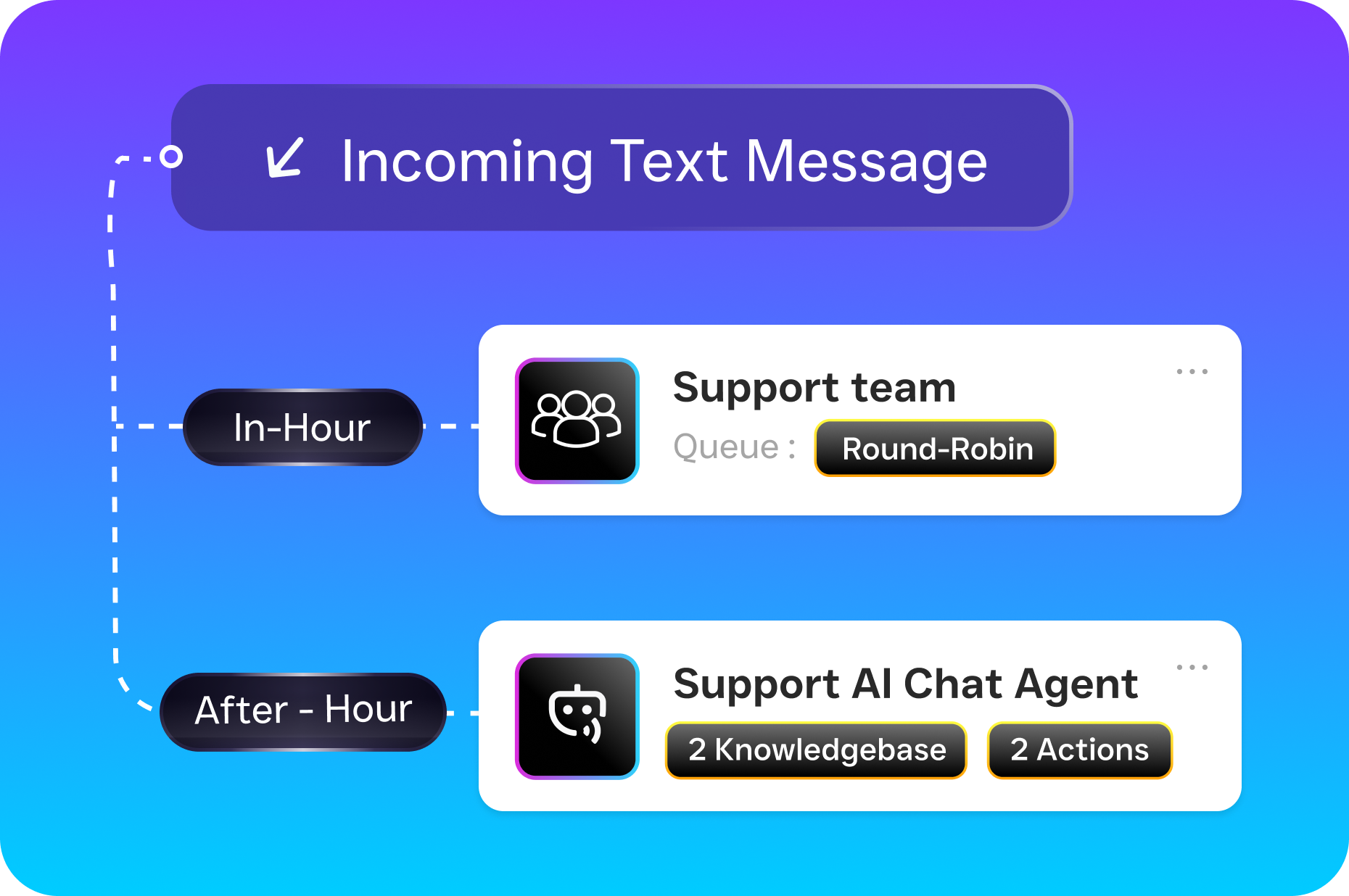
- Conditional logic and branching. Build smart workflows that adapt based on contact properties, time of day, channel of origin, or previous interactions. A first-time caller gets a different sequence than a repeat customer. After-hours leads get a different path than those who call during business hours.
Who Needs This?
Workflow automation for small business isn’t limited to one industry, but certain businesses see outsized returns because their operations depend heavily on timely follow-up and consistent communication.
- Home services companies (roofers, plumbers, HVAC techs, landscapers, appliance repair): High call volume, frequent missed calls during jobs, and seasonal spikes make automation essential. A plumber on a job site can’t answer every call, but an automated text-back and follow-up sequence keeps that lead warm.
- Healthcare and wellness practices (dental offices, medical clinics, MedSpas, therapy practices): Appointment-heavy operations need automated reminders, confirmations, and recall sequences. Integration with tools like Mindbody keeps scheduling tight.
- Legal practices: Client intake, consultation scheduling, and case follow-ups involve repetitive communication. Clio integration means your practice management system stays current without double entry.
- Salons, gyms, and fitness studios: Membership renewals, class reminders, and rebooking sequences drive retention. Automating these touchpoints frees front-desk staff for in-person service.
- Real estate agencies: Lead response speed is everything in real estate. An automated sequence that texts a new lead within seconds, then follows up with property details an hour later, can mean the difference between winning and losing a listing.
- Operations managers and business owners wearing multiple hats: If you’re the person who answers the phone, schedules the jobs, sends the invoices, and does the work, automation gives you your time back.
Benefits of Workflow Automation for Small Business
Faster Lead Response Without More Staff
Speed to lead is one of the most well-documented factors in conversion. According to PYMNTS research, 61% of small businesses already using AI deploy it specifically to automate daily tasks, and lead follow-up is consistently one of the top use cases. With SalesCaptain, the moment a lead comes in from any channel, your workflow fires. No waiting for someone to check the missed calls log tomorrow morning.
Consistent Customer Experience Across Every Channel
When a customer texts your business, DMs you on Instagram, and then calls the next day, they expect continuity. Because SalesCaptain’s workflows operate across the unified inbox, every interaction feeds into the same contact record and the same automation. Your customer doesn’t get three different versions of your follow-up process depending on how they reached out. That consistency builds trust, and it’s nearly impossible to maintain manually once you’re handling volume across multiple channels.
Reduced No-Shows and Missed Revenue
No-shows cost appointment-based businesses thousands every month. Automated reminder sequences through SMS are consistently more effective than phone call reminders because they’re less intrusive and easier for the customer to confirm. SalesCaptain lets you build multi-step reminder workflows that adapt based on whether the customer confirmed or not, sending an additional nudge only when needed.
Scale Without Hiring
Hiring another receptionist or admin costs $30,000 to $40,000 a year according to Bureau of Labor Statistics wage data for receptionists and information clerks. Workflow automation handles much of what that hire would do: answering common questions, sending follow-ups, routing leads, updating records. For a business paying $159/month for SalesCaptain’s Business plan, that’s a fraction of the cost with 24/7 coverage.
How SalesCaptain Compares
Most tools that offer some form of workflow automation weren’t built for service businesses. ActiveCampaign, for example, is a marketing automation platform. It’s strong for email sequences, but it doesn’t have a phone system, a unified inbox, or AI voice agents. You’d need to bolt on three or four other tools to get what SalesCaptain provides natively.
HighLevel is popular among marketing agencies, but its complexity creates a steep learning curve that most service business owners don’t have time for. It was designed for agencies to manage clients, not for a roofing company owner to set up their own automations in ten minutes.
Platforms like Nextiva and Dialpad offer phone systems with some automation, but they’re limited. Nextiva caps SMS at 250 messages per user per month, which won’t last a week for a busy service business. Dialpad doesn’t include toll-free minutes or social chat. Neither offers the kind of trigger-based, cross-channel workflow builder that connects calls, texts, webchat, and social DMs in a single automation.
SalesCaptain combines the workflow engine with AI phone agents, AI chat agents, and a unified inbox. That means your automations don’t just send messages. They work alongside AI that answers calls, qualifies leads, and books appointments. According to Aira’s data on missed business calls, a significant percentage of business calls go unanswered. Having an AI agent handle those calls while your workflows manage the follow-up creates a system where nothing falls through.
Frequently Asked Questions
Do I need technical skills to set up workflow automation in SalesCaptain?
No. SalesCaptain’s visual drag-and-drop builder is designed for business owners, not developers. You select triggers, drag action blocks, set conditions, and activate. If you can use a smartphone, you can build a workflow. There’s no coding, no scripting, and no need to hire an agency.
What kinds of tasks can I automate?
Common automations include missed call text-backs, appointment reminders and confirmations, lead follow-up sequences across SMS and email, CRM updates when new contacts are created, team notifications for high-priority leads, and review request messages after completed appointments. Any repetitive communication task that follows a predictable pattern is a candidate.
Can workflows connect to tools I already use?
Yes. SalesCaptain integrates natively with over 50 platforms including HubSpot, Salesforce, Zoho, ServiceFusion, HousecallPro, Mindbody, Rezdy, Shopify, QuickBooks, Clio, and Zapier. Zapier alone opens up connections to thousands of additional apps, so your workflows can push and pull data from nearly any tool in your stack.
How does workflow automation work with SalesCaptain’s AI agents?
They complement each other. The AI Phone Agent handles live calls, answering questions, qualifying leads, and booking appointments. When that call ends, a workflow can automatically fire: updating your CRM, notifying your team, sending a confirmation text to the caller, or starting a follow-up sequence. The AI agent handles the conversation; the workflow handles everything that should happen after.
What does it cost?
SalesCaptain offers a free Startup plan for one location. The Business plan is $159/month per location, and the Enterprise plan is $300/month per location. AI call minutes are billed at $0.12/minute. Workflow automation is included in all plans, so there’s no extra charge for the builder or automations you create.
How quickly can I get results from automating workflows?
Most businesses see an impact within the first week. A missed call text-back workflow takes five minutes to build and starts recovering leads immediately. Appointment reminder sequences reduce no-shows starting with the next day’s schedule. The faster you activate your first workflow, the faster you stop losing revenue to manual processes.
Stop losing leads to slow follow-ups and missed calls. SalesCaptain’s workflow automation gives your small business the power to respond instantly, follow up consistently, and scale without hiring. Start building your first automation today.