
AI-powered customer experience marketing (CXM) platform that helps local businesses win.


How to Automate Appointment Booking for Small Business: A Complete Guide
You just missed another call while you were with a customer. Two hours later, you check your voicemail and realize that lead already booked with your competitor. According to industry data from SkipCalls, small businesses lose over $26,000 per year from missed calls alone, and a huge chunk of those are people trying to schedule an appointment. Sound familiar? If you run a service business, learning how to automate appointment booking for small business operations isn’t just a nice upgrade, it’s a survival strategy.
Quick Answer
Automate appointment booking by implementing scheduling software that syncs with your calendar, sends automatic confirmations and reminders, and accepts bookings 24/7 through your website or messaging platforms. Look for tools offering integration with your existing systems, customizable availability, and payment processing to streamline your entire booking workflow without manual intervention.
What Does It Mean to Automate Appointment Booking?
Automating appointment booking means replacing the endless back-and-forth. No more phone tag. No more texts saying “does Tuesday work for you?” Technology handles it instead. Your automated system captures what the customer needs, checks your availability, confirms the booking, and sends reminders, all without you lifting a finger. The entire cycle happens in seconds, whether it’s 2 PM on a Monday or 11 PM on a Saturday.
This goes beyond simply adding an online booking page to your website, though that’s one piece of the puzzle. True appointment automation covers every channel where customers actually reach out: phone calls, text messages, website chat, social media DMs. It handles the scheduling conversation on each one. And it includes what comes after: confirmation messages, reminders before the appointment, and rescheduling options if plans change. When done right, it feels seamless to the customer and invisible to you.
Free weekly newsletter
Growth tips for service businesses
Every Tuesday — actionable ideas to get more leads, reviews, and repeat customers. No fluff.
For small businesses that depend on appointments, think HVAC companies, dental offices, salons, law firms, fitness studios, this automation directly translates to revenue. Every appointment that books itself is one your staff didn’t have to spend five minutes scheduling. Multiply that across dozens of daily inquiries and you’re reclaiming hours of productive time each week. As Beancount’s guide to small business automation explains, the businesses that automate repetitive tasks early are the ones that scale without ballooning their payroll.
Why Manual Appointment Scheduling Costs You More Than You Think
Most small business owners dramatically underestimate how much manual scheduling actually costs. It’s not just the receptionist’s salary. There’s the cascading impact of slow response times, human errors, and limited availability. When a potential customer calls and reaches voicemail, the odds they’ll call back? Slim. Research compiled by Aira on missed business call statistics shows that the revenue impact varies by industry, but the pattern is consistent: missed calls mean missed money, especially for appointment-driven businesses.
The Hidden Cost of Slow Response Times
Speed matters. When someone searches for a plumber, a dentist, or a personal injury lawyer, they’re usually contacting two or three businesses at once. The first one to respond and offer a concrete appointment time almost always wins. If your process requires a human to check the calendar, call back, and confirm, that’s a 10 to 30 minute delay at best. Hours, if your staff is buried. An automated system responds in seconds. That’s the difference between booking the job and losing it to someone down the street.
The Staffing Trap
Hiring another person to answer phones and manage your calendar seems obvious. But the math rarely works for small businesses. A full-time receptionist costs $30,000 to $40,000 per year according to data from the Bureau of Labor Statistics, and that person still can’t work nights, weekends, or holidays without overtime. Then there’s sick days, training time, and turnover. Automation doesn’t replace your team. It handles the routine scheduling tasks so your people can focus on higher-value work, serving customers who are already in your office or shop.
No-Shows and Forgotten Appointments
Manual scheduling also means manual follow-up. That’s where things fall apart. When reminders depend on a person remembering to send them, some always slip through the cracks. No-shows are brutal. An empty appointment slot for an HVAC technician, a dental hygienist, or a personal trainer represents direct revenue loss plus the opportunity cost of whoever could have filled that spot. Automated reminder sequences via text and email dramatically reduce no-show rates because they’re relentless and consistent.
📺 Watch: How to Set Up Appointment Reminders with Automation
How to Automate Appointment Booking for Small Business: Step by Step
The good news? Automating your appointment booking doesn’t require a computer science degree or a massive budget. Think about the process in layers, capture the request, check availability, confirm the booking, follow up, then automate each one with the right tools. Here’s how to approach it practically.
Step 1: Map Out Every Way Customers Request Appointments
Before you automate anything, know where appointment requests come from. Pull out a notepad. Phone calls, website contact forms, text messages, Instagram DMs, Facebook messages, walk-ins who ask about returning, emails, Google Business Profile messages. Most small businesses are shocked to find they’re managing five or more channels and handling each one differently. This audit reveals your biggest gaps and shows you where automation will have the most immediate impact.
For many service businesses, phone calls remain the top channel. Roofing companies, law firms, most new customers still pick up the phone. But increasingly, younger customers and those researching after hours prefer texting or messaging through social media. Your automation strategy needs to cover all of these entry points. Why? Leaving any channel unautomated means leaving money on the table during those hours or on those platforms.
Step 2: Choose the Right Type of Automation for Each Channel
Different channels need different solutions. For your website, an AI-powered chat widget can engage visitors, ask qualifying questions, and offer available time slots, all without a human touching it. For phone calls, an AI voice agent can answer, understand what the caller needs, and book the appointment conversationally. For text messages and social media DMs, automated chat agents respond instantly with booking links or walk the customer through scheduling right there in the conversation. Meet customers where they already are. Don’t force them to a single booking page.
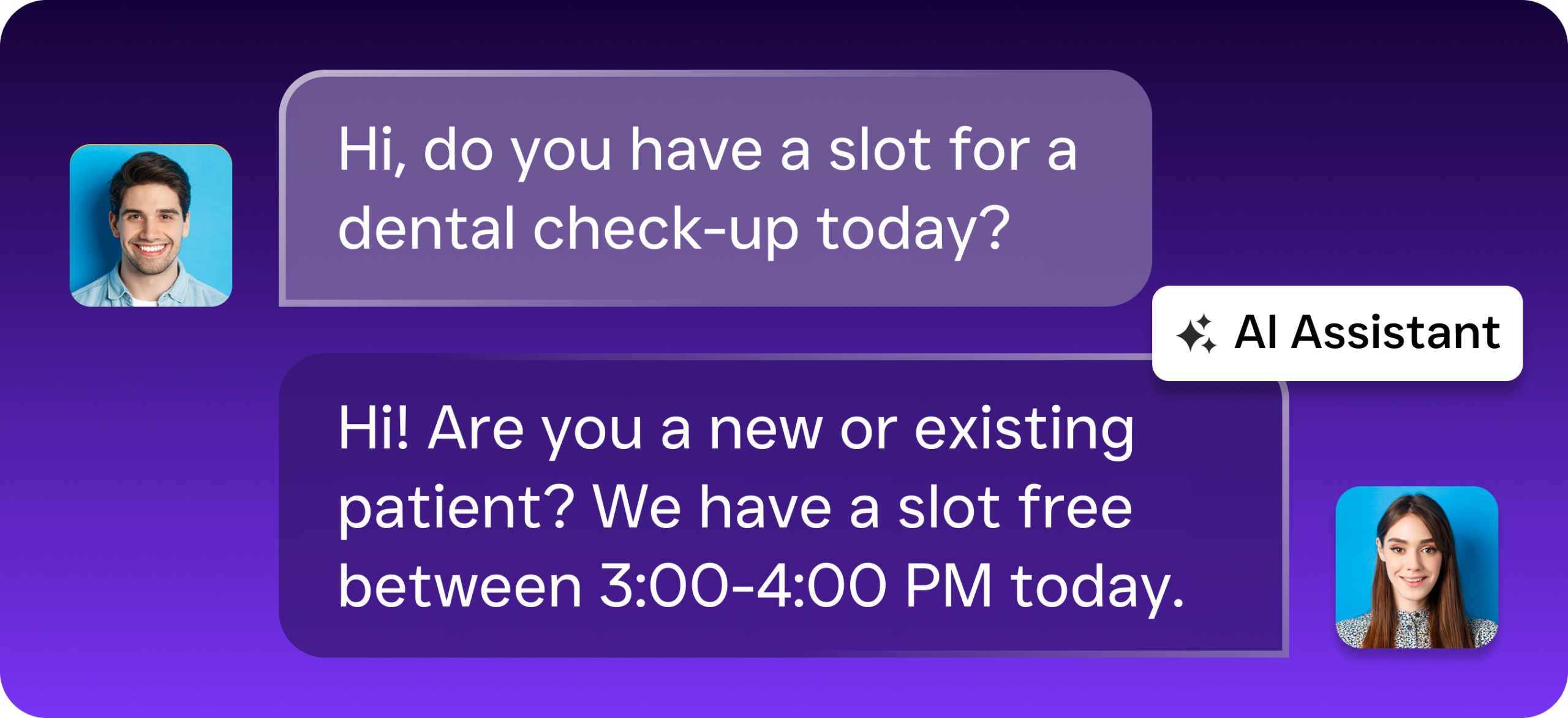
This is where many businesses stumble. They install an online scheduling tool on their website and call it done. But if 60% of your leads come in by phone and your scheduling tool only works on the web, you’ve solved a fraction of the problem. As Inkle’s business automation guide points out, the most effective automation covers the full customer journey, not just one touchpoint. Think about scheduling the way your customer experiences it, from first contact through confirmation, and automate every step.
Step 3: Connect Your Calendar and CRM
Automation only works if it syncs with your real-time availability. Whatever tools you use, Google Calendar, Outlook, a field service management platform like ServiceFusion or HousecallPro, your automated booking system needs to connect with them. This prevents double-bookings, ensures customers see accurate availability, and automatically updates your schedule when a new appointment confirms. If you use a CRM like HubSpot, Salesforce, or Zoho, the integration should also create or update contact records so your team has context before the appointment happens.
The integration layer is what separates basic automation from a system that actually saves time. Without it, you end up with appointments booked in one place that don’t appear in another. Confusion. Missed commitments. Look for tools that offer native integrations with the software you already use rather than requiring complex workarounds. The fewer manual data transfers your team has to do, the better. Fewer errors. More time saved.
Step 4: Set Up Automated Confirmations and Reminders
Once an appointment is booked, automation should handle what comes next. Send an immediate confirmation via text and email with the date, time, and any prep instructions. Then schedule a reminder 24 hours before, and optionally another 2 hours before. Include a simple way to reschedule or cancel, a reply-to-text option works best because it reduces friction. This sequence alone can cut your no-show rate significantly. And it runs on autopilot.
Go further by building in post-appointment follow-up. A quick text asking how the service went, a link to leave a review, or a prompt to book their next visit keeps the relationship active without your staff lifting a finger. These touchpoints compound over time, turning one-time customers into repeat clients. The entire lifecycle, from first contact to rebooking, can run through automated workflows that trigger based on customer actions.
Step 5: Handle After-Hours and Overflow Intelligently
This is the step most small businesses skip. And it’s arguably the most valuable. According to Phone2’s analysis of missed call costs, a significant percentage of customer calls happen outside business hours. What does that actually look like? If your automation only works during the day, you’re still losing evening and weekend leads. AI-powered phone and chat agents that operate 24/7 capture these opportunities by answering calls, responding to texts, and booking appointments at any hour. That’s your competitive edge over businesses that shut down communication at 5 PM.
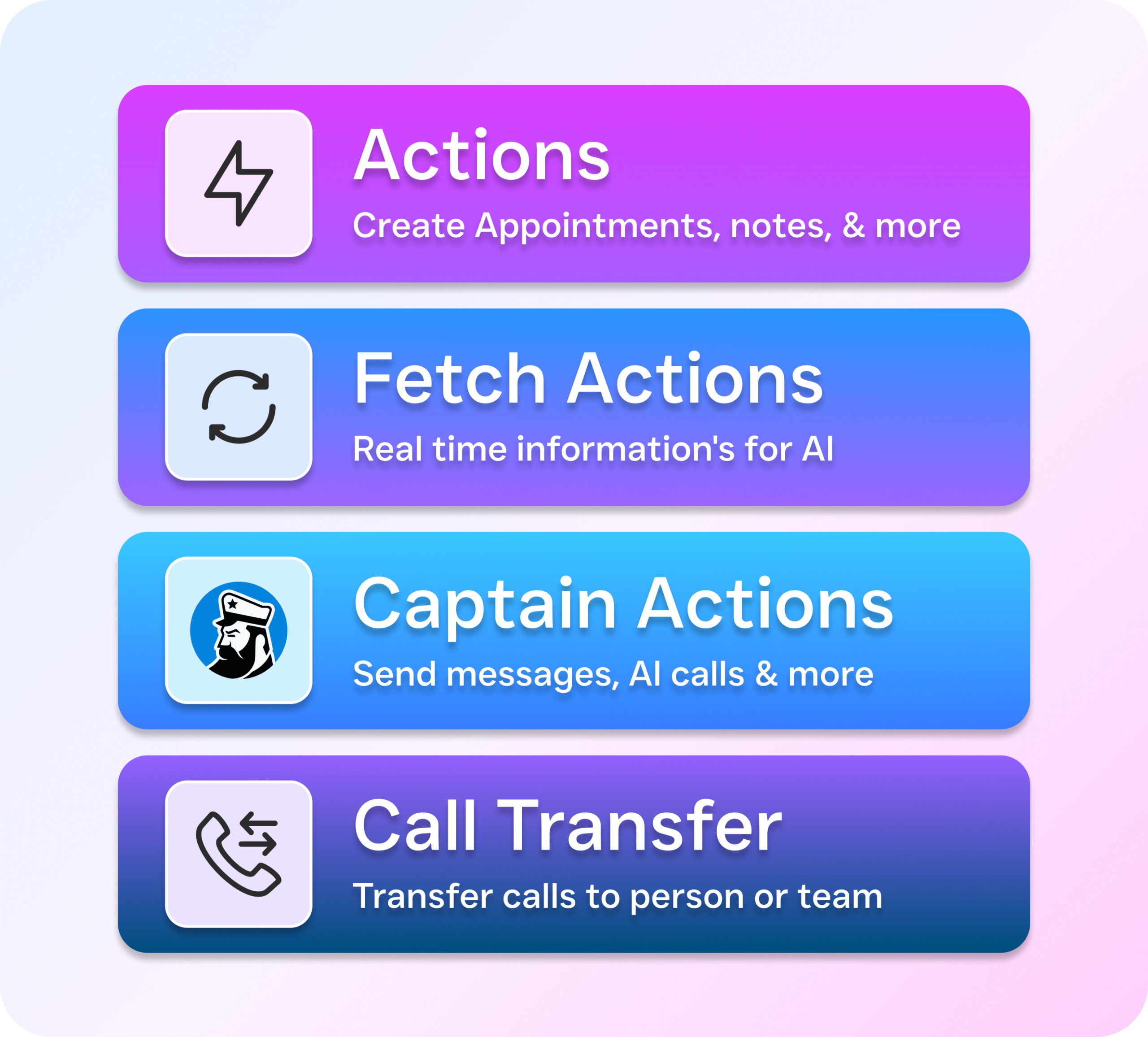
Overflow handling matters during business hours too. When your staff is busy with customers, calls go unanswered. An AI agent can serve as a backup, answering when your team can’t, collecting the caller’s information, qualifying the lead, and either booking the appointment directly or routing urgent calls to the right person. This layered approach means no opportunity falls through the cracks. Tuesday afternoon rush? Sunday evening inquiry? Both get handled.
Best Practices for Appointment Booking Automation
Knowing how to automate appointment booking for small business is one thing. Doing it well is another. The difference between automation that delights customers and automation that frustrates them comes down to a few key practices that are easy to implement but often overlooked.
Keep It Conversational, Not Robotic
Customers don’t want to feel like they’re navigating a phone tree from 2005. The best automated booking experiences feel natural. Whether it’s a voice agent on the phone or a chat agent in a text thread, people should feel like they’re talking to something intelligent. The AI should understand context, handle reasonable variations in how people ask for things, and gracefully pass to a human when the request goes beyond its capabilities. Avoid rigid scripts that break when a customer says something unexpected. Modern AI agents can handle open-ended conversation while still guiding toward the booking you want.
Qualify Before You Book
Not every appointment request deserves a spot on your calendar. Automated booking should include a qualification step, a few quick questions that determine whether the lead is a good fit. For a roofing company, that might be confirming the service area. For a law firm, it could be identifying the type of case. For a MedSpa, it might involve checking whether the client has had the treatment before. This filtering prevents your calendar from filling up with appointments that waste your team’s time and keeps your schedule focused on revenue-generating work.
Monitor and Refine Regularly
Set-it-and-forget-it’s tempting but dangerous. Review your automated booking data monthly. How many appointments are being booked through each channel? What’s your no-show rate before and after automation? Are customers dropping off at a particular step? Use this data to adjust your AI agent’s responses, your reminder timing, and your qualification questions. The businesses that get the best results from automation treat it as a living system, not a one-time setup. Plat AI’s research on business intelligence automation highlights how even simple data analysis of your automated workflows can uncover significant improvement opportunities.
How SalesCaptain Helps Automate Appointment Booking
SalesCaptain was built specifically for service businesses that need to automate appointment booking across every customer channel. Not just one. Its AI Phone Agent answers calls 24/7 with natural-sounding voice conversations, qualifies callers, checks availability, and books appointments without any human involvement. Unlike basic scheduling tools that only work on your website, SalesCaptain’s AI handles the actual phone conversation, the channel that still drives the most leads for businesses like HVAC companies, dental practices, law firms, and salons.
Beyond phone calls, SalesCaptain’s AI Chat Agents cover SMS, webchat, Instagram DMs, and Facebook Messenger, responding instantly on whichever channel the customer prefers. All of these conversations funnel into a single Unified Inbox where your team can see every interaction across every channel in one place, with full contact history and context. This means nothing slips through the cracks. Your staff always knows what’s been said and scheduled. The platform’s Workflow Automation builder handles confirmations, reminders, follow-ups, and CRM updates automatically, with native integrations for tools like HubSpot, Salesforce, HousecallPro, ServiceFusion, Clio, and more.
What sets SalesCaptain apart from tools like Podium (inbound-only, limited AI) or HighLevel (steep learning curve, expensive) is the combination of AI voice agents, AI chat agents, and a unified inbox in one platform built for non-technical business owners. No complex setup required. Pricing starts with a free plan for single-location businesses, with paid plans at $159/month per location, a fraction of what a part-time receptionist costs. AI call minutes are billed at $0.12/minute, making it practical for businesses at any volume.
Comparison: Appointment Automation Approaches
| Approach | Channels Covered | After-Hours Capability | Lead Qualification | Typical Monthly Cost |
|---|---|---|---|---|
| Online scheduling tool (e.g. Calendly) | Website only | Website book Ready to see it in action? See how small businesses use SalesCaptain to automate appointment booking and stop losing calls. Book a Free Demo →Frequently Asked QuestionsWhat exactly does automating appointment booking mean for small businesses?Automating appointment booking means using technology to handle the entire scheduling conversation without manual intervention—from capturing customer needs and checking availability to sending confirmations and reminders. Rather than manual back-and-forth communication, the system processes appointment requests across multiple channels like phone calls, texts, website chat, and social media DMs, all within seconds. How much money can small businesses save by automating appointment booking?Small businesses lose over $26,000 per year from missed calls alone, with a significant portion being appointment scheduling attempts that go to competitors instead. By automating these bookings, you reclaim hours of productive staff time each week that would otherwise be spent on scheduling conversations, allowing you to handle more appointments without increasing payroll. What channels can automated appointment booking systems handle?Automated appointment booking systems can handle customer inquiries across every major communication channel including phone calls, text messages, website chat, and social media direct messages. The system manages the scheduling conversation on each channel and includes follow-up features like confirmation messages, appointment reminders, and rescheduling options. Is adding an online booking page to my website the same as automating appointments?Adding an online booking page is only one piece of true appointment automation and isn’t sufficient on its own. Real automation covers every channel where customers actually reach out to you and handles the complete cycle including scheduling, confirmations, reminders, and rescheduling across all communication methods. Which types of small businesses benefit most from appointment booking automation?Service-based businesses that depend heavily on appointments benefit most from automation, including HVAC companies, dental offices, salons, law firms, and fitness studios. For these businesses, automating appointment booking directly translates to revenue since every appointment that books itself is productive time your staff doesn’t spend scheduling. |