
AI-powered customer experience marketing (CXM) platform that helps local businesses win.



A cloud PBX phone system replaces the clunky hardware sitting in your office closet with a modern, internet-based phone setup that works anywhere you’ve a connection. For service businesses juggling dozens of calls a day across one or more locations, it’s the difference between catching every lead and watching revenue walk out the door. SalesCaptain’s cloud PBX phone system pairs enterprise-grade call handling with AI-powered voice agents, so your phones are always covered, even at 2 AM on a Saturday.
Quick Answer
A cloud PBX phone system is a business phone solution hosted on remote servers instead of on-site equipment. It routes calls over the internet, enabling employees to make and receive calls from anywhere using any device. Cloud PBX systems typically include voicemail, call forwarding, auto-attendants, and conference calling, with costs based on the number of users rather than expensive hardware installation.
What Is a Cloud PBX Phone System?
PBX stands for Private Branch Exchange. Traditionally, that meant a physical box bolted to a wall, routing calls through copper lines to desk phones. A cloud PBX phone system moves all of that logic to the internet. Your calls travel over VoIP (Voice over Internet Protocol) instead of legacy phone lines, and the routing, voicemail, IVR menus, and call recording all live on remote servers rather than on-site hardware.
What does that actually mean for your business? No installation crew. No maintenance contracts. In fact, no panic when the hardware fails during your busiest month. You get a business phone number, plug in your settings from a browser, and start taking calls. According to recent cloud PBX market research, adoption is accelerating because businesses of all sizes recognize the cost and flexibility advantages over traditional systems.
Free weekly newsletter
Growth tips for service businesses
Every Tuesday — actionable ideas to get more leads, reviews, and repeat customers. No fluff.
However, not all cloud PBX platforms are built the same. Most were designed for corporate call centers or tech-forward sales teams. SalesCaptain was built from the ground up for service businesses, which is why the phone system includes features like missed-call text-back, AI call answering, and a unified inbox that connects your calls to every other communication channel you use.
How a Cloud PBX Phone System Works in SalesCaptain
Getting your cloud PBX running on SalesCaptain doesn’t require a telecom degree. Here’s the step-by-step process from signup to live calls.
- Choose your business phone number. Pick a new local or toll-free number, or port your existing number over. SalesCaptain supports one unified number for calls, SMS, and fax, so customers only need to remember a single point of contact.
- Set up your call flow. Use the visual IVR builder to map out how incoming calls get routed. You can send callers to specific team members, departments, or queues based on the options they select. Add hold music, business-hours rules, and after-hours routing in the same screen.
- Activate your AI Phone Agent. This is where SalesCaptain diverges from a standard cloud PBX. Turn on the AI voice agent and it’ll answer calls, qualify leads, book appointments, answer FAQs, and block spam, all without a human picking up. Configure the agent’s knowledge base, tone, and call scripts to match your brand.
- Connect your channels. Link your SMS, webchat, Instagram DMs, Facebook Messenger, and email into the unified inbox. Every call, text, and message now flows into one place where your team can collaborate.
- Integrate with your tools. Sync SalesCaptain with your CRM (HubSpot, Salesforce, Zoho), field service software (ServiceFusion, HousecallPro), or scheduling tools. Over 50 native integrations keep data flowing automatically.
- Go live. Calls start routing through your new cloud PBX immediately. Monitor everything from the dashboard: call recordings, voicemails, AI agent transcripts, and real-time analytics.
Key Capabilities
SalesCaptain’s cloud PBX phone system includes the features you’d expect from an enterprise platform, plus several you won’t find bundled together anywhere else.
- 24/7 AI Phone Agent: A natural-sounding voice agent that picks up every call, day or night. It books appointments, qualifies leads, and answers common questions. Missed calls become a thing of the past, which matters because the cost of missed calls for small businesses adds up fast.
- IVR and Call Routing: Build multi-level IVR menus without touching code. Route calls by department, location, time of day, or caller input. Warm transfers, cold transfers, and call queueing are all included.
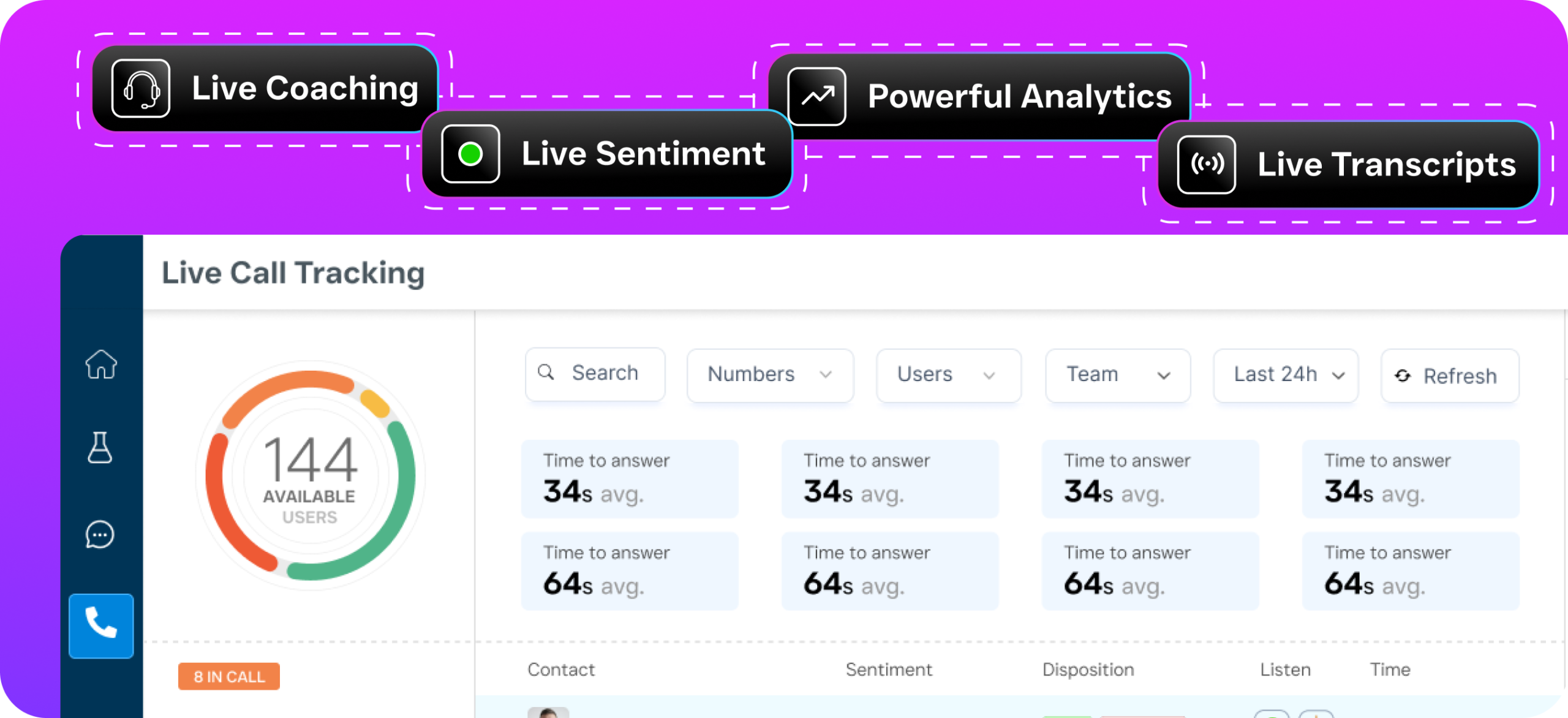
- Call Recording and Post-Call Analytics: Every call is recorded and stored. Review transcripts, track sentiment, and use real-time speech analytics to coach your team on what’s working.
- Missed-Call Text-Back: When a call goes unanswered (rare with AI answering, but still possible during high-volume spikes), an automated text fires off instantly so the lead doesn’t go cold.
- Voicemail and Voicemail Drop: Visual voicemail lets your team read messages instead of listening to them. Plus, voicemail drop lets reps leave pre-recorded messages in a single click during outbound campaigns.
- Power Dialer: For outbound calling, the built-in power dialer lets your team move through call lists without manually dialing each number. Paired with call coaching and whispering, managers can guide reps in real time without the customer hearing.
Who Needs This?
A cloud PBX phone system isn’t just for tech companies with remote engineering teams. It’s particularly valuable for businesses where phone calls directly generate revenue.
- Home service companies (roofing, plumbing, HVAC, landscaping, appliance repair) that lose jobs every time a call goes to voicemail during a busy afternoon.
- Legal practices where a potential client calling after hours often moves on to the next firm listed on Google.
- Healthcare and wellness providers (dental offices, MedSpas, therapy practices) that need appointment scheduling around the clock.
- Salons, gyms, and fitness studios where booking friction directly reduces membership sign-ups and visit frequency.
- Real estate agencies that can’t afford slow response times on buyer and seller inquiries.
- Multi-location businesses that need consistent call handling across every site without hiring additional front-desk staff at each one.
The common thread? These are all businesses where missed calls translate directly into lost revenue. If your phone is a primary sales channel, your phone system needs to do more than just ring.
Benefits of a Cloud PBX Phone System
Never Miss Another Lead
The most immediate benefit is coverage. Traditional phone setups rely on humans being available to answer. That’s fine during business hours when things are slow, but what about lunch breaks, after-hours calls, and weekends? With SalesCaptain’s AI Phone Agent handling calls 24/7, every call gets answered. According to SchedulingKit’s analysis of missed call data, businesses lose thousands of dollars annually simply because nobody picked up.
Cut Overhead Without Cutting Quality
Hiring a full-time receptionist costs you salary, benefits, training, and coverage for sick days. A human receptionist also can’t work 24/7 without burnout or additional hires. SalesCaptain’s AI voice agent costs $0.12 per minute. For most service businesses, that’s a fraction of what you’d spend on staff, and the AI doesn’t call in sick. The business case for hosted PBX gets even stronger when you factor in eliminated hardware maintenance and reduced IT overhead.
Unify Everything in One Place
Calls are just one channel. Your customers also text, DM you on Instagram, message through your website chat, and email. Without a unified system, your team is juggling four or five apps and losing context between them. SalesCaptain’s unified inbox pulls every conversation into a single view, so whoever picks up the thread can see the full history. That means faster responses, fewer repeated questions, and a more professional experience for your customers.
Scale Across Locations Affordably
Per-user pricing models punish growing businesses. Add five team members and your bill jumps $150 or more per month. SalesCaptain uses per-location pricing instead: $159/month per location on the Business plan, or $300/month per location on Enterprise. A five-person office and a fifteen-person office pay the same rate. That’s a significant advantage for multi-location service businesses expanding into new markets.
How SalesCaptain Compares
Most cloud PBX providers were built for different use cases than yours. RingCentral and 8×8 target mid-market and enterprise companies. Dialpad focuses on tech-forward sales teams. Aircall is a call center tool. They’re all solid platforms for their intended audiences, but service businesses have different needs.
Take Aircall at $30 per license per month. It doesn’t include a Voice AI Agent, webchat, email channel, or missed-call text-back. There’s no real-time AI for calls, either. For an HVAC company that needs phones answered after hours and leads texted back instantly, those gaps are deal-breakers. SalesCaptain also includes leads forms, payments via text, and auto URL shortening, none of which Aircall offers.
Or consider OpenPhone, which starts at $15 per user. It lacks voicemail drop, call coaching and whispering, real-time speech analytics, call queueing, and sentiment analysis for calls. Its AI capabilities are minimal, and it supports only seven integrations versus SalesCaptain’s 50+. For a business that needs more than a basic phone app, OpenPhone runs out of room quickly. Comparisons of AI receptionist tools consistently highlight the gap between basic VoIP apps and platforms that include genuine voice AI.
Nextiva ($20/user/month) caps SMS at 250 messages per user per month, doesn’t support WhatsApp, and lacks voicemail drop, call coaching, leads forms, and payments via text. For service businesses that rely on high-volume texting for appointment reminders and follow-ups, that SMS cap alone is a non-starter.
SalesCaptain’s pricing starts free for one location, and the paid plans include the AI phone agent, unified inbox, workflow automation, and all communication channels bundled together. You aren’t paying separate bills for your phone system, your chat tool, and your AI receptionist.
Frequently Asked Questions
Can I keep my existing business phone number?
Yes. SalesCaptain supports number porting, so you can transfer your current business phone number to the platform. Your customers won’t notice any change on their end, but you’ll gain access to AI call answering, the unified inbox, and all the advanced call features immediately.
How reliable is a cloud PBX compared to a traditional phone system?
SalesCaptain delivers 99.99% uptime with crystal-clear audio quality. That’s more reliable than most traditional PBX setups, which are vulnerable to hardware failure, power outages, and physical damage. Because the system runs in the cloud, there’s built-in redundancy that on-premises equipment simply can’t match. According to small business phone platform analysis, reliability is consistently cited as a top driver of cloud PBX adoption.
Do I need technical expertise to set up SalesCaptain’s cloud PBX?
No. The platform was designed for non-technical business owners and operations managers. Setting up your IVR, call routing, AI phone agent, and integrations all happens through visual, drag-and-drop interfaces. Most businesses are fully live within a day.
What happens if the AI Phone Agent can’t handle a caller’s request?
The AI agent is configured to recognize when a call needs human attention. It can warm-transfer the caller to a specific team member or department, leave a detailed message in the unified inbox, or trigger a workflow that notifies your team instantly. You stay in control of how escalations work.
Ready to see it in action?
See how businesses use SalesCaptain to never miss a customer call again.
Book a Free Demo →Replace Your Old Phone System with a Cloud PBX That Works Around the Clock
SalesCaptain gives you an AI-powered cloud PBX phone system, unified inbox, and automation tools in one platform, starting free for your first location.