
AI-powered customer experience marketing (CXM) platform that helps local businesses win.



If you’re comparing Aircall vs Dialpad, you’re likely searching for a cloud phone system that fits your business without unnecessary complexity. Both platforms serve different audiences, and detailed breakdowns of their features and pricing show meaningful differences between them. This comparison covers where each platform excels, where they fall short, and why a third option built specifically for service businesses might be the better fit.
Quick Answer
Aircall excels in call routing flexibility and European compliance, while Dialpad offers stronger AI-powered analytics and seamless mobile experiences. Aircall suits teams prioritizing customizable workflows; Dialpad wins for data-driven insights and remote-first operations. Pricing is comparable, but your choice depends on whether you need advanced routing or intelligent call intelligence features.
What Is Dialpad?
Dialpad is a cloud communications platform designed primarily for technology-forward sales teams. Starting at $15 per user per month, it offers AI-powered features like real-time transcription, sentiment analysis, and custom sales playbooks. However, Dialpad doesn’t include toll-free minutes, lacks native WhatsApp support, and has no email channel. Its strength lies in outbound sales workflows rather than inbound service business communication.
Related guide: alternatives to aircall.
Related guide: aircall vs justcall comparison.
Related guide: dialpad vs ringcentral.
Related guide: aircall competitors.
What Is Aircall?
Aircall positions itself as a call center solution for customer-facing teams, with pricing starting at $30 per license per month. That makes it one of the more expensive options in this category. While Aircall offers CRM integrations with tools like Salesforce and HubSpot, it doesn’t include a Voice AI Agent, native WhatsApp, webchat, or an email channel. There’s also no missed-call text-back feature, which is a critical gap for businesses that can’t afford to lose inbound leads. According to a comparison by ZappX, both platforms serve distinct niches but leave gaps for service-oriented businesses.
Free weekly newsletter
Growth tips for service businesses
Every Tuesday — actionable ideas to get more leads, reviews, and repeat customers. No fluff.
Aircall vs Dialpad: What Both Platforms Miss
Here’s the reality most comparison articles won’t tell you: neither Aircall nor Dialpad was built for service businesses. Aircall targets call center operations. Dialpad focuses on sales teams. Both platforms assume you’ve dedicated staff handling communication throughout the day. But if you’re a plumber, dentist, HVAC contractor, or salon owner, your needs look completely different.
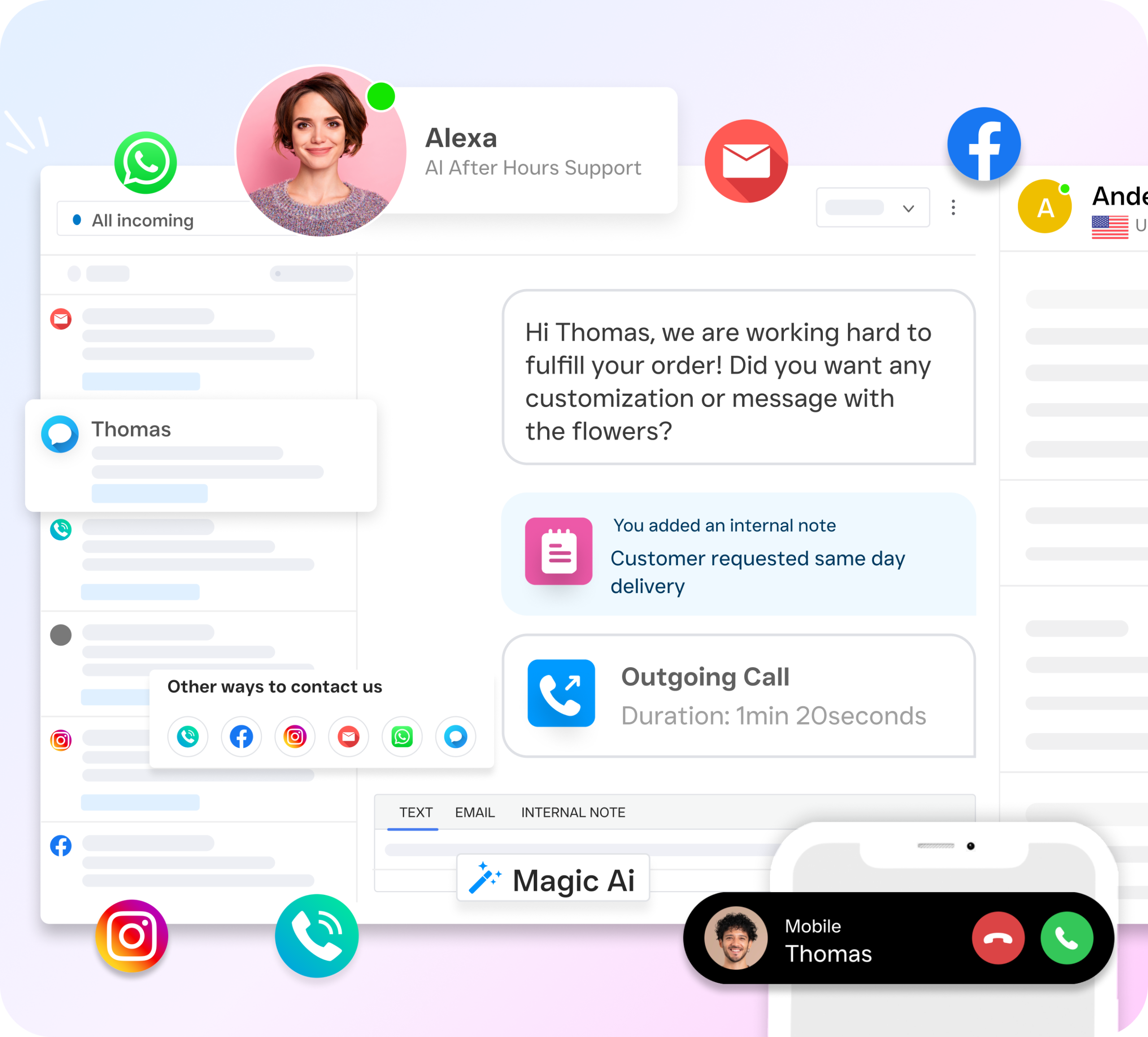
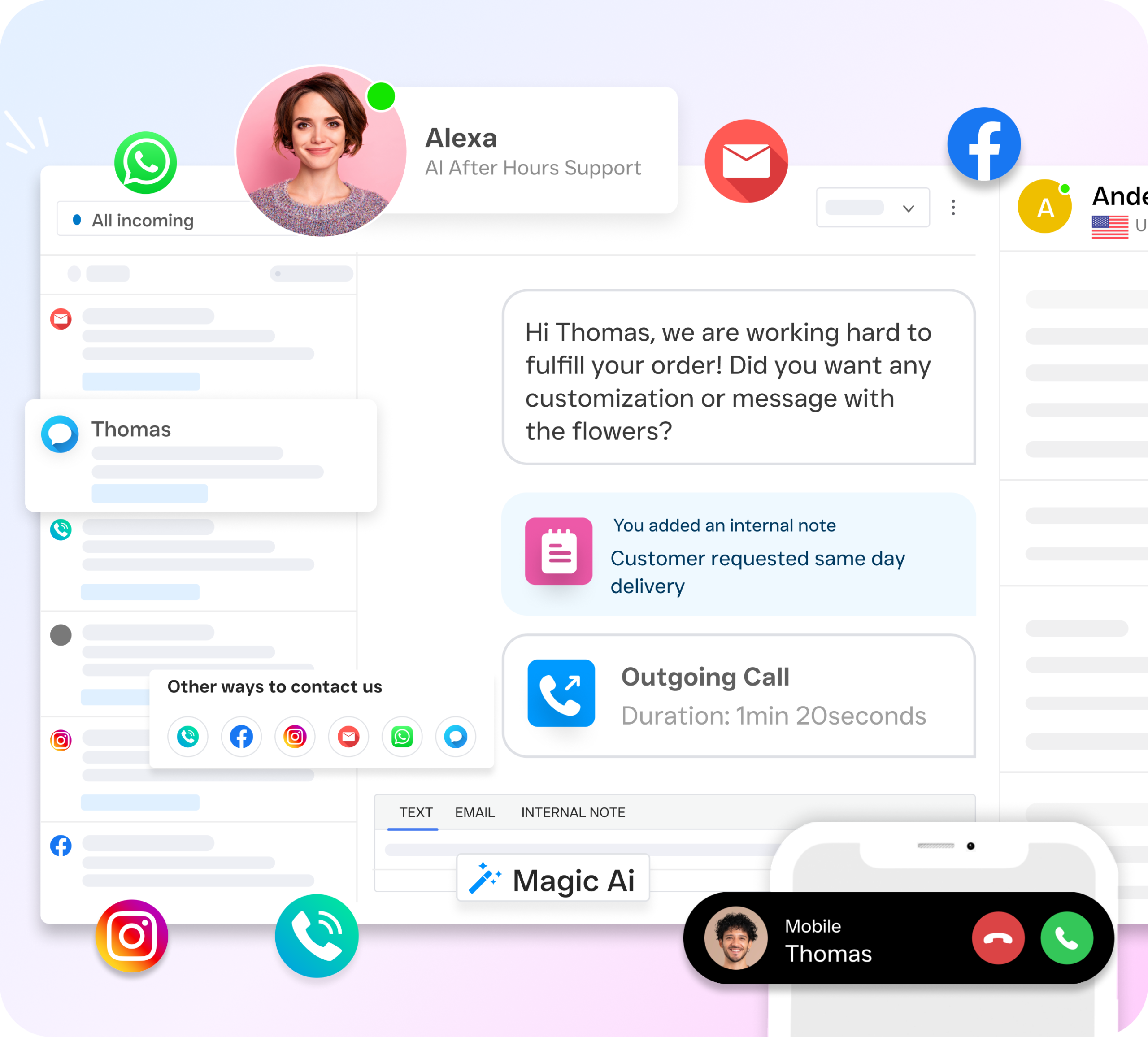
Service businesses need to capture every inbound call, respond instantly to texts and social messages, book appointments without human intervention, and follow up automatically. Neither Aircall nor Dialpad offers a Voice AI Agent that can answer calls 24/7. Neither provides a unified inbox that pulls together calls, texts, webchat, Instagram DMs, and Facebook Messenger into one place. And neither offers text-to-pay functionality or high-volume SMS campaigns out of the box.
That’s where SalesCaptain enters the conversation. Rather than forcing you to adapt your workflows to a sales dialer or call center platform, SalesCaptain was built from the ground up for appointment-heavy, inbound-focused service businesses.
What Is SalesCaptain?
SalesCaptain is an AI-powered unified communication platform that combines AI phone agents, AI chat agents, and a collaborative inbox into a single tool. It’s designed for SMBs with one to five or more locations across industries like home services, healthcare, legal, real estate, and fitness. You don’t need technical expertise to set up AI agents that answer calls, qualify leads, book appointments, and respond to messages around the clock.
Pricing starts with a free plan for a single location, with the Business tier at $159/month per location and Enterprise at $300/month per location. AI call minutes run $0.12/minute. That per-location pricing model scales affordably, especially if you’re managing multiple offices or franchises. SalesCaptain integrates natively with over 50 tools including HubSpot, Salesforce, ServiceFusion, HousecallPro, Clio, and Shopify.
Dialpad vs SalesCaptain: Feature Comparison
This table compares the features that matter most for service businesses evaluating their options. Values are based on verified product data, not marketing claims.
| Feature | SalesCaptain | Dialpad |
|---|---|---|
| Unified Inbox (calls, SMS, webchat, social, email) | ✓ | ✗ |
| WhatsApp Messaging | ✓ (native) | Partial (Zapier only) |
| Review Management | ✓ | ✗ |
| Text-to-Pay | ✓ | ✗ |
| Workflow Automation | ✓ (visual drag-and-drop) | Partial (basic message flows) |
| High Volume SMS | ✓ | ✗ |
| Social Chat (Facebook, Instagram) | ✓ | ✗ |
| AI Transcription & Summaries | ✓ | ✓ |
| Call Coaching & Whispering | ✓ | ✓ |
| Sentiment Analysis | ✓ | ✓ |
| Pricing | Free / $159 per location | $15 per user |
| Best For | Service businesses, SMBs | Tech-forward sales teams |
Both platforms share some AI capabilities like real-time transcription, call coaching, and sentiment analysis. Yet SalesCaptain’s advantage becomes clear once you look at the communication channels and automation tools that service businesses actually rely on daily.
Where Dialpad Falls Short
Dialpad is a solid product for its intended audience, but it has real limitations if you’re running a service business. Here’s what’s missing, based on verified feature data.
Dialpad doesn’t offer a Voice AI Agent that can independently answer calls, book appointments, or qualify leads. It also lacks an AI Chat Agent for handling SMS, webchat, or social media conversations. For a service business that misses calls after hours or during busy periods, this is a significant gap. According to research from Aira, a large percentage of business calls go unanswered, and each one represents potential lost revenue.
No Unified Multichannel Inbox
Dialpad handles voice and basic messaging, but it doesn’t pull together email, social chat across Facebook and Instagram, webchat, and SMS into a single inbox. If your team juggles multiple tabs and apps to manage customer conversations, you already know how chaotic that gets. SalesCaptain consolidates every channel into one collaborative view with full contact history.
Limited Messaging and Payment Features
Several features that service businesses depend on are absent from Dialpad’s offering:
- No high-volume SMS for campaigns, appointment reminders, or bulk outreach
- No text-to-pay for collecting payments directly through a text message
- No leads form for capturing prospect information from your website
- No auto URL shortening or click tracking for measuring engagement on links you send
- No native email channel, so you’ll need a separate tool for email communication
- No toll-free minutes included in the base plan
As a SuccessCX analysis notes, choosing the right cloud phone system depends on matching features to your actual workflow, not just checking boxes on a spec sheet.
Workflow Automation Is Basic
Dialpad offers a message flow builder, but it’s described as “very basic” in verified comparisons. There’s no visual drag-and-drop workflow automation engine for building trigger-based sequences like follow-up reminders, CRM updates, or appointment confirmation flows. SalesCaptain’s workflow builder connects with 50+ integrations and automates the repetitive tasks that eat up staff time.
Where Aircall Falls Short Compared to Both
Before settling on either Dialpad or Aircall, it’s worth noting Aircall’s own gaps. At $30/license/month, it’s the most expensive option here. And despite the premium pricing, Aircall doesn’t offer a Voice AI Agent, native WhatsApp, webchat, email channel, real-time AI for calls, or missed-call text-back. Its focus remains squarely on call center operations, not the kind of inbound automation that service businesses need. According to Bland AI’s comparison, both Aircall and Dialpad serve specific niches without addressing the broader needs of small service-oriented companies.
Why SalesCaptain Is the Better Choice for Service Businesses
SalesCaptain fills every gap that Aircall and Dialpad leave open. Here’s what makes it distinct for businesses that live and die by phone calls, appointments, and customer responsiveness.
- AI Phone Agent that works 24/7: A natural-sounding voice agent answers every call, books appointments, qualifies leads, answers FAQs, and blocks spam. No human needed. Missed calls become a thing of the past.
- AI Chat Agents across every channel: Automated agents handle SMS, webchat, Instagram DMs, and Facebook Messenger with instant responses. Leads get captured and appointments get booked even while you sleep.
- True unified inbox: Calls, texts, webchat, social DMs, email, and internal notes all live in one collaborative inbox. Your whole team sees the same conversation history. No more switching between apps.
- Text-to-pay and high-volume SMS: Collect payments via text and run SMS campaigns at scale. These aren’t add-ons; they’re built into the platform.
- Visual workflow automation: Build trigger-based sequences with a drag-and-drop builder. Automate follow-ups, appointment reminders, CRM syncs, and notifications across all your tools.
- Per-location pricing that scales: Instead of per-user pricing that climbs as you hire, SalesCaptain charges per location. A five-person team at one location pays the same as a one-person operation.
- AI writer, translator, and grammar check: Draft professional messages faster, translate for multilingual customers, and catch errors before they go out.
- 50+ native integrations: Connect with HubSpot, Salesforce, Zoho, HousecallPro, QuickBooks, Clio, Shopify, and more without needing Zapier workarounds.
The National Federation of Independent Business consistently highlights that small businesses struggle most with staffing and time management. SalesCaptain directly addresses both by automating the communication tasks that typically require additional hires.
Which Should You Choose?
If your team runs outbound sales campaigns, manages a high-velocity pipeline, and needs features like AI scorecards and custom sales playbooks, Dialpad is a reasonable fit. Its per-user pricing works well for lean sales teams, and its real-time transcription is genuinely useful during cold calls and demos. Similarly, if you operate a traditional call center with dedicated agents and need a clean interface for routing calls, Aircall does that job, albeit at a higher price point. As ITQLick’s comparison shows, both platforms have loyal followings in their respective niches.
But if you’re a service business owner who can’t afford to miss calls after hours, needs to respond to leads across multiple channels instantly, and wants AI handling the repetitive work so you don’t have to hire more staff, SalesCaptain is built for exactly that. The combination of an AI Voice Agent, AI Chat Agents, a unified inbox, and visual workflow automation in a single platform doesn’t exist elsewhere at this price point. For plumbers, dentists, HVAC contractors, salon owners, attorneys, and every other service professional who’s tired of losing customers to slow response times, it’s the clear choice.
Frequently Asked Questions
Is Dialpad cheaper than Aircall?
Yes. Dialpad starts at $15 per user per month, while Aircall starts at $30 per license per month. However, Dialpad doesn’t include toll-free minutes in its base plan, which can add costs. SalesCaptain offers a free tier and charges $159/month per location regardless of how many users you’ve, making it more predictable for growing teams.
Does Dialpad have an AI agent that can answer calls automatically?
No. Dialpad offers AI-powered transcription, sentiment analysis, and real-time coaching during calls, but it doesn’t have a standalone AI Voice Agent that can independently answer calls, book appointments, or qualify leads without a human on the line. SalesCaptain’s AI Phone Agent handles all of those tasks around the clock.
Can Aircall or Dialpad handle Instagram and Facebook messages?
Neither platform natively supports social chat across Instagram DMs or Facebook Messenger. Dialpad’s messaging capabilities focus on SMS and webchat. SalesCaptain includes social chat for both platforms as part of its unified inbox, so your team manages every conversation from one place.
What’s the biggest difference between Aircall, Dialpad, and SalesCaptain?
Aircall is a call center tool. Dialpad is a sales communication platform. SalesCaptain is a unified communication platform with AI agents built specifically for service businesses. The difference comes down to audience: if you book appointments, respond to leads across channels, and need 24/7 coverage without hiring staff, SalesCaptain is designed for your workflow.
Does SalesCaptain integrate with the same CRMs as Aircall and Dialpad?
SalesCaptain integrates natively with 50+ tools including HubSpot, Salesforce, Zoho, ServiceFusion, HousecallPro, Mindbody, Shopify, QuickBooks, and Clio. Many of these are service-industry-specific integrations that neither Aircall nor Dialpad offers natively. SalesCaptain also connects with Zapier for additional flexibility.
Ready to see it in action?
See why growing businesses are switching from Dialpad and Aircall to SalesCaptain.
Book a Free Demo →Try SalesCaptain Free
Stop losing customers to missed calls and slow responses. SalesCaptain gives you AI-powered phone and chat agents, a unified inbox for every channel, and workflow automation that keeps your business running 24/7. Start with the free plan and see the difference in your first week.