
AI-powered customer experience marketing (CXM) platform that helps local businesses win.



Every missed call is a missed opportunity. For service businesses, research suggests that a significant percentage of business calls go unanswered, and each one can cost you a paying customer. The best auto attendant phone system solves this by answering every call instantly, routing callers to the right place, and making sure no lead slips through the cracks. Sound familiar? If you’re a service business owner tired of losing revenue to voicemail, this guide breaks down what auto attendants do, how SalesCaptain’s approach goes further than a basic phone tree, and why it matters for your bottom line.
Quick Answer
An auto attendant phone system automatically answers incoming calls and routes them to the right department or person based on caller input. It uses voice prompts or keypad selections to direct calls without human intervention, reducing wait times and ensuring no leads get missed. Modern systems integrate with CRM platforms, support call recording, and analytics to help service businesses capture and convert more leads while reducing staffing costs.
What Is an Auto Attendant Phone System?
An auto attendant is the automated voice that greets callers and directs them through a menu of options before connecting them to the right person or department. Think “Press 1 for scheduling, press 2 for billing.” It replaces the need for a live receptionist to answer and transfer every single call.
But here’s the thing—the term gets used loosely. A traditional auto attendant is relatively simple: it plays a greeting, offers menu options, and routes calls based on keypad input. That’s it. There’s no intelligence behind the routing. No ability to handle complex requests. And no awareness of what happens after the call ends.
Free weekly newsletter
Growth tips for auto dealerships & repair shops
Every Tuesday — actionable ideas to get more leads, reviews, and repeat customers. No fluff.
Auto Attendant vs. IVR
People often confuse auto attendants with IVR (Interactive Voice Response) systems. While they overlap, IVR is more capable. An IVR can collect information from callers, interact with databases, and process inputs beyond simple menu selections. An auto attendant, by contrast, primarily routes calls. Most modern phone systems blend both into a single experience, so the distinction matters less than it used to. What matters more is what happens after the routing. And that’s where many systems fall short.
Why Basic Auto Attendants Aren’t Enough Anymore
Callers don’t want to sit through five menu options. They want answers. According to an analysis of over 347,000 calls, AI-powered phone systems consistently outperform traditional auto attendants in both caller satisfaction and lead capture. The reason is straightforward: customers who reach a dead-end menu hang up. Meanwhile, those who get an immediate, conversational response stay on the line. For service businesses competing on responsiveness, a static phone tree is a liability.
How Auto Attendant Works in SalesCaptain
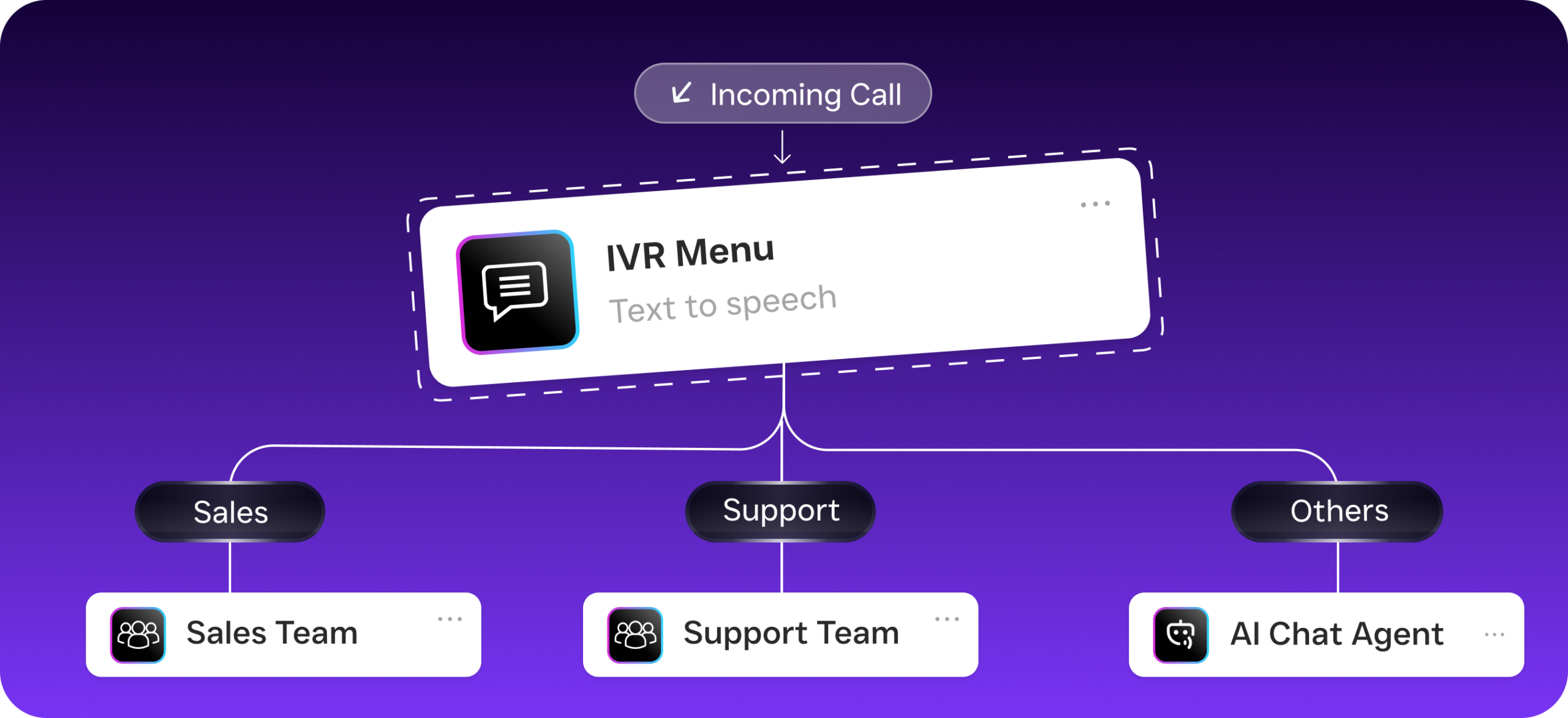
SalesCaptain doesn’t just offer a traditional auto attendant. Its system combines an IVR builder, customizable call flows, and an AI Phone Agent that can actually converse with callers. Here’s how the setup works in practice:
- Choose or port your business phone number. You can get a new local or toll-free number, or bring your existing one. SalesCaptain’s phone system runs on 99.99% uptime infrastructure, so call quality stays crystal clear.
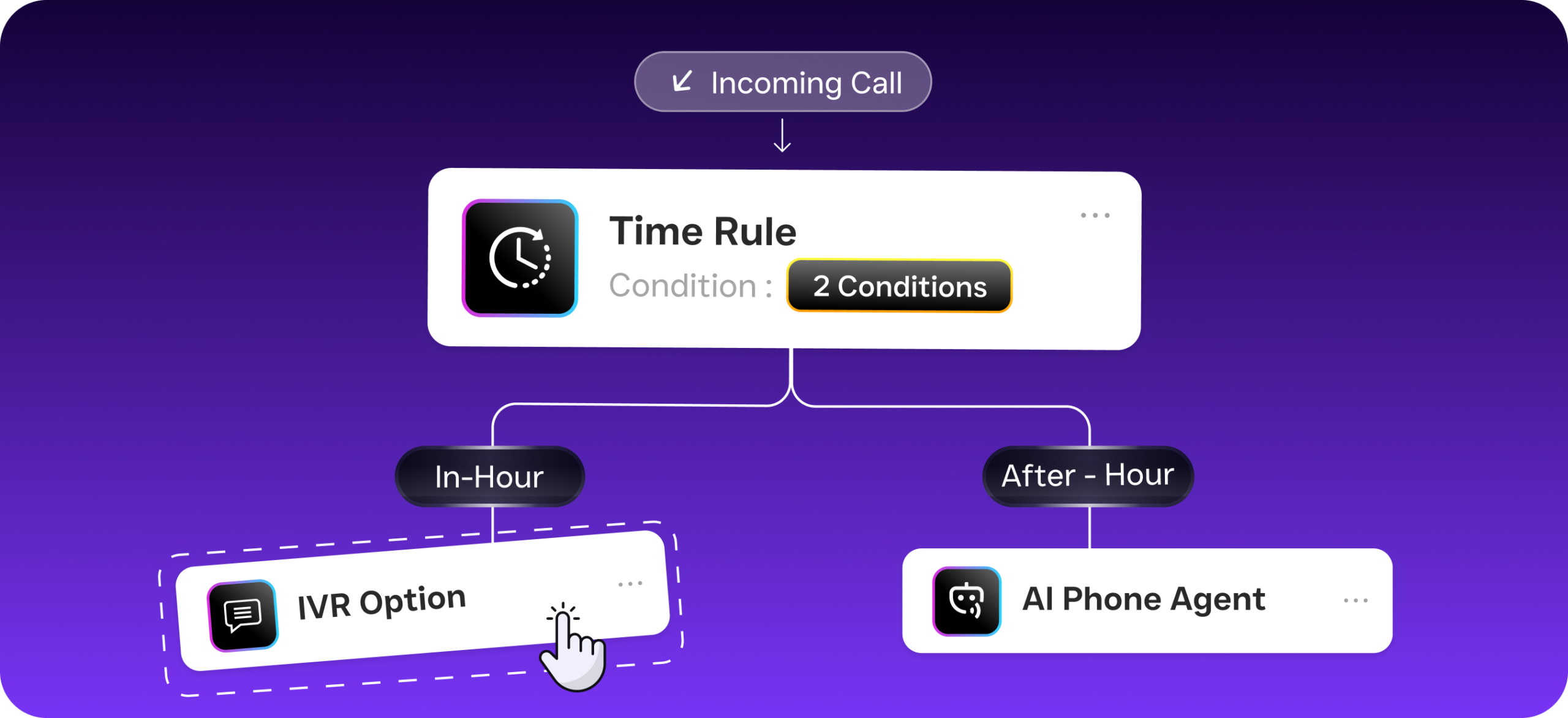
- Build your call flow with the drag-and-drop builder. Map out exactly what happens when someone calls: a greeting, menu options, time-based routing for after hours, or a direct handoff to the AI Phone Agent. You don’t need any technical skills to set this up.
- Configure your AI Phone Agent. This is where SalesCaptain diverges from every basic auto attendant. Instead of rigid menu trees, the AI agent answers in a natural-sounding voice. It can book appointments, qualify leads, answer FAQs about your services, and block spam callers. All without a human picking up the phone.
- Set time-based and conditional routing rules. During business hours, calls can ring your team first and fall back to the AI agent if nobody answers. After hours, the AI agent handles everything autonomously. You define the rules once. They run 24/7 without any extra effort.
- Connect your existing tools. SalesCaptain integrates with over 50 platforms including HubSpot, Salesforce, ServiceFusion, HousecallPro, and QuickBooks. When a caller books an appointment or gives their information, it syncs to your CRM automatically.
- Monitor everything in the Unified Inbox. Every call, text, voicemail, and chat lands in one collaborative inbox. Your team sees real-time transcriptions, AI-generated summaries, and full contact history without switching between apps.
📺 Watch: How to Set Up an IVR Menu (Press 1 for Sales)
Key Capabilities
The best auto attendant phone system needs to do more than answer and route. What does that look like in practice? Here are the capabilities that separate a real business communication platform from a basic phone menu:
- 24/7 AI-Powered Call Answering: SalesCaptain’s AI Phone Agent picks up every call, day or night, weekends and holidays included. It doesn’t put callers on hold or push them to voicemail. Instead, it engages in real conversation, capturing leads your competitors lose after hours.
- Customizable Greetings, Hold Music, and IVR Menus: You control the caller experience completely. Record custom greetings per department, upload hold music, and build multi-level IVR menus with the visual builder. Time-based greetings let you play different messages during and after business hours.
- Appointment Booking and Lead Qualification: The AI agent doesn’t just route calls. It books appointments directly into your calendar, asks qualifying questions you define, and captures caller details. That means warm leads are ready for follow-up before your team even reviews the call.
- Spam Blocking and Call Screening: Robocalls and spam waste your team’s time. SalesCaptain filters them automatically, so your staff only deals with real customers. Legitimate callers get through instantly while junk calls get blocked.
- AI Transcription and Summaries: Every call is transcribed in real time with speaker distinction. On top of that, the AI generates a concise summary highlighting action items, customer concerns, and next steps. Your team can scan a two-sentence summary instead of listening to a 10-minute recording.
- Missed Call Text-Back: If a call does go unanswered for any reason, SalesCaptain automatically sends the caller an SMS. This keeps the conversation alive and gives the customer a way to engage immediately. Rather than calling a competitor.
Who Needs This?
Not every business needs the same level of phone automation. But if your revenue depends on answering calls and booking appointments, an auto attendant isn’t optional. It’s infrastructure. Here’s who benefits most:
- Home service businesses (roofing, plumbing, HVAC, landscaping, appliance repair) where customers call expecting immediate help and won’t leave a voicemail.
- Healthcare and wellness practices (dental offices, MedSpas, therapy clinics) managing high call volumes for scheduling, rescheduling, and insurance questions.
- Legal practices that can’t afford to miss a potential client call, especially after hours when urgent legal matters arise.
- Salons, gyms, and fitness studios where appointment booking drives the entire business model.
- Real estate agencies juggling buyer inquiries, showing requests, and seller follow-ups across multiple agents.
- Multi-location businesses needing consistent call handling across every site without hiring separate receptionists for each.
- Operations managers and business owners who want their team focused on service delivery rather than answering repetitive phone calls.
Benefits of an Auto Attendant Phone System
Capture Revenue You’re Currently Losing
Industry data suggests missed calls can cost businesses six figures annually in lost revenue. For a plumbing company or dental practice, even a handful of missed calls per week adds up fast. An auto attendant ensures every caller reaches someone (or something) that can help. That directly protects your revenue stream.
Scale Without Hiring More Staff
Hiring a full-time receptionist costs $30,000 to $40,000 per year according to Bureau of Labor Statistics data. SalesCaptain’s Business plan costs $159 per month per location. That’s a fraction of the cost. And the AI agent doesn’t call in sick, take lunch breaks, or quit after three months. For multi-location businesses, the math becomes even more compelling because you’re replacing the need for a receptionist at every site.
Deliver a Professional First Impression
Callers judge your business in the first few seconds. A professional greeting followed by efficient routing signals competence. Conversely, a ringing phone that goes to a generic voicemail tells callers you might not be reliable. Especially for small businesses competing against larger firms, a polished phone experience closes the credibility gap instantly.
Free Your Team for Higher-Value Work
Repetitive calls eat hours from your staff’s day. Questions like “What are your hours?” or “Do you serve my area?” can be handled entirely by the AI Phone Agent. Your team then focuses on the calls that actually require human judgment. Complex service questions. Closing a sale. The result is better productivity across the board without burning anyone out.
How SalesCaptain Compares
Most platforms offer some version of an auto attendant, but the depth varies wildly. Here’s where SalesCaptain stands apart from common alternatives.
Aircall charges $30 per license per month and focuses heavily on call center use cases. While it offers solid call management, it doesn’t include an AI voice agent, missed-call text-back, webchat, or an email channel. You also won’t find real-time AI assistance during calls. That means your team handles every interaction manually. For service businesses that need automation, not just a phone system, that gap matters.
Nextiva starts at $20 per user per month but caps SMS at 250 messages per user each month. It also lacks WhatsApp support, voicemail drop, and the call coaching and whispering features SalesCaptain includes. Those limitations make it harder to run unified communication across channels. Especially for businesses that rely heavily on texting for appointment confirmations and follow-ups.
OpenPhone positions itself as a simple, affordable phone app at $15 per user. Yet it scores poorly on AI capabilities. It offers only 7 integrations. And it doesn’t support call coaching, power dialing, or review management.SalesCaptain’s 50+ integrations and full-featured AI agent offer considerably more depth.
The auto attendant systems market is growing rapidly as businesses recognize that traditional phone trees aren’t enough. The trend is clearly moving toward AI-powered systems that can do more than route calls. SalesCaptain sits squarely at this intersection. It combines a traditional auto attendant, IVR, and conversational AI in one platform built specifically for service businesses.
Frequently Asked Questions
What’s the difference between an auto attendant and an AI phone agent?
A traditional auto attendant plays a recorded greeting and routes callers based on keypad input. An AI phone agent, like SalesCaptain’s, goes further. It actually converses with callers in natural language. It can answer questions, book appointments, qualify leads, and handle requests without needing a human to step in. Think of an auto attendant as a menu. An AI phone agent is an intelligent receptionist.
Can I keep my existing business phone number?
Yes. SalesCaptain supports number porting, so you can bring your current business number onto the platform. You can also get a new local or toll-free number if you prefer. The transition doesn’t disrupt your existing call flow or customer experience.
How much does SalesCaptain’s auto attendant cost?
SalesCaptain offers a free Startup plan for one location. The Business plan is $159 per month per location and includes the full suite of AI phone agent, call flows, IVR, unified inbox, and workflow automation features. AI call minutes are billed at $0.12 per minute. Compared to other AI receptionist solutions on the market, that’s competitive for the breadth of features included.
Do I need technical skills to set up call flows?
No. SalesCaptain’s drag-and-drop call flow builder is designed for non-technical business owners. You map out your routing logic visually. Set conditions like time of day or department. And publish. Most businesses have their call flows running within an hour.
Does SalesCaptain work for multi-location businesses?
Absolutely. Per-location pricing means you can scale affordably as you add sites. Each location gets its own phone number, call flows, and AI agent configuration. Your team manages everything from one unified inbox. That consistency across locations is something most competitors charge significantly more to deliver.
What integrations are available?
SalesCaptain connects natively with over 50 tools including HubSpot, Salesforce, Zoho, ServiceFusion, HousecallPro, Mindbody, Shopify, QuickBooks, Clio, and Zapier. When the AI agent books an appointment or captures lead information, it syncs directly to your existing systems. No manual data entry required.
Ready to see it in action?
See how auto shops use SalesCaptain to handle customer calls automatically and never miss appointments.
Book a Free Demo →Stop Losing Calls. Start Capturing Every Lead.
SalesCaptain gives your business a 24/7 AI-powered auto attendant, intelligent call routing, and a unified inbox for every channel. Set it up in under an hour. No technical skills required. Start free at salescaptain.com and see why service businesses are replacing outdated phone trees with an AI agent that actually handles calls.